

Overview
Kameleoon’s SDKs allow you to conduct experiments to enhance user experience in web and mobile applications. Based on the diagram below, implementing an experiment with a Kameleoon SDK involves three stages: initialization, user identification and attribute assignment, and variation assignment and tracking. This article will provide a detailed explanation of each of these stages.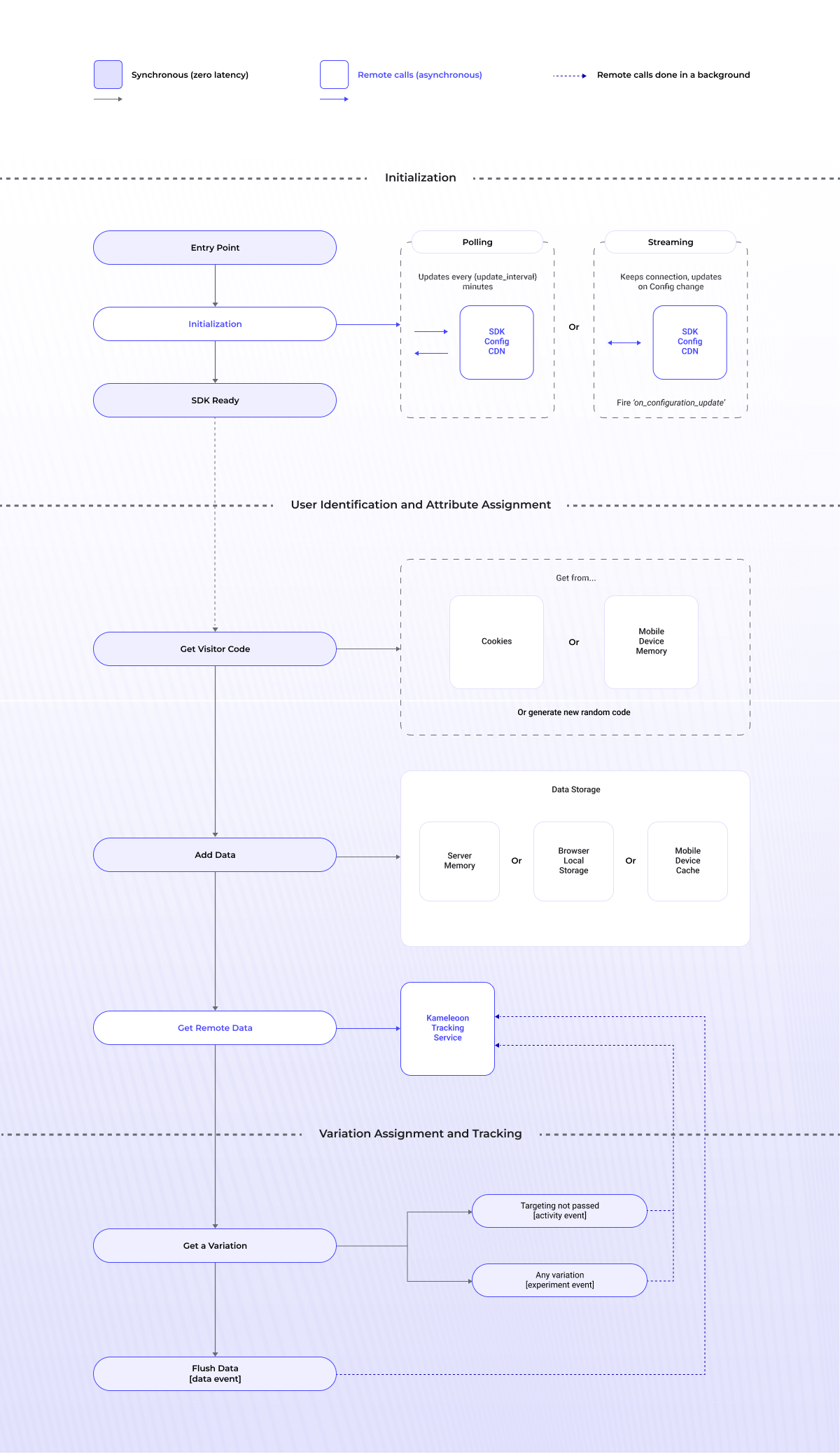
Methods (and their names) described in each step below, will have different syntaxes, based on the convention of the particular language of the SDK.
1. Initialization
Upon initialization, the SDK fetches any updated feature flag configuration using Cloudflare’s Content Delivery Network via two methods: Polling, a default option where the SDK regularly sends a request to the CDN (default interval is every 60 minutes) to obtain the most recent configuration, and Streaming, a premium option where the Kameleoon SDK is notified of any real-time changes to the configuration via server-sent events (SSE). Once the configurations are fetched, the SDK begins visitor code assignment along with the variations and targeting process. For more information, refer to technical considerations.As shown in the diagram, during Streaming , the
on_configuration_update method (remember, name will vary across each SDK) allows you to handle the event when configuration has updated data. It takes one input parameter handler. The handler that will be called when the configuration is updated using a real-time configuration event. For more information, please refer to the individual Web and Mobile SDKs.2. User identification and attribute assignment
At this stage, to calculate variation, visitor code is allocated and user attributes are incorporated:-
1. Assigning visitor code: Initialization provides the option to assign a unique ID to a visitor. For web SDKs, the
getVisitorCode()method retrieves a visitor code from the request headers cookie. If the visitor code does not exist, the method generates a random visitor code and stores it in a response header cookie. For mobile SDKs, the visitor code is obtained from the mobile device’s memory. -
2. Adding user attributes for targeting purposes: Kameleoon’s targeting conditions enable activation of feature flags based on user attributes. To use these conditions effectively, set values using the
addData()method and/orgetRemoteVisitorData()to retrieve and use specific criteria. User attributes are then stored in server memory for server-side SDKs, browser local storage for client-side SDKs, or device memory for mobile SDKs. For more details, refer to the data storage article. -
3. Adding external data for targeting purposes: External data, such as user preferences or CRM data, can be stored using the Data API (a REST API) via the POST endpoint. This data is then retrieved in the SDK by using the
getRemoteData()method.
3. Variation assignment and tracking
In Kameleoon SDKs, thegetVariation() (isFeatureFlagActive() / getVariations()) method retrieves the configuration of a feature experiment that contains multiple variations. It can be used to obtain the variation key(s) assigned to a specific user.
When a visitor meets all the targeting conditions and exposition rules for the feature flag, Kameleoon uses a hash function to assign the visitor to a variation and then sends an experiment event to the tracking service. If the visitor doesn’t meet the conditions, an activity event is sent to indicate that the user is active on the web or mobile app. Additionally, the flush() method can be used to send any other stored data to the tracking service.
4. Helpful documents
For language-specific integrations, please refer to the Web SDK and Mobile SDK articles: Web SDKs Mobile SDKs Additional resourcesFAQ
When is it a good time to flush data?
When is it a good time to flush data?
Generally, you don’t need to call the
flush method manually: other calls to SDK methods send data along with them. However, if you need to send data to the Data API without triggering the visitor feature flag, use the flush method.When does the SDK send a tracking request for analytics?
When does the SDK send a tracking request for analytics?
By default, the SDK batches multiple events together and sends a tracking request to Kameleoon servers for analytics purposes on a configurable interval. This approach improves efficiency and reduces server load.The SDK sends a tracking request:
- Periodically: By default, the SDK sends a request every 1000 ms (1 second). You can change this interval by setting the tracking interval value.
- On demand: Instantly, if your code calls a method like
flush(instant=true).
getVariation(when you settracktotrue).getVariations(when you settracktotrue).isFeatureFlagActive(when you settracktotrue).trackConversionflush(with or withoutinstant=true)
activityTrackingIntervalMillisecond (or activity_tracking_interval_millisecond) parameter in your SDK configuration.For server-side SDKs, event batching is particularly useful as each tracking request can consolidate multiple visitors’ data into a single request. This approach aggregates information on all affected visitors and sends it once per interval, improving efficiency, and reducing server load.Which methods trigger HTTP requests? Are they synchronous or asynchronous?
Which methods trigger HTTP requests? Are they synchronous or asynchronous?
Different SDKs may name these methods differently due to language peculiarities.
- isFeatureFlagActive / getVariation / trackConversion / flush
- These methods make asynchronous requests to the Data API to store all information about the visitor (including variations received by the user). Kameleoon uses this information to display statistics in app.kameleoon.com
- getRemoteData / getRemoteVisitorData / getVisitorWarehouseAudience
- These methods make requests to the Data API to obtain information about the visitor. In the JavaScript SDK, they are asynchronous, so you must await the result before you use it.
- Additionally, SDK makes asynchronous requests to obtain the configuration necessary for internal work.
When should I use isFeatureFlagActive or getVariation?
When should I use isFeatureFlagActive or getVariation?
Call
isFeatureFlagActive when you need to know whether the flag is active but don’t need to know the exact variation the visitor received. When using Experiment rules, it’s better to call getVariation if you have two or more variations other than off.