

Set up a Kameleoon destination in Adobe Audience Manager
Create a Kameleoon destination in Adobe Audience Manager (AAM) by following Adobe’s cookie destination documentation. Use the following settings:- Name: Kameleoon
- Type: Cookie
- Auto-fill Destination Mapping: Segment ID
- Cookie Name: The value of this field must be
aamkamsegs(don’t change this, as it will prevent the integration from working). - Cookie Domain: Enter all domains where Adobe Audience Manager should create the
amkamsegscookie. Kameleoon recommends indicating your main domain in this field:mymaindomain.com. To learn more about this, read this article. - Data format option: Set the data format as Serial single key (with the following properties):
- Key:
aam_segs_ - Key-Value Pair Delimiter: should be a colon ”:”
- Serialize: clear the Enabled option.
- Key:
Choose the AAM segments you want to use with Kameleoon
After you create the Kameleoon destination, add the AAM segments that you want to use with Kameleoon by following Adobe’s cookie destination documentation. To check the segments that are available in Kameleoon, make sure that the Mapping column of the Kameleoon destination contains values likeaamseg=ID of the segment. If this isn’t the case, contact your AAM Customer Success Manager.
Set up a Kameleoon Custom Data to use AAM segments
To use your AAM segments in Kameleoon’s Segment builder, you must set up a custom data in your Kameleoon account. You can choose your custom data’s name (for example, Adobe Audience Manager Segments). Follow the steps below and configure the settings exactly as written:- Retrieval method: Custom JavaScript Code. Copy and paste the code below in the custom code section of the custom data as below.
- Type: List of strings
- Scope: Page
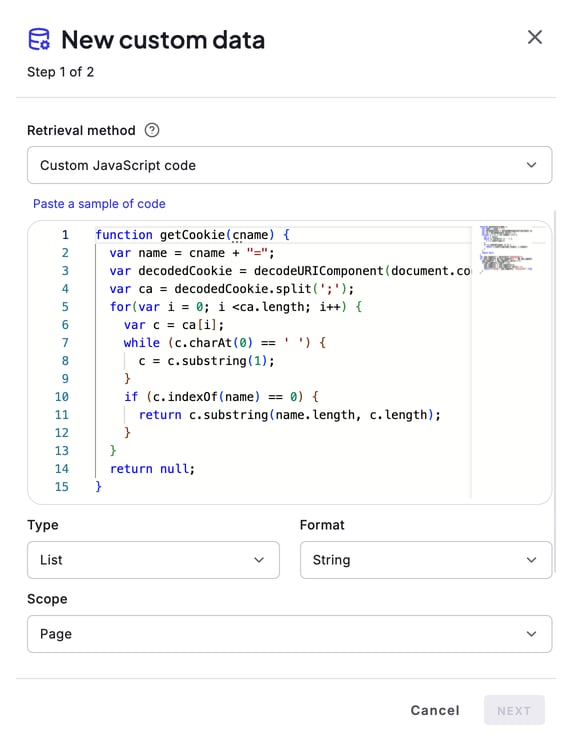
aamkamsegs cookie and fill the custom data with the AAM segments for which the current user qualifies. If a Kameleoon campaign runs on your project for a given AAM segment, Kameleoon will determine, in real-time (with no network request to an AAM API endpoint), the user’s eligibility, and display the campaign accordingly.
Fetch AAM segments’ names in Kameleoon
You can retrieve the AAM mapped segments’ names via the AAM REST API, so when you use the custom data in Kameleoon’s Segment builder, you can use the AAM segment name instead of the segment ID. When you open the Kameleoon Segment builder, Kameleoon makes an authenticated request to thehttps://api.demdex.com/v1/destinations/destinationId/mappings endpoint, replacing destinationId with the ID corresponding to the Kameleoon Destination you created.
For each mapped segment, Kameleoon retrieves the segment name (elementName) and the segment ID (sid). The segment name is then available from the Kameleoon Segment builder when you use the custom data.
To set up this feature, contact your Kameleoon Customer Success Manager. You must provide authentication credentials, as explained in this article.