

What are the Kameleoon domains that I need to whitelist?
What are the Kameleoon domains that I need to whitelist?
Easy setup (with wildcards)
Add the following content to your CSP header configuration:Complete setup (fully detailed)
Replace[your-site-code] with your Kameleoon site code in each line where it appears and add this to your configuration:Web Experimentation
https://[your-site-code].kameleoon.xx: Loads the Kameleoon Web Experimentation Application Script,engine.js(previously namedkameleoon.js).https://(eu|na)-data.kameleoon.(eu|io): Used for tracking.https://logger.kameleoon.io: Sends tracking data for logging.https://data.kameleoon.net: Required if you use the Kameleoon Simulation tool to QA experiments across multiple subdomains.
Feature Experimentation (Client-side SDKs)
https://client-config.kameleoon.com: Required for SDK versions < 2.1.0.https://sdk-config.kameleoon.eu: Required for SDK versions >= 2.1.0.https://(eu|na)-data.kameleoon.(eu|io): Used for tracking.https://logger.kameleoon.io: Sends tracking data for logging.
Graphic Editors
https://static.kameleoon.com: (deprecated) Loads static resources for the old graphic editor.https://editor.kameleoon.com: (deprecated) Used by the old graphic editor.https://graphical-editor.kameleoon.com: Used by the new graphic editor.https://storage.kameleoon.(eu|io): Loads images used in experiments created with the graphic editors.
Prompt-Based Experimentation (PBX)
https://aibuilder.kameleoon.com: Used by the prompt-based editor.https://electra.kameleoon.com: Used by the prompt-based editor.https://storage.kameleoon.(eu|io): Loads images in the prompt-based editor.https://api.kameleoon.com: Loads account-related information.https://sdk-config.kameleoon.eu: Controls Kameleoon feature flags activated in the prompt-based editor.wss://electra.kameleoon.com: Used for data exchange.
Simulation
https://api.kameleoon.com: Used by the old simulation.https://simulation.kameleoon.com: Used by the new simulation.
Product Recommendation
https://static.products.kameleoon.com: Loads resources for the Product Recommendation module.https://api.products.kameleoon.com: API used by the Product Recommendation module.https://images.products.kameleoon.com: Loads product images for recommendations.
APIs & Integrations
https://api.kameleoon.com: Required if you intend to use the Automation API for testing directly from the browser.https://customers.kameleoon.com: Required if you use the SDK API or a custom integration developed by Kameleoon.
Internal Resources
engine.js does not include simulation paths or application-specific information to minimize script size. To provide these details, load the full script kameleoonFull.js, which supplies engine.js with necessary data on internal resources and loading instructions.https://static.kameleoon.com: Loads internal resources.https://static.experimentation.dev: Loads internal resources.https://sdk-config.experimentation.dev: Controls Kameleoon feature flags activated in the Kameleoon product.https://eu-data.experimentation.dev: Sends tracking data for logging purposes.
Will Kameleoon's script (engine.js) slow down your website?
Will Kameleoon's script (engine.js) slow down your website?
CDN delivery and scalability
Theengine.js script is served via the Cloudflare CDN, which means it scales automatically regardless of your website’s traffic volume. There are no loading or slowness issues at any traffic level—Cloudflare’s global network handles delivery, so neither spikes nor sustained high traffic affect script performance for your visitors.Caching
By default, the browser cachesengine.js for 90 minutes, minimizing repeat load times for returning visitors. If your use case requires a shorter cache duration, this can be reduced—down to as little as 1 minute—on request. Contact Kameleoon support to adjust this setting for your account.Important considerations
Script size may increase depending on the number of experiments you run and their content (CSS/JavaScript).For experiments or personalization campaigns that do not need to load immediately, use the “DELAYED” tag. This delays loading non-essential experiments until after the first page load. Kameleoon intelligently manages these: it only downloads configuration after 10 seconds of idle time or when a visitor is targeted and allocated a variation other than the control. This approach ensures minimal impact on load performance while still delivering full functionality for prioritized experiments.Web Experimentation (engine.js)
The engine.js processes outgoing requests through an internal queue that runs approximately every 500 ms. The queue batches events and recursively sends additional batches if needed. On page unload or cleanup, the engine forces immediate processing of all queued events. In Safari, the engine persists unsent events to session storage to prevent data loss.The engine also sends an activity event every 60 seconds when a scroll or click is detected. When no activity is detected, the engine makes no additional tracking calls.Feature Experimentation (SDKs)
For feature flag and SDK use cases, Kameleoon performs flag evaluations locally after initialization. Tracking requests to the Data API are batched and flushed in the background rather than sent individually per evaluation. Batching reduces request volume and avoids performance degradation during traffic spikes. The flush interval is configurable in the SDK, with a default of 1 second.Data API rate limits
Kameleoon applies rate limits to the Data API to protect service reliability. Limits are based on your contractual Monthly Unique Visitors (MUV) and the requester’s IP address. If you exceed those limits, the API returns HTTP 429.These limits apply to all requests that reach the Data API, including the tracking calls thatengine.js sends automatically and the batched tracking requests that SDKs send. In environments where many visitors share a single IP address (such as offices or corporate networks), IP-based limits can apply even when your overall MUV stays within contract.Kameleoon automatically detects known bot traffic and excludes it from these rate limit calculations. Requests identified as coming from bots do not count towards the limits described above.For server-side integrations, you can lift IP-based limits by authenticating your requests. If your use case requires higher limits, contact Kameleoon support to discuss options.Rate limits apply to your entire customer account, not to individual projects. If one project generates excessive requests (for example, because a faulty implementation creates a loop that sends custom data events repeatedly), that project consumes the shared account limit and can cause HTTP 429 errors across all your other projects.To identify which project is generating unexpected traffic, use the Live events page (Insights > Live events). Select each project in turn and compare its event count over the past hour or 24 hours against the expected volume. A project generating far more events than its visitor volume justifies (for example, tens of millions of events against a 100,000 MUV contract) is the likely source. Filter events by type to narrow the cause: custom data events are the most common culprit, often because a misconfigured loop sends the same custom data variable, or all custom data variables, on every page load.Platform scalability
The Kameleoon platform uses horizontal scaling, auto-scaling infrastructure, load balancing, and regular load and stress testing. For more detail, see How does Kameleoon’s platform support scalability and elasticity?.Why does the Kameleoon engine (engine.js application file) use the eval() function?
Why does the Kameleoon engine (engine.js application file) use the eval() function?
eval() function to add custom code to Kameleoon, such as custom data and custom JavaScript, when implementing variations of a page. The eval() function allows Kameleoon to dynamically execute this custom code at runtime.If you use a Content Security Policy (CSP) directive that prevents the use of the eval() function, implement the following JavaScript snippet before the Kameleoon installation tag:eval(), implementing the code snippet will not remove these restrictions. To ensure full functionality, adjust the relevant CSP directive to allow eval() or similar functions. Otherwise, certain advanced targeting or customization features in Kameleoon remain inaccessible due to browser security enforcement.eval() function. However, you can work around this requirement by installing the Kameleoon Chrome Extension and enabling the Dev Tools > Tag injection > Bypass policies setting to override the policies locally. You must also provide your sitecode. Enabling the Bypass policies setting allows you to use the Graphic editor in a Chrome browser.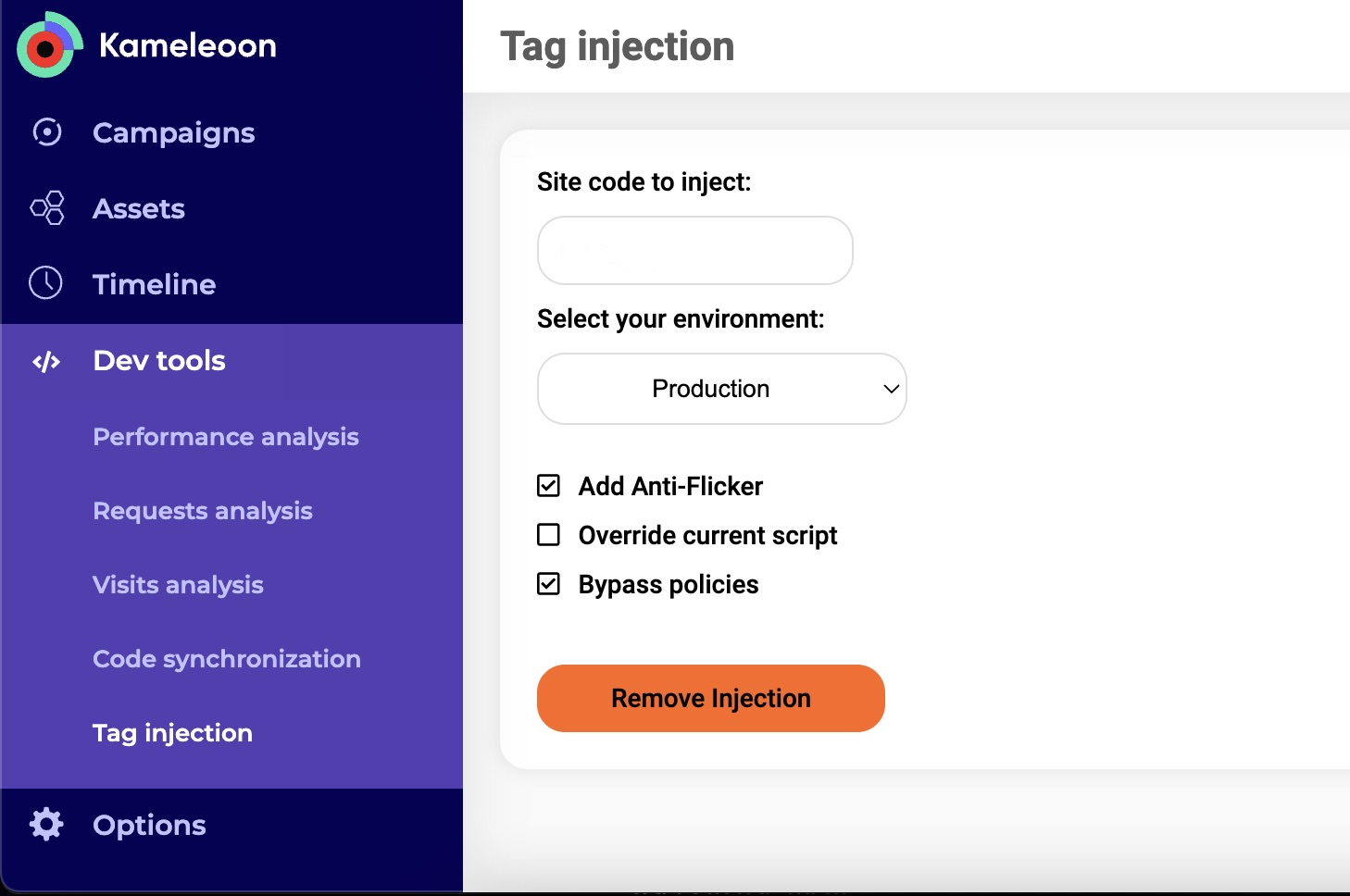
eval() function. These limitations apply even if you use any code snippet or workaround mentioned in the FAQ. The following features will remain unavailable unless your CSP explicitly allows eval():- Targeting a segment with a custom JavaScript condition (only supported when the condition runs asynchronously).
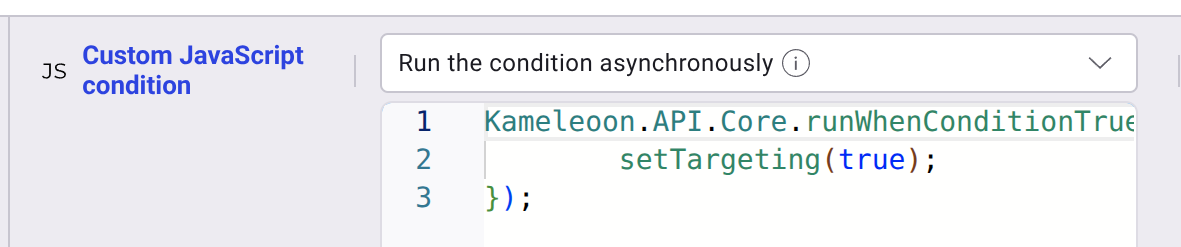
- Using custom data with custom JavaScript code.
- Using acquisition channels with custom JavaScript code.
eval() function. You can implement session data unification regardless of your CSP eval() policy.Can I use my server to act as a proxy for Kameleoon's tracking calls?
Can I use my server to act as a proxy for Kameleoon's tracking calls?
(eu|na)-data.kameleoon.(eu|io). For example, if you choose tracking.yourdomain.com as your tracking domain, a tracking request would be a POST to tracking.yourdomain.com. Your server should then forward the request, along with all necessary data and parameters, to the (eu|na)-data.kameleoon.(eu|io) host. To enable this option, contact your Customer Success Manager.Can I use Subresource Integrity (SRI) with the Kameleoon app file?
Can I use Subresource Integrity (SRI) with the Kameleoon app file?
Why does my website load with a huge flash/flicker effect on Firefox?
Why does my website load with a huge flash/flicker effect on Firefox?
<script> tag (even an almost empty one).Example:Can I modify the installation tag Kameleoon provides?
Can I modify the installation tag Kameleoon provides?
Can I add the installation tag in a separate external script?
Can I add the installation tag in a separate external script?
Is it possible to encrypt data in case of dedicated data-storage clusters (on-premises setup)?
Is it possible to encrypt data in case of dedicated data-storage clusters (on-premises setup)?
Can I delay non-essential experiments until after the first page load?
Can I delay non-essential experiments until after the first page load?
DELAYED tag to the experiments you want to defer. For more information, see the managing tags documentation.Kameleoon intelligently manages experiments tagged as “DELAYED.” It only downloads configuration after 10 seconds of idle time or when the visitor is targeted and allocated a variation other than the control. Focus on delivering the best user experience by deferring resource-intensive tests.How does Kameleoon's platform support scalability and elasticity?
How does Kameleoon's platform support scalability and elasticity?
- Scalable architecture: Distributed and modular architecture allows for horizontal scaling.
- Auto-scaling infrastructure: Cloud-based infrastructure automatically scales computational resources.
- Load Balancing: Advanced techniques distribute traffic evenly across servers.
- Data ingestion and processing: Robust APIs and a data broker manage large volumes of data efficiently.
- Testing for scalability: Regular load and stress testing ensure the system handles extreme conditions.
- Elastic data storage: Multi-tiered storage allows for rapid data access and long-term scalability.
Which databases and frameworks does Kameleoon use?
Which databases and frameworks does Kameleoon use?
- Hadoop File System (along with Spark)
- Cassandra
- ClickHouse
- Kafka
What network requests does the Kameleoon engine make?
What network requests does the Kameleoon engine make?
Segments Request
- Purpose: Collects events for targeted segments by the visitor.
- Endpoint:
https://${SITECODE}.kameleoon.io/audiences/segments.js - Method: GET
- Note: The browser caches the file for 90 minutes.
Live-update Experiments Configuration Request
- Purpose: Retrieves LIVE-UPDATE tagged experiments configuration.
- Endpoint:
https://${SITECODE}.kameleoon.io/live-experiments/config.js - Method: GET
- Note: The browser caches the file for 2 minutes.
Feature Flag Rules Configuration Request
- Purpose: Loads feature flag rules and variations from a file separate from the main configuration. The engine fires this request only when the site has at least one feature flag rule.
- Endpoint:
https://${SITECODE}.kameleoon.io/live-ff/config.js - Method: GET
- Note: To serve the file from your own location (for example, a proxy or CDN), set
window.kameleoonFeatureFlagRulesFileto the full URL before the Kameleoon engine loads. - Listener: To wait for this request to complete and run code only after the engine registers the feature flag rules, listen for the
Kameleoon::FeatureFlagFileLoadedevent:
Deferred Experiment Variation Request
- Purpose: Loads variation data for DELAYED tagged experiments.
- Endpoint:
https://${SITECODE}.kameleoon.io/experiments/${action.id}/variations/${variationId}.js - Method: GET
- Note: The browser caches the file for 30 days.
Deferred Personalization Variation Request
- Purpose: Loads variation data for DELAYED tagged personalizations.
- Endpoint:
https://${SITECODE}.kameleoon.io/personalizations/${action.id}/variations/${variationId}.js - Method: GET
- Note: The browser caches the file for 30 days.
Previous Visits Request
- Purpose: Obtains previous visits for cross-device reconciliation and real-time sync of visits.
- Endpoint:
https://(eu|na)-data.kameleoon.(eu|io)/visit/visitor - Method: GET
Tracking Events Request
- Purpose: Records events during visits.
- Endpoint:
https://(eu|na)-data.kameleoon.(eu|io)/visit/events - Method: POST
IP address Request
- Purpose: Enables exclusion/inclusion of visitors based on IP address.
- Endpoint:
https://(eu|na)-data.kameleoon.(eu|io)/ip - Method: GET
- Note: Kameleoon never stores IPs in databases. The visitor’s browser employs the IP solely for comparison purposes.
Geolocation Request
- Purpose: Obtains geolocation data for targeting and analytics.
- Endpoint:
https://(eu|na)-data.kameleoon.(eu|io)/geolocation - Method: GET
Current Weather Request
- Purpose: Returns current weather conditions.
- Endpoint:
https://(eu|na)-data.kameleoon.(eu|io)/weather/weather - Method: GET
Weather Forecast Request
- Purpose: Returns a 5-day weather forecast.
- Endpoint:
https://(eu|na)-data.kameleoon.(eu|io)/weather/forecast - Method: GET
Kameleoon Script Detection Request
- Purpose: Detects the implementation status of the Kameleoon Script.
- Endpoint:
https://(eu|na)-data.kameleoon.(eu|io)/active-script/event - Method: POST
Products Request
- Purpose: Gathers product events for targeting and recommendations.
- Endpoint:
https://(eu|na)-data.kameleoon.(eu|io)/product/events - Method: POST
Kameleoon Conversion Scores Request
- Purpose: Retrieves predictive scores for targeting.
- Endpoint:
https://(eu|na)-data.kameleoon.(eu|io)/predict/latestPredictionScoreHistograms - Method: GET
Is my data isolated from other customers' data?
Is my data isolated from other customers' data?
How does Kameleoon control employee access to my account?
How does Kameleoon control employee access to my account?