メインコンテンツへスキップ
DMPで利用可能なセグメントは、Piwik Pro AudiencesからREST-API経由で提供されます。 Kameleoonアカウントで Admin > Projects をクリックします。

グローバルカスタムスクリプト

グローバルカスタムスクリプトを挿入するには:
  • Configuration > General をクリックします。
Global custom script インサートにより、KameleoonをMatomoにリンクします。このインサートに追加したJavaScriptコードは、ページが読み込まれるたびに実行されます。この機能は、通常、複雑なトラッキングコードや他のソリューションとの連携を追加するために使用されます。
以下のコードをコピーして、Global script セクションに貼り付けます:
const getPiwikProSegments = (visitorID) => {
        const clientID = 'Replace this with your client_id from generated credentials';
        const websiteID = 'Replace this with your project_id';
        const xhr = new XMLHttpRequest();
        xhr.onload = function run() {
            if (this.status === 200) {
                Kameleoon.API.Data.setCustomData(
                    'Piwik Pro segments',
                    JSON.parse(xhr.response)
                );
            }
        };
        xhr.open('GET', https://customers.kameleoon.com/kameleoon/piwik/user/${visitorID}?id=${clientID}&website_id=${websiteID}, true);
        xhr.send();
    };

    Kameleoon.API.Core.runWhenConditionTrue(() => typeof _paq !== 'undefined', () => {
        _paq.push([function init() {
            getPiwikProSegments(this.getVisitorId());
        }]);
    });
Validate をクリックして変更を構成に適用します。

カスタムデータ

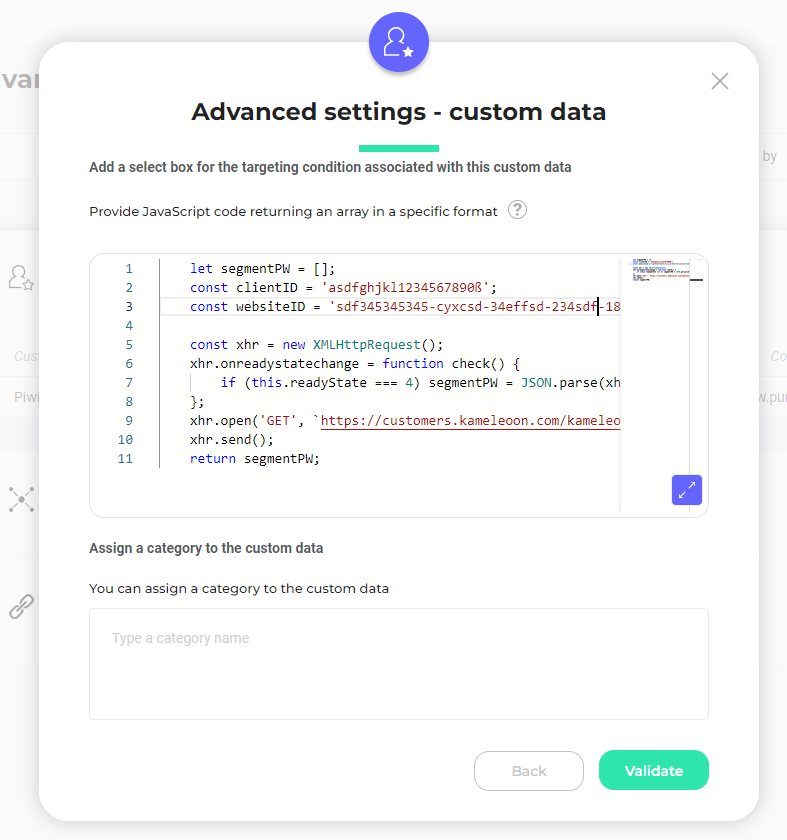
次に、新しいカスタムデータを作成する必要があります。 以下が必要です: Activation API Method 取得方法を使用します。このコードはカスタムデータの Save the values for the targeting condition associated with the custom data point セクションに配置する必要があります(client_idwebsite_id を追加することを忘れないでください)。
  let segmentPW = [];
     const clientID = 'Replace this with your client_id from generated credentials';
     const websiteID = 'Replace this with you website_id';
 

     const xhr = new XMLHttpRequest();
     xhr.onreadystatechange = function check() {
         if (this.readyState === 4) segmentPW = JSON.parse(xhr.response);
     };
     xhr.open('GET', [https://customers.kameleoon.com/kameleoon/piwik/segments/?id=${clientID}&website_id=${websiteID}](https://customers.kameleoon.com/kameleoon/piwik/segments/?id=$%7BclientID%7D&website_id=$%7BwebsiteID%7D), false);
     xhr.send();
     return segmentPW; 
このコードでは、Piwik Pro APIを使用してすべてのセグメントを取得するKameleoon Webservice(https://customers.kameleoon.com/kameleoon/piwik/)を呼び出していることに気づくでしょう。この呼び出しは、CORSポリシーの問題を回避するために必要です。 カスタムデータは list of および strings タイプに設定する必要があり、スコープは Page にします。

サーバーサイド用の外部セグメント同期

当社のSDKの1つでMatomoセグメントデータを使用したい場合、各SDKドキュメントに記載されているガイドラインに従い、getRemoteData() メソッドを使用する必要があります。