Documentation Index

Fetch the complete documentation index at: https://docs.kameleoon.com/llms.txt

Use this file to discover all available pages before exploring further.

Kameleoon randomly allocates a variation to a visitor by default. The statistical paper explains the assignment algorithm logic in the “Kameleoon’s assignation algorithm” section. The default function follows:
function (experiment)
{
  var registeredVariationId;
  var deviationRandom = experiment.obtainVariationAssignmentRandomNumber();
  var total = 0.0;
  for (var i = 0, l = experiment.variations.length; i < l; ++i)
  {
      total += experiment.variations[i].deviation;
      if (deviationRandom <= total)
      {
          registeredVariationId = experiment.variations[i].id;
          break;
      }
  }
  return registeredVariationId != null ? registeredVariationId : "none";
}
Overwrite the default function to change how Kameleoon selects and displays variations. Secure websites can use this to show consistent variations to connected users across platforms and devices:
function(experiment)
{
 var memberId = window.member_id.toString(); //CODE to update with your variable that contains the unique identifier. It has to be available before calling the Kameleoon snippet
 memberId = memberId + experiment.id.toString();
 var hash = 0;
 for (i = 0; i < memberId.length; ++i)
 {
 char = memberId.charCodeAt(i);
 hash = ((hash << 5) - hash) + char;
 hash = hash & hash;
 }
 hash = (Math.abs(hash) * 9301 + 49297) % 233280;
 var deviationRandom = hash / 233280;
 var total = 0.0;
 for (var i = 0, l = experiment.variations.length; i < l; ++i)
 {
 total += experiment.variations[i].deviation;
 if (deviationRandom <= total)
 {
 chosenVariationId = experiment.variations[i].id;
 break;
 }
 }
return registeredVariationId != null ? registeredVariationId : "none";
}
Add the custom code to the account’s advanced options:
  1. Log in to the Kameleoon account.
  2. Click Admin > Projects.
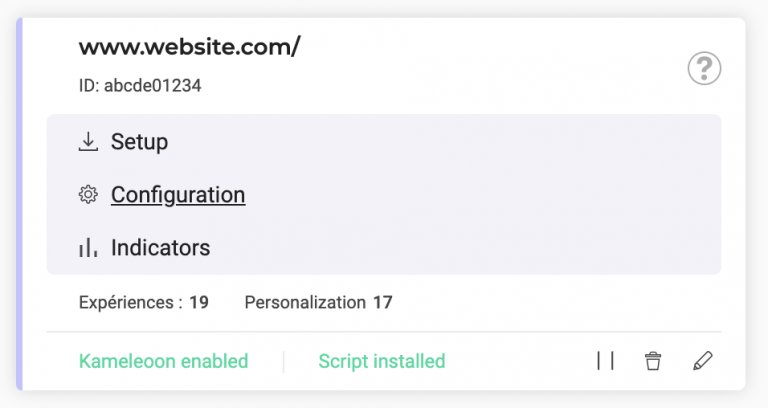
  3. Click Configuration on the website card.
  1. Add the script above in the Variation selection script field.