Product Recommendation APIは、50,000を超える商品のカタログインポートに推奨される方法です。毎日のフルカタログ再インポートの代わりに、このエンドポイントを使用してください。
このチュートリアルでは、Product Recommendation APIを使用してKameleoonに商品カタログをインポートする手順と、よくある落とし穴について説明します。
Product Recommendation APIはRESTfulの原則に従っています。
インポート処理は以下の連続したステップで構成されています。
- カテゴリーのインポート: 商品をアップロードする前に、すべてのカテゴリーが最新であることを確認するために
POST リクエストを送信します。
- 商品のインポートと更新: Kameleoonアカウントに商品カタログをインポートするために
PUT リクエストを送信します。
- 利用可能な商品の更新: 商品の在庫状況を更新するための
PATCH リクエストです。
このAPIは、Kameleoon上の既存商品の在庫状況を変更するための専用エンドポイントも提供しています。これはより軽量なアプローチです。
データ
- Shop ID
eehj3eu84299kg5ghw5a6743r8 および Shop Secret pmd5362597thrgq8k256ep01t0
- これらはKameleoonアプリの Recommendations > Settings > Store settings で確認できます。必要に応じてキーについてカスタマーサクセスマネージャーにお問い合わせください。
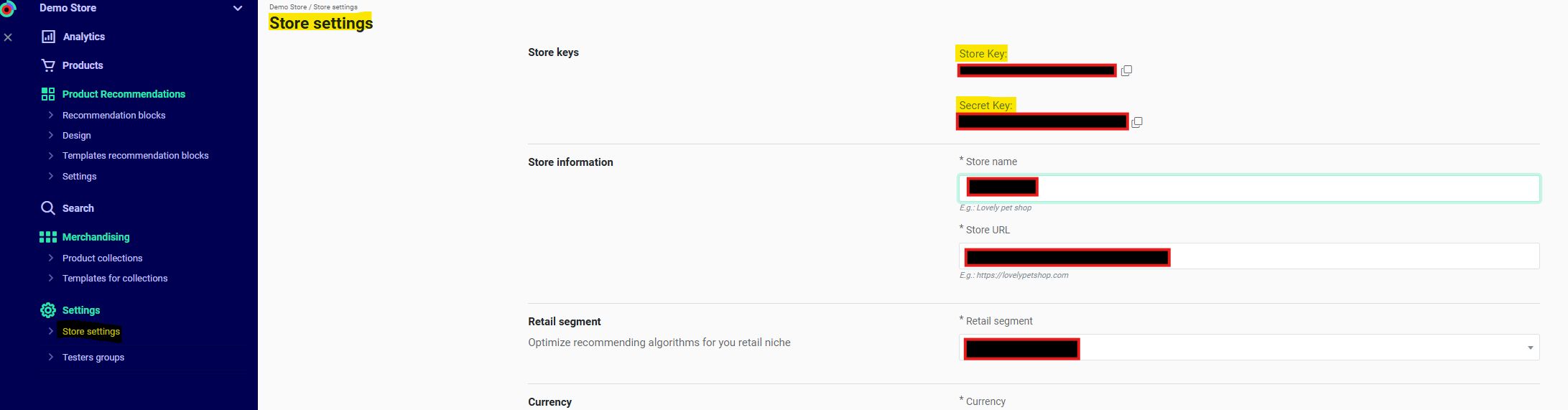
- Webhook
http://www.webhook.com/importCategoriesApiResponses/ および http://www.webhook.com/importProductsApiResponses/
- Webhookは、カタログインポートの前に Import Categories ステップの完了を保証し、Import Products リクエストの完了を検証します。
- Kameleoonの現在の商品カタログ:
[
{
"id": "PD1", // String (max 64). Required
"group_id": "Shoe", // String (max 64). Optional
"name": "Sneaker", // String (max 255). Required
"price": "1", // Float (positive). Required
"oldprice": "2", // Float (positive). Optional
"currency": "USD", // Currency code: USD, EUR. Required.
"url": "https://example.com/product", // String (URL). Required
"picture": "https://example.com/product/image.png", // String (URL). Required
"available": true, // Boolean (true, false). Required
"categories": ["shoeID"], // Array of categories IDs. Required.
"locations": [
{
"location": "USA",
"delivery_types": {
"store": 10,
"stock": 50 }
},
{
"location": "CAN",
"price": 60
}
]
},
{
"id": "PD2", // String (max 64). Required
"group_id": "Glass", // String (max 64). Optional
"name": "Sunglasses", // String (max 255). Required
"price": "1", // Float (positive). Required
"oldprice": "2", // Float (positive). Optional
"currency": "USD", // Currency code: USD, EUR. Required.
"url": "https://example.com/product", // String (URL). Required
"picture": "https://example.com/product/image.png", // String (URL). Required
"available": true, // Boolean (true, false). Required
"categories": ["glassID"], // Array of categories IDs. Required.
"locations": [
{
"location": "USA",
"delivery_types": {
"store": 10,
"stock": 50 }
},
{
"location": "CAN",
"price": 60
}
]
}
]
[ {{
"id": "glassID",
"name": "Glass"
},
{
"id": "shoesID",
"name": "shoes",
},
}]
- Kameleoonにインポートする商品:
- PD2 (Glass) の価格が3に変更され、新しいカテゴリー(
"id": "BootID", "name": "Boot"))を持つ新しい商品があります。
{
"id": "PD3", // String (max 64). Required
"group_id": "Boot", // String (max 64). Optional
"name": "Standard Boot", // String (max 255). Required
"price": "1", // Float (positive). Required
"oldprice": "2", // Float (positive). Optional
"currency": "USD", // Currency code: USD, EUR. Required.
"url": "https://example.com/product", // String (URL). Required
"picture": "https://example.com/product/image.png", // String (URL). Required
"available": true, // Boolean (true, false). Required
"categories": ["bootID"], // Array of categories IDs. Required.
"locations": [
{
"location": "USA",
"delivery_types": {
"store": 10,
"stock": 50 }
},
{
"location": "CAN",
"price": 60
}
]
}
カテゴリーのインポート
このステップでは カテゴリーのインポートエンドポイント を使用します。
データはリクエストボディ内のJSON文字列として送信されます。すべてのカテゴリーを1回の POST リクエストで送信してください。
以下の例では、新しい商品をインポートできるように、既存および新規のすべてのカテゴリーを送信しています。
curl -X POST -L 'https://api.products.kameleoon.com/import/categories' \
-H 'Content-Type: application/json' \
-d '{
"shop_id":"eehj3eu84299kg5ghw5a6743r8",
"shop_secret":"pmd5362597thrgq8k256ep01t0",
"items":[
{
"id":"slassID",
"name":"Glass"
},
{
"id":"shoesID",
"name":"shoes"
},
{
"id":"bootID",
"name":"boots"
}
],
"webhook":"http://www.webhook.com/importCategoriesApiResponses/"
}'
webhook はリクエストの完了時に開発者に通知します。指定したすべてのカテゴリーがインポートされて利用可能になると、指定されたwebhookに POST リクエストが送信されます。大規模なカテゴリーのインポートには、処理に数分かかることがあるため、webhook を使用してください。商品インポートエンドポイント を使用して商品をインポートする場合、webhookは商品インポートを開始する前にすべてのカテゴリーが処理されたことを保証します。カテゴリー不明の商品はインポート中に無視されます。成功したリクエストの例:失敗したリクエストの例:{ "status": "error", "message": "MESSAGE"}
商品のインポートと更新
このステップでは 商品のインポートエンドポイント を使用します。
APIの制限は1分あたり40リクエストで、最大1.5秒に1リクエストです。
リクエストの重量制限は35メガバイトです。
以下の例は、price および oldprice フィールドが変更された更新商品 PD2 と、新商品 PD3 を送信しています。商品 PD1 は変更されていないため省略されます。
# !!! IMPORTANT: Wait for a successful POST request to the webhook endpoint
# (http://www.webhook.com/importCategoriesApiResponses)
# from the Import Categories step before making this call.
#Check that all required fields are filled for each product
curl -X PUT -L 'https://api.products.kameleoon.com/import/products' \
-H 'Content-Type: application/json' \
-d '{
"shop_id":"eehj3eu84299kg5ghw5a6743r8",
"shop_secret":"pmd5362597thrgq8k256ep01t0",
"items":[
{
"id": "PD3", // String (max 64). Required
"group_id": "Boot", // String (max 64). Optional
"name": "StandardBoot", // String (max 255). Required
"price": "1", // Float (positive). Required
"oldprice": "2", // Float (positive). Optional
"currency": "USD", // Currency code: USD, EUR. Required.
"url": "https://example.com/product", // String (URL). Required
"picture": "https://example.com/product/image.png", // String (URL). Required
"available": true, // Boolean (true, false). Required
"categories": ["bootID"], // Array of categories IDs. Required.
"locations": [
{
"location": "USA",
"delivery_types": {
"store": 10,
"stock": 50 }
},
{
"location": "CAN",
"price": 60
}
]
},
{
"id": "PD2", // String (max 64). Required
"group_id": "Glass", // String (max 64). Optional
"name": "Sunglasses", // String (max 255). Required
"price": "3", // Float (positive). Required
"oldprice": "1", // Float (positive). Optional
"currency": "USD", // Currency code: USD, EUR. Required.
"url": "https://example.com/product", // String (URL). Required
"picture": "https://example.com/product/image.png", // String (URL). Required
"available": true, // Boolean (true, false). Required
"categories": ["glassID"], // Array of categories IDs. Required.
"locations": [
{
"location": "USA",
"delivery_types": {
"store": 10,
"stock": 50 }
},
{
"location": "CAN",
"price": 60
}
]
}
],
"webhook":"http://www.webhook.com/importProductsApiResponses/"
}'
# check for the result of the request, which will be sent
# to the provided webhook http://www.webhook.com/importProductsApiResponses/
利用可能な商品の更新
在庫状況を管理するには 利用可能な商品の更新エンドポイント を使用します。
このエンドポイントは、商品のIDを使用して利用可能な商品のリストを更新します。
このシナリオでは、PD2 と PD3 のIDを提供して PD1 のIDを省略することで、商品 PD1 を利用不可としてマークします。
curl -X PATCH -L 'https://api.products.kameleoon.com/import/products' \
-H 'Content-Type: application/json' \
-d '{
"shop_id":"eehj3eu84299kg5ghw5a6743r8",
"shop_secret":"pmd5362597thrgq8k256ep01t0",
"items":["PD2","PD3"],
}'
主な推奨事項
-
ワークフローの順序
商品をインポートする前に必ずカテゴリーをインポートしてください
-
データの完全性
商品のインポートにはすべての必須フィールドが必要です
-
Webhook戦略
大規模なインポートの監視に不可欠です
-
パフォーマンスのヒント
- 商品のバッチサイズは35MB以下にしてください
- レート制限: 1分あたり40リクエスト
- 商品の在庫状況を変更する場合のみ、利用可能な商品の更新エンドポイントを使用してください。
-
エラー処理
- カテゴリーIDを検証してください
- フィールド形式を確認してください
- Webhookレスポンスを監視してください