> ## Documentation Index
> Fetch the complete documentation index at: https://docs.kameleoon.com/llms.txt
> Use this file to discover all available pages before exploring further.
# Eulerian Analytics
> Send Kameleoon personalization and experiment data to Eulerian Analytics to segment and analyze campaign results within Eulerian's reporting tools.
When you create a personalization with Kameleoon, you can read your results in Eulerian, a proprietary data collection platform. The campaign data is then transmitted to segment the analyses in Eulerian's tools.
## Activate Eulerian on Kameleoon
To enable Eulerian on Kameleoon:
1. Open the Kameleoon app.
2. Click **Admin** > **Integrations**.
3. Click **Install the tool**.
4. Select the project on which you want to activate Eulerian.
5. Click **Validate**.
You will then see an **ON** toggle to the right of the tool’s line and the number of projects on which the tool is configured.

The data will be automatically pushed to Eulerian if it is installed on your pages.
If you need to change the behavior of our native bridge, you can [create a custom analytics bridge](./custom-analytics-integration) and use our Eulerian sample code from [our Github repository](https://github.com/Kameleoon/custom-analytics-integrations/tree/master/eulerian).
## Retrieve and use Kameleoon personalization data in Eulerian
### In Eulerian
1. Open your Eulerian account.
2. Click **List of personalization parameters** > **Add a personalization parameter**.
3. Name the personalization parameter and select the **user-centric** type.
4. Click **Validate**.
### In Kameleoon
Once your custom setting is created in Eulerian, you can associate it with a Kameleoon personalization. The personalization's data will then be automatically sent to Eulerian. To associate a Eulerian custom setting with a Kameleoon personalization:
1. Navigate to the personalizations page.
2. Click **New personalization**.
3. Select **Eulerian Technologies** in the **Reporting tools** section.
4. Choose the personalization you'd like to associate the tool with.
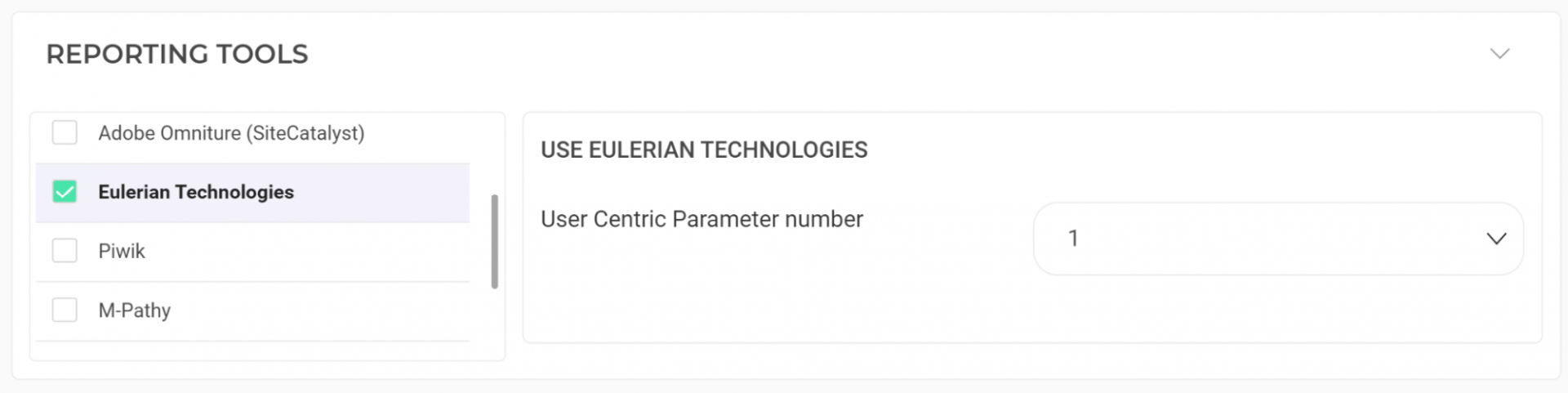
The data will be automatically sent to Eulerian.
#### On a feature flag
[Learn how to manage third-party analytics integrations](../../../experimentation/feature-experimentation/track-your-feature-experiments/managing-third-party-integrations)