> ## Documentation Index
> Fetch the complete documentation index at: https://docs.kameleoon.com/llms.txt
> Use this file to discover all available pages before exploring further.
# Define feature variables
> Define feature variables to dynamically control your feature flag's content across environments without redeploying code.
You can define feature variables to remotely update your feature flags' content in your chosen environment. You must create feature variables [to create feature variations](./define-feature-variations). There is no limit on the number of feature variables you can create.
## Creating feature variables
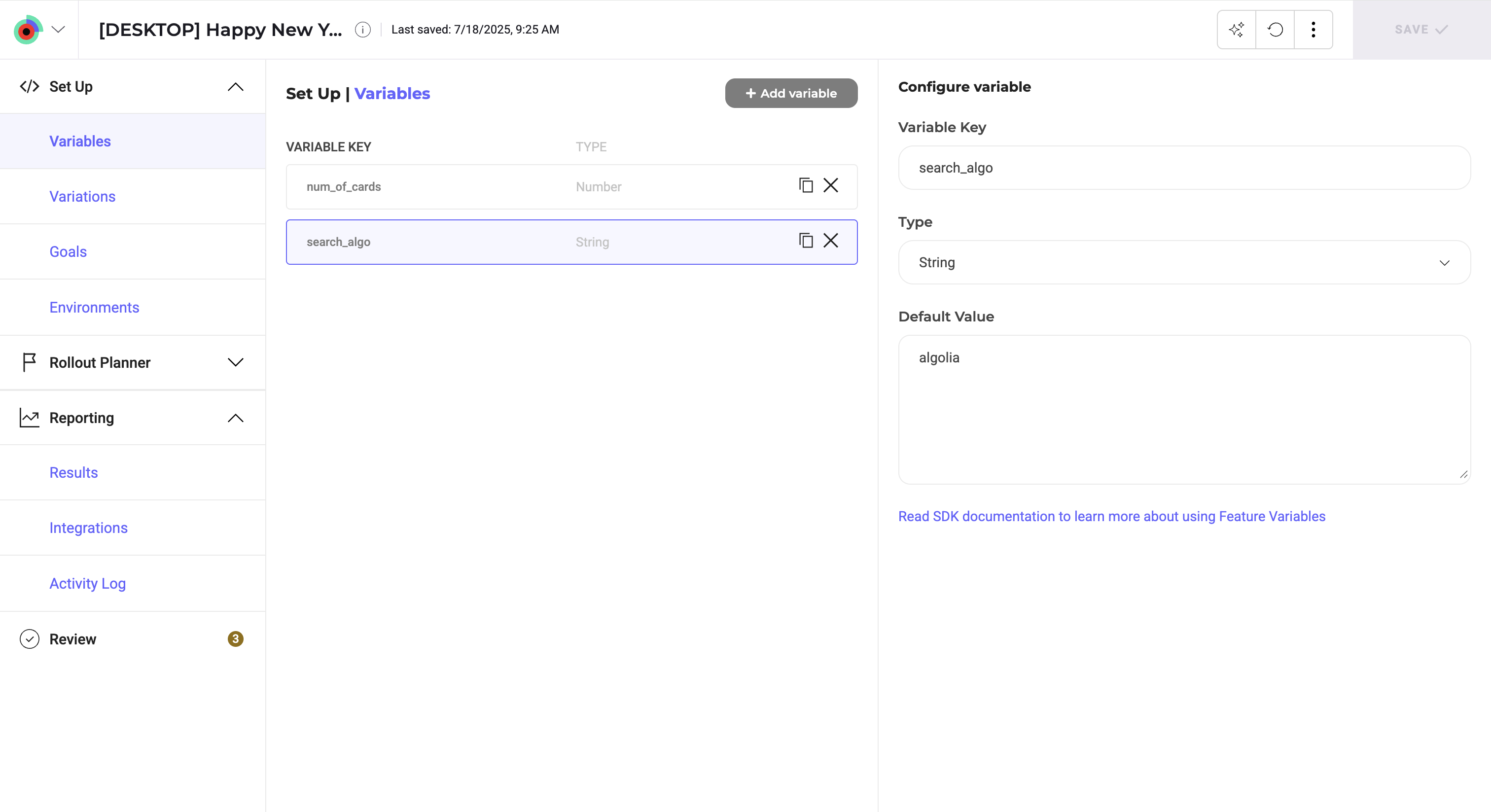
1. Navigate to your feature flag or create a new one.
2. In the left sidebar, click **Set Up** > **Variables** > **Add Variable**.
3. Select your variable's **Type**.
* If you select **Enum**, enter a list of allowed values separated by commas. This type creates a predefined list of options that you can select from when you define feature variations, rather than typing values manually.
4. Enter a **Variable Key**.
5. Set the **Default Value**.
* For **Enum** variables, select the default value from the list you defined in step 3.
6. Click **Save**.
To retrieve a feature variable from your source code, you must call the `getVariation()` method. Please note that if you use feature variations, Kameleoon will automatically bucket the user in a variation and return the value of the variable that has been defined in the variation (you do not need to call the `getVariation()` method).
## Benefits of feature variables
Feature variables let you variabilize parts of your feature flag code, so you can dynamically assign values to variables without coding them in your source code.
Once the feature variable's code is in production, changing it does not require redeployment. For example, if your feature is a discount offer for premium customers, but you're not sure what the discount percentage will be, you can create a **Discount Percentage** variable in your code and update it from the Kameleoon app without changing or pushing new code.
Developers and product owners can work together to variablize parts of your feature that might change, so product updates are not blocked by development and deployments.
Choose your SDK language and use the sample code provided to set up the SDK in your application in any of the following languages:
* [Android](/developer-docs/sdks/mobile-sdks/android-sdk)
* [iOS](/developer-docs/sdks/mobile-sdks/ios-sdk)
* [Java](/developer-docs/sdks/web-sdks/java-sdk)
* [C#](/developer-docs/sdks/web-sdks/csharp-sdk)
* [Node.js](/developer-docs/sdks/web-sdks/nodejs-sdk)
* [PHP](/developer-docs/sdks/web-sdks/php-sdk)
* [Ruby](/developer-docs/sdks/web-sdks/ruby-sdk)
* [Go](/developer-docs/sdks/web-sdks/go-sdk)
* [Flutter](/developer-docs/sdks/mobile-sdks/flutter-sdk)
* [Python](/developer-docs/sdks/web-sdks/python-sdk)
* [Rust](/developer-docs/sdks/web-sdks/rust-sdk)
* [Elixir](/developer-docs/sdks/web-sdks/elixir-sdk)