> ## Documentation Index
> Fetch the complete documentation index at: https://docs.kameleoon.com/llms.txt
> Use this file to discover all available pages before exploring further.
# Piwik Pro Audiences
> Piwik ProオーディエンスセグメントをKameleoonの実験やパーソナライゼーションのターゲティング条件として、カスタムデータブリッジを介して利用できます。
DMPで利用可能なセグメントは、Piwik Pro AudiencesからREST-API経由で提供されます。
Kameleoonアカウントで **Admin** > **Projects** をクリックします。
## グローバルカスタムスクリプト
グローバルカスタムスクリプトを挿入するには:
* **Configuration** > **General** をクリックします。
**Global custom script** インサートにより、KameleoonをMatomoにリンクします。このインサートに追加したJavaScriptコードは、ページが読み込まれるたびに実行されます。この機能は、通常、複雑なトラッキングコードや他のソリューションとの連携を追加するために使用されます。

以下のコードをコピーして、**Global script** セクションに貼り付けます:
```javascript theme={null}
const getPiwikProSegments = (visitorID) => {
const clientID = 'Replace this with your client_id from generated credentials';
const websiteID = 'Replace this with your project_id';
const xhr = new XMLHttpRequest();
xhr.onload = function run() {
if (this.status === 200) {
Kameleoon.API.Data.setCustomData(
'Piwik Pro segments',
JSON.parse(xhr.response)
);
}
};
xhr.open('GET', https://customers.kameleoon.com/kameleoon/piwik/user/${visitorID}?id=${clientID}&website_id=${websiteID}, true);
xhr.send();
};
Kameleoon.API.Core.runWhenConditionTrue(() => typeof _paq !== 'undefined', () => {
_paq.push([function init() {
getPiwikProSegments(this.getVisitorId());
}]);
});
```
**Validate** をクリックして変更を構成に適用します。
## カスタムデータ
次に、[新しいカスタムデータ](../../../assets/custom-data/create-custom-data)を作成する必要があります。
以下が必要です:
* Bearerトークン生成用の `client_id` と `client_secret`([認証情報を取得](https://developers.piwik.pro/en/latest/platform/getting_started.html))。
* `website_id`。
**Activation API Method** 取得方法を使用します。このコードはカスタムデータの **Save the values for the targeting condition associated with the custom data point** セクションに配置する必要があります(`client_id` と `website_id` を追加することを忘れないでください)。
```javascript theme={null}
let segmentPW = [];
const clientID = 'Replace this with your client_id from generated credentials';
const websiteID = 'Replace this with you website_id';
const xhr = new XMLHttpRequest();
xhr.onreadystatechange = function check() {
if (this.readyState === 4) segmentPW = JSON.parse(xhr.response);
};
xhr.open('GET', [https://customers.kameleoon.com/kameleoon/piwik/segments/?id=${clientID}&website_id=${websiteID}](https://customers.kameleoon.com/kameleoon/piwik/segments/?id=$%7BclientID%7D&website_id=$%7BwebsiteID%7D), false);
xhr.send();
return segmentPW;
```
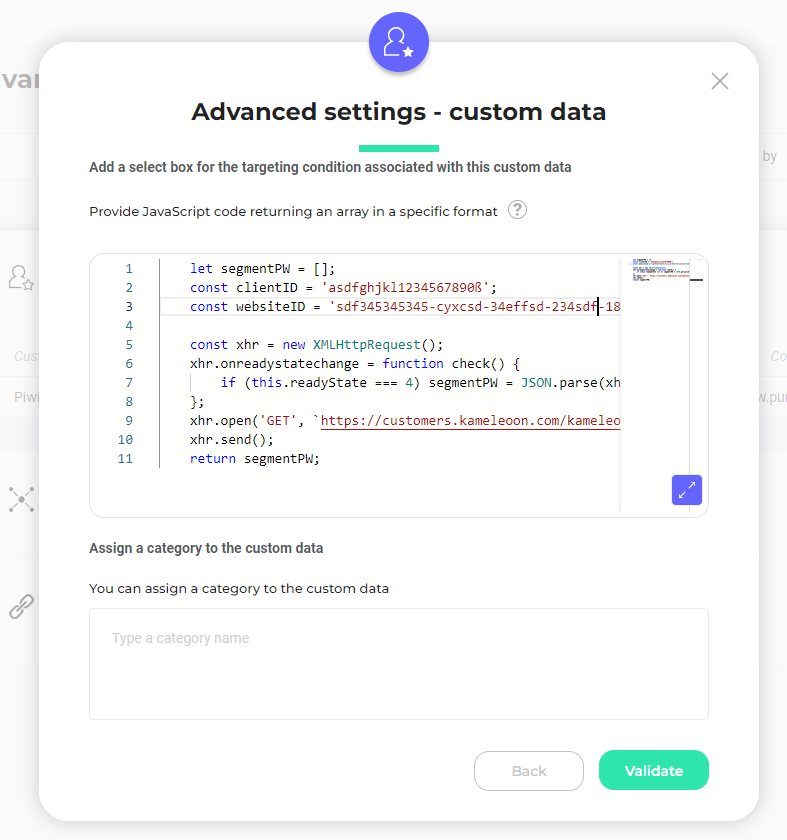
このコードでは、Piwik Pro APIを使用してすべてのセグメントを取得するKameleoon Webservice(`https://customers.kameleoon.com/kameleoon/piwik/`)を呼び出していることに気づくでしょう。この呼び出しは、CORSポリシーの問題を回避するために必要です。
カスタムデータは **list of** および **strings** タイプに設定する必要があり、スコープは **Page** にします。
## サーバーサイド用の外部セグメント同期
**当社のSDKの1つでMatomoセグメントデータを使用したい場合**、各SDKドキュメントに記載されているガイドラインに従い、[`getRemoteData()`](../../../../developer-docs/sdks/mobile-sdks/ios-sdk#getremotedata) メソッドを使用する必要があります。