> ## Documentation Index
> Fetch the complete documentation index at: https://docs.kameleoon.com/llms.txt
> Use this file to discover all available pages before exploring further.
# Matomo
> カスタム変数を介して Kameleoon の実験データを Matomo に送信し、ヒートマップ、記録、フォームなどにキャンペーンのバリエーションデータをタグ付けして行動分析を行います。
Matomo はヒートマップを含むデータ可視化ツールを提供します。詳細については、[Matomo のヒートマップに関するドキュメント](https://fr.matomo.org/docs/heatmaps/)を参照してください。
Matomo 統合により、ヒートマップ、記録、フォームなどに、訪問者が閲覧したキャンペーン名やバリエーション名をタグ付けできます。
**主なメリット:**
* 各 Matomo アナリティクスツール(例: ヒートマップ、セッション記録)をキャンペーン名およびバリエーション名でフィルタリングできます。
* キャンペーンのバリエーションに露出した訪問者の行動を分析し、新しい実験やパーソナライゼーションの機会を特定できます。
## Matomo を有効化する
Matomo(旧 Piwik)を使用するには、Kameleoon の Integrations ページで有効化する必要があります。手順は次のとおりです。
1. Kameleoon アプリにログインします。
2. **Admin** > **Integrations** > **Install the tool** をクリックします。
3. Matomo を設定するプロジェクトを選択します。
4. **Validate** をクリックします。
ツールの行の右側に **ON** トグルと、ツールが設定されているプロジェクト数が表示されます。

ツールのスクリプトがページにインストールされていれば、実験結果は Matomo に送信されます。
ネイティブブリッジの動作を変更したい場合は、[カスタムアナリティクスブリッジを作成](./custom-analytics-integration) し、[GitHub リポジトリ](https://github.com/Kameleoon/custom-analytics-integrations/tree/master/matomo) にある Matomo サンプルコードを使用できます。
## Matomo を実験に関連付ける
### グラフィック / コードエディタ
Integrations ページで Matomo を有効化すると、最終化パネルの **Integrations** ステップでレポートツールとして選択できます。

ドロップダウンリストから、関連付ける Matomo の [カスタム変数](https://fr.matomo.org/docs/custom-variables/)(`customVar`)の ID を選択します。
Kameleoon はこのカスタム変数を介して、自動的に Matomo にデータを送信します。
### 実験結果ページ
実験の結果ページから、レポートツールの中で Matomo を選択することも可能です。
ドロップダウンリストから、関連付ける [カスタム変数](https://fr.matomo.org/docs/custom-variables/) の ID(`customVar`)を選択します。
Kameleoon はこのカスタム変数を使用して、自動的に Matomo にデータを送信します。ツールの有効化後に取得されたデータのみが反映されます。
## Matomo をパーソナライゼーションに関連付ける
### パーソナライゼーション作成ページ
Integrations ページで Matomo を有効化すると、パーソナライゼーションのレポートツールとして選択できます。
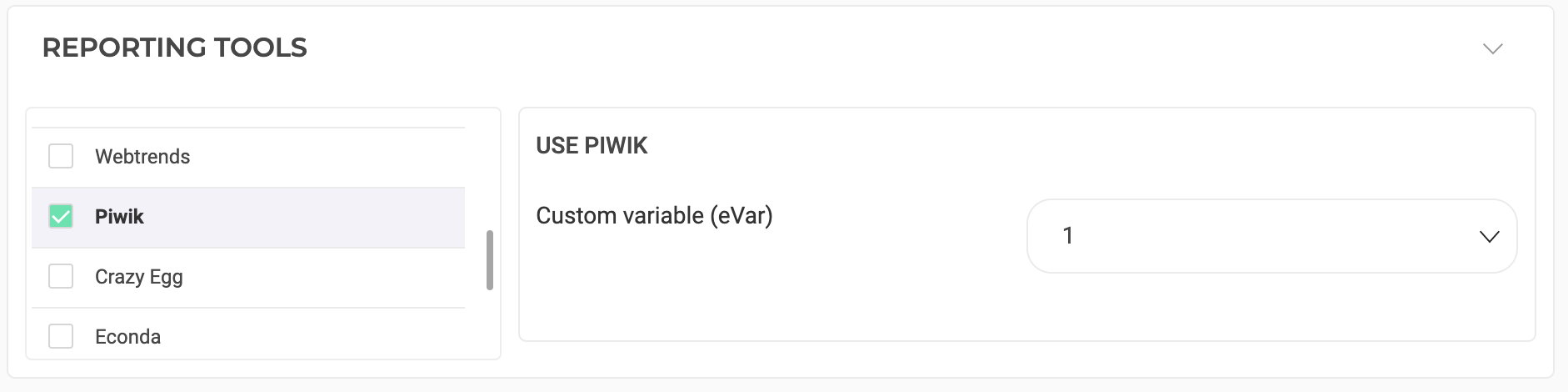
ドロップダウンリストから、関連付ける [カスタム変数](https://fr.matomo.org/docs/custom-variables/) の ID(`customVar`)を選択します。
Kameleoon はこのカスタム変数を介して、自動的に Matomo にデータを送信します。
## Matomo をフィーチャーフラグに関連付ける
[サードパーティ製アナリティクス統合の管理方法を学ぶ](../../../experimentation/feature-experimentation/track-your-feature-experiments/managing-third-party-integrations)
## Matomo で結果をセグメント化する
このカスタム変数に基づいて結果をセグメント化する方法については、[Matomo の関連ドキュメント](https://matomo.org/docs/custom-variables/) を参照してください。