> ## Documentation Index
> Fetch the complete documentation index at: https://docs.kameleoon.com/llms.txt
> Use this file to discover all available pages before exploring further.
# Product Recommendation APIを使用してKameleoonに商品カタログをインポートする
> Product Recommendation APIを使用して、カテゴリー、商品、在庫状況の更新を含む商品カタログをKameleoonにインポートします。
Product Recommendation APIは、50,000を超える商品のカタログインポートに推奨される方法です。毎日のフルカタログ再インポートの代わりに、このエンドポイントを使用してください。
このチュートリアルでは、Product Recommendation APIを使用してKameleoonに商品カタログをインポートする手順と、よくある落とし穴について説明します。
Product Recommendation APIはRESTfulの原則に従っています。
インポート処理は以下の連続したステップで構成されています。
* **[カテゴリーのインポート](../all-endpoints/Import/import-categories)**: 商品をアップロードする前に、すべてのカテゴリーが最新であることを確認するために `POST` リクエストを送信します。
* **[商品のインポートと更新](../all-endpoints/Import/import-product)**: Kameleoonアカウントに商品カタログをインポートするために `PUT` リクエストを送信します。
* **[利用可能な商品の更新](../all-endpoints/Import/update-products)**: 商品の在庫状況を更新するための `PATCH` リクエストです。
このAPIは、Kameleoon上の既存商品の在庫状況を変更するための専用エンドポイントも提供しています。これはより軽量なアプローチです。
## データ
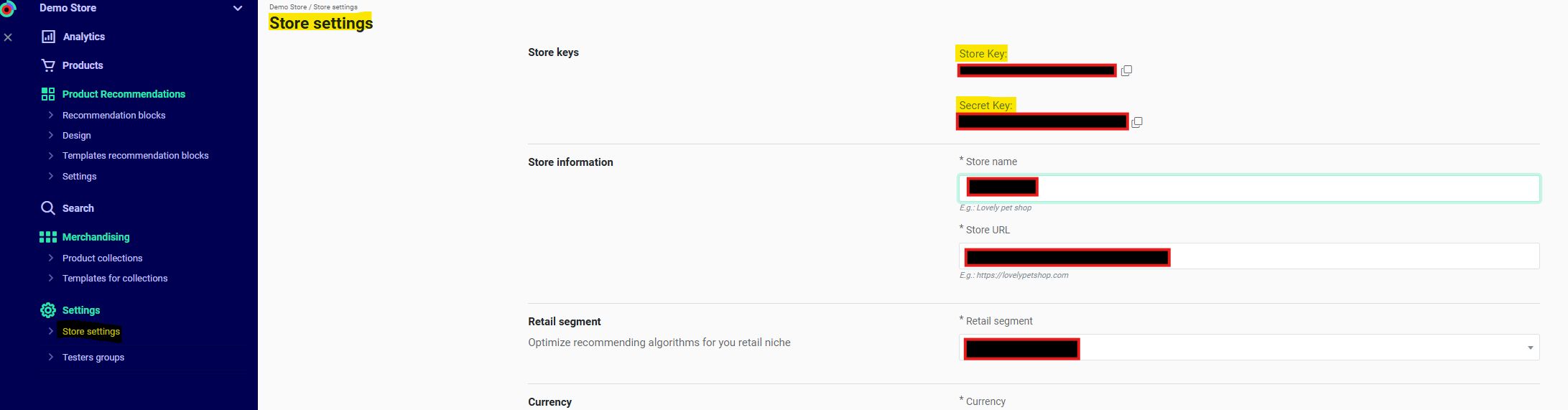
* **Shop ID** `eehj3eu84299kg5ghw5a6743r8` および **Shop Secret** `pmd5362597thrgq8k256ep01t0`
* これらはKameleoonアプリの **Recommendations** > **Settings** > **Store settings** で確認できます。必要に応じてキーについてカスタマーサクセスマネージャーにお問い合わせください。
* **Webhook** `http://www.webhook.com/importCategoriesApiResponses/` および `http://www.webhook.com/importProductsApiResponses/`
* Webhookは、カタログインポートの前に **Import Categories** ステップの完了を保証し、**Import Products** リクエストの完了を検証します。
* **Kameleoonの現在の商品カタログ:**
```json theme={null}
[
{
"id": "PD1", // String (max 64). Required
"group_id": "Shoe", // String (max 64). Optional
"name": "Sneaker", // String (max 255). Required
"price": "1", // Float (positive). Required
"oldprice": "2", // Float (positive). Optional
"currency": "USD", // Currency code: USD, EUR. Required.
"url": "https://example.com/product", // String (URL). Required
"picture": "https://example.com/product/image.png", // String (URL). Required
"available": true, // Boolean (true, false). Required
"categories": ["shoeID"], // Array of categories IDs. Required.
"locations": [
{
"location": "USA",
"delivery_types": {
"store": 10,
"stock": 50 }
},
{
"location": "CAN",
"price": 60
}
]
},
{
"id": "PD2", // String (max 64). Required
"group_id": "Glass", // String (max 64). Optional
"name": "Sunglasses", // String (max 255). Required
"price": "1", // Float (positive). Required
"oldprice": "2", // Float (positive). Optional
"currency": "USD", // Currency code: USD, EUR. Required.
"url": "https://example.com/product", // String (URL). Required
"picture": "https://example.com/product/image.png", // String (URL). Required
"available": true, // Boolean (true, false). Required
"categories": ["glassID"], // Array of categories IDs. Required.
"locations": [
{
"location": "USA",
"delivery_types": {
"store": 10,
"stock": 50 }
},
{
"location": "CAN",
"price": 60
}
]
}
]
```
* **Kameleoonの現在のカテゴリー:**
```json theme={null}
[ {{
"id": "glassID",
"name": "Glass"
},
{
"id": "shoesID",
"name": "shoes",
},
}]
```
* **Kameleoonにインポートする商品:**
* PD2 (Glass) の価格が3に変更され、新しいカテゴリー(`"id": "BootID", "name": "Boot")`)を持つ新しい商品があります。
```json theme={null}
{
"id": "PD3", // String (max 64). Required
"group_id": "Boot", // String (max 64). Optional
"name": "Standard Boot", // String (max 255). Required
"price": "1", // Float (positive). Required
"oldprice": "2", // Float (positive). Optional
"currency": "USD", // Currency code: USD, EUR. Required.
"url": "https://example.com/product", // String (URL). Required
"picture": "https://example.com/product/image.png", // String (URL). Required
"available": true, // Boolean (true, false). Required
"categories": ["bootID"], // Array of categories IDs. Required.
"locations": [
{
"location": "USA",
"delivery_types": {
"store": 10,
"stock": 50 }
},
{
"location": "CAN",
"price": 60
}
]
}
```
## カテゴリーのインポート
このステップでは [カテゴリーのインポートエンドポイント](../all-endpoints/Import/import-categories) を使用します。
商品をアップロードする前に、最新のカテゴリーリストを当社のデータベースにアップロードする必要があります。
データはリクエストボディ内のJSON文字列として送信されます。**すべてのカテゴリーを1回の `POST` リクエストで送信してください。**
以下の例では、新しい商品をインポートできるように、既存および新規のすべてのカテゴリーを送信しています。
```bash theme={null}
curl -X POST -L 'https://api.products.kameleoon.com/import/categories' \
-H 'Content-Type: application/json' \
-d '{
"shop_id":"eehj3eu84299kg5ghw5a6743r8",
"shop_secret":"pmd5362597thrgq8k256ep01t0",
"items":[
{
"id":"slassID",
"name":"Glass"
},
{
"id":"shoesID",
"name":"shoes"
},
{
"id":"bootID",
"name":"boots"
}
],
"webhook":"http://www.webhook.com/importCategoriesApiResponses/"
}'
```
`webhook` はリクエストの完了時に開発者に通知します。指定したすべてのカテゴリーがインポートされて利用可能になると、指定されたwebhookに `POST` リクエストが送信されます。
大規模なカテゴリーのインポートには、処理に数分かかることがあるため、`webhook` を使用してください。
[商品インポートエンドポイント](../all-endpoints/Import/import-product) を使用して商品をインポートする場合、webhookは商品インポートを開始する前にすべてのカテゴリーが処理されたことを保証します。カテゴリー不明の商品はインポート中に無視されます。
**成功したリクエストの例:**
```json theme={null}
{ "status": "success"}
```
失敗したリクエストの例:
```json theme={null}
{ "status": "error", "message": "MESSAGE"}
```
## 商品のインポートと更新
このステップでは [商品のインポートエンドポイント](../all-endpoints/Import/import-product#items-オブジェクトのパラメーターリスト) を使用します。
APIの制限は1分あたり40リクエストで、最大1.5秒に1リクエストです。
リクエストの重量制限は35メガバイトです。
特定の商品を更新するには、リクエスト内の各商品に必須のパラメータをすべて指定してください。必須プロパティを省略すると、インポートでそれらの商品が無視され、データベースは変更されません。たとえば、商品価格の更新には、カテゴリー、名前、画像、タグなど、すべての必須パラメータを含める必要があります。
必須ではないプロパティの値を省略すると、その値はデータベースから削除されます。
必須フィールドについては、[エンドポイントのドキュメント](../all-endpoints/Import/import-product#items-オブジェクトのパラメーターリスト)を確認してください。
以下の例は、`price` および `oldprice` フィールドが変更された更新商品 `PD2` と、新商品 `PD3` を送信しています。商品 `PD1` は変更されていないため省略されます。
```bash theme={null}
# !!! IMPORTANT: Wait for a successful POST request to the webhook endpoint
# (http://www.webhook.com/importCategoriesApiResponses)
# from the Import Categories step before making this call.
#Check that all required fields are filled for each product
curl -X PUT -L 'https://api.products.kameleoon.com/import/products' \
-H 'Content-Type: application/json' \
-d '{
"shop_id":"eehj3eu84299kg5ghw5a6743r8",
"shop_secret":"pmd5362597thrgq8k256ep01t0",
"items":[
{
"id": "PD3", // String (max 64). Required
"group_id": "Boot", // String (max 64). Optional
"name": "StandardBoot", // String (max 255). Required
"price": "1", // Float (positive). Required
"oldprice": "2", // Float (positive). Optional
"currency": "USD", // Currency code: USD, EUR. Required.
"url": "https://example.com/product", // String (URL). Required
"picture": "https://example.com/product/image.png", // String (URL). Required
"available": true, // Boolean (true, false). Required
"categories": ["bootID"], // Array of categories IDs. Required.
"locations": [
{
"location": "USA",
"delivery_types": {
"store": 10,
"stock": 50 }
},
{
"location": "CAN",
"price": 60
}
]
},
{
"id": "PD2", // String (max 64). Required
"group_id": "Glass", // String (max 64). Optional
"name": "Sunglasses", // String (max 255). Required
"price": "3", // Float (positive). Required
"oldprice": "1", // Float (positive). Optional
"currency": "USD", // Currency code: USD, EUR. Required.
"url": "https://example.com/product", // String (URL). Required
"picture": "https://example.com/product/image.png", // String (URL). Required
"available": true, // Boolean (true, false). Required
"categories": ["glassID"], // Array of categories IDs. Required.
"locations": [
{
"location": "USA",
"delivery_types": {
"store": 10,
"stock": 50 }
},
{
"location": "CAN",
"price": 60
}
]
}
],
"webhook":"http://www.webhook.com/importProductsApiResponses/"
}'
# check for the result of the request, which will be sent
# to the provided webhook http://www.webhook.com/importProductsApiResponses/
```
## 利用可能な商品の更新
在庫状況を管理するには [利用可能な商品の更新エンドポイント](../all-endpoints/Import/update-products) を使用します。
このエンドポイントは、商品のIDを使用して利用可能な商品のリストを更新します。
このシナリオでは、`PD2` と `PD3` のIDを提供して `PD1` のIDを省略することで、商品 `PD1` を利用不可としてマークします。
```bash theme={null}
curl -X PATCH -L 'https://api.products.kameleoon.com/import/products' \
-H 'Content-Type: application/json' \
-d '{
"shop_id":"eehj3eu84299kg5ghw5a6743r8",
"shop_secret":"pmd5362597thrgq8k256ep01t0",
"items":["PD2","PD3"],
}'
```
## 主な推奨事項
1. **ワークフローの順序**\
商品をインポートする前に必ずカテゴリーをインポートしてください
2. **データの完全性**\
商品のインポートにはすべての必須フィールドが必要です
3. **Webhook戦略**\
大規模なインポートの監視に不可欠です
4. **パフォーマンスのヒント**
* 商品のバッチサイズは35MB以下にしてください
* レート制限: 1分あたり40リクエスト
* 商品の在庫状況を変更する場合のみ、利用可能な商品の更新エンドポイントを使用してください。
5. **エラー処理**
* カテゴリーIDを検証してください
* フィールド形式を確認してください
* Webhookレスポンスを監視してください