> ## Documentation Index
> Fetch the complete documentation index at: https://docs.kameleoon.com/llms.txt
> Use this file to discover all available pages before exploring further.
# VS Code extension
> Write and test Kameleoon experiment code directly in Visual Studio Code with live injection via the Kameleoon Chrome extension.
As experiments become more complex, ensuring they work effectively and remain bug-free presents challenges. Previously, developers had two options:
* Write JavaScript code directly in Kameleoon and use the Previsualization feature to check it.
* Copy and paste code into the Chrome developer console.
Both methods were cumbersome, lowering productivity for developers and sometimes failing to match production conditions or showing differences when simulating experiment behavior.
Developers can now write JavaScript or TypeScript code in **Microsoft Visual Studio Code** using the Kameleoon Visual Studio Code extension. The extension automatically detects updates and sends them to the browser via Kameleoon’s Chrome extension. Chrome then injects the new code into the Kameleoon engine and automatically reloads the page. Visual Studio Code is the first development environment to integrate with Kameleoon; others may follow based on client requests.
## Installation[](#installation "Direct link to Installation")
You can now install the extension from the [Visual Studio marketplace](https://marketplace.visualstudio.com/items?itemName=Kameleoon.kameleoon).
[Visual Studio marketplace](https://storage.googleapis.com/kameleoon-storage-documentation/developers/images/VS-Code-Extension-1.png)
## Getting started[](#getting-started "Direct link to Getting started")
The first step involves initializing the VS Code project. To initialize, go to the command palette and execute the **Kameleoon - Initialize** command.
Press *Ctrl+Shift+P* to bring up the *Command Palette* then start typing "Kameleoon - Initialize" to filter and display the *Kameleoon - Initialize* command.
Provide [Kameleoon Automation API credentials](/user-manual/account-and-team-management/users-and-teams/api-credentials) to allow the bridge to authenticate and communicate with the platform. Once you obtain credentials from the [profile](/user-manual/account-and-team-management/users-and-teams/api-credentials), add them to the **credentials.json** file at the root of the repository:
```json theme={null}
{
"client_id": "YOUR_CLIENT_ID",
"client_secret": "YOUR_CLIENT_SECRET"
}
```
Finally, install the required NodeJS modules by running this command:
```shell theme={null}
npm install
```
### Import from the Kameleoon account[](#import-from-the-kameleoon-account "Direct link to Import from the Kameleoon account")
Import all projects, experiments, personalizations, variations, segments, goals, and custom data using the **Kameleoon - Import all projects** command.
If the Kameleoon account is too large to load everything at once, use the **Kameleoon - Import project** command to select a single project to import.
## Usage[](#usage "Direct link to Usage")
### Import entities[](#import-entities "Direct link to Import entities")
You can import an entity using one of the following commands:
```shell theme={null}
Kameleoon - Import all projects
Kameleoon - Import project
Kameleoon - Import experiment
Kameleoon - Import personalization
Kameleoon - Import segment
Kameleoon - Import custom data
Kameleoon - Import goal
```
### Create entities[](#create-entities "Direct link to Create entities")
You can create an entity using one of the following commands:
```shell theme={null}
Kameleoon - Create experiment
Kameleoon - Create personalization
Kameleoon - Create variation
Kameleoon - Create goal
Kameleoon - Create segment
Kameleoon - Create custom data
```
### Duplicate entities[](#duplicate-entities "Direct link to Duplicate entities")
You can duplicate an entity using one of the following commands:
```shell theme={null}
Kameleoon - Duplicate experiment
Kameleoon - Duplicate personalization
Kameleoon - Duplicate variation
Kameleoon - Duplicate goal
Kameleoon - Duplicate segment
Kameleoon - Duplicate custom data
```
### Fetch entities[](#fetch-entities "Direct link to Fetch entities")
You can update your local entity using one of the following commands:
```
Kameleoon - Fetch projectKameleoon - Fetch experimentKameleoon - Fetch personalizationKameleoon - Fetch segmentKameleoon - Fetch custom dataKameleoon - Fetch goal
```
### Deploy entities[](#deploy-entities "Direct link to Deploy entities")
You can deploy your local entity using one of the following commands:
```shell theme={null}
Kameleoon - Fetch project
Kameleoon - Fetch experiment
Kameleoon - Fetch personalization
Kameleoon - Fetch segment
Kameleoon - Fetch custom data
Kameleoon - Fetch goal
```
### Synchronize[](#synchronize "Direct link to Synchronize")
```shell theme={null}
Kameleoon - Synchronize variation code to Chrome
Kameleoon - Synchronize common code to Chrome
Kameleoon - Synchronize global code to Chrome
Kameleoon - Remove synchronization
```
### Kameleoon Campaigns view[](#kameleoon-campaigns-view "Direct link to Kameleoon Campaigns view")
The extension provides a view called **Kameleoon Campaigns**. This view is available in the Explorer panel.
It allows you to see all your projects and campaigns, along with their current state and associated variations.
[Kameleoon Campaigns view](https://storage.googleapis.com/kameleoon-storage-documentation/developers/images/VS-Code-Extension-2.gif)
## Technical reference[](#technical-reference "Direct link to Technical reference")
### Entities[](#entities "Direct link to Entities")
The following table provides an overview of managing entities using the VS Code extension:
| Project | Experiment | Personalization | Variation | Segment | Goal | Custom data |
| --------------------- | ---------- | --------------- | --------- | ------------------------------------------------------------------- | ---- | ----------- |
| \[entity].info.json | ✓ | ✓ | ✓ | ✓ | ✓ | ✓ |
| \[entity].config.json | X | ✓ | ✓ | ✓ | ✓ | ✓ |
| Has its own folder | ✓ | ✓ | ✓ | ✓ | ✓ | ✓ |
| Can be created | X | ✓ | ✓ | ✓ | ✓ | ✓ |
| Can be imported | ✓ | ✓ | ✓ | X | ✓ | ✓ |
| Can be updated | ✓ | ✓ | ✓ | Not individually; use fetch commands for experiment/personalization | ✓ | ✓ |
| Can be deleted | X | X | X | X | X | X |
### Project[](#project "Direct link to Project")
The /projects folder contains the projects instead of the root, due to the /custom-data folder.
\[projects folder]\([https://storage.googleapis.com/kameleoon-storage-documentation/developers/images/VS-Code-Extension-3.png](https://storage.googleapis.com/kameleoon-storage-documentation/developers/images/VS-Code-Extension-3.png)
Each project has its own **proj.info.json** file containing IDs (**site ID** and **sitecode**). A project doesn’t have a **proj.config.json** file because the VS Code extension does not support project creation.
Each project can contain experiments, personalizations, custom data, goals, segments, and the global script.
#### Global script[](#global-script "Direct link to Global script")
The global script is contained under the **/projects/\*/global** folder.
\[Global script]\([https://storage.googleapis.com/kameleoon-storage-documentation/developers/images/VS-Code-Extension-4.png](https://storage.googleapis.com/kameleoon-storage-documentation/developers/images/VS-Code-Extension-4.png)
Because each project can have only one global script, the global script folder does not contain any **info.json** or **config.json** file. It only contains the script itself.
#### Experiment[](#experiment "Direct link to Experiment")
Experiments are contained under the **/projects/\*/experiments** folder.
[Experiments folder](https://storage.googleapis.com/kameleoon-storage-documentation/developers/images/VS-Code-Extension-4.png)
Each experiment has its own folder.
Each experiment has its own **exp.config.json** and **exp.info.json** files.
By default, the extension creates the experiment’s folder using the same naming convention from previous versions, but also creates the **exp.info.json** and **exp.config.json** files. The folder name is not important because only the configuration files are used.
#### Personalization[](#personalization "Direct link to Personalization")
Personalizations are contained under the **/projects/\*/personalizations** folder.
[Personalization folder](https://storage.googleapis.com/kameleoon-storage-documentation/developers/images/VS-Code-Extension-5.png)
Each personalization has its own folder.
Each personalization has its own **perso.config.json** and **perso.info.json** files.
By default, the extension creates the personalization folder using the same naming convention from previous versions, but also creates the **perso.info.json** and **perso.config.json** files. The folder name is not important because only the configuration files are used.
#### Variation[](#variation "Direct link to Variation")
Variations are contained under the associated experiment or personalization folder.
[Variation folder](https://storage.googleapis.com/kameleoon-storage-documentation/developers/images/VS-Code-Extension-6.png)
Each variation has its own folder (**even in a personalization**).
Each variation has its own **var.config.json** and **var.info.json** files.
By default, the extension creates the variation’s folder using the same naming convention from previous versions, but also creates the **var.info.json** and **var.config.json** files. The folder name is not important because only the configuration files are used.
#### Segment[](#segment "Direct link to Segment")
Segments are contained under the **/projects/\*/segments** folder.
[Segments folder](https://storage.googleapis.com/kameleoon-storage-documentation/developers/images/VS-Code-Extension-7.png)
Each segment has its own folder.
Each segment has its own **segment.config.json** and **segment.info.json** files.
By default, the extension creates the segment’s folder using the same naming convention from previous versions, but also creates the **segment.info.json** and **segment.config.json** files. The folder name is not important because only the configuration files are used.
#### Goal[](#goal "Direct link to Goal")
Goals are contained under the **/projects/\*/goals** folder.
[Goals folder](https://storage.googleapis.com/kameleoon-storage-documentation/developers/images/VS-Code-Extension-8.png)
Each goal has its own folder.
Each goal has its own **goal.config.json** and **goal.info.json** files.
By default, the extension creates the goal’s folder using the same naming convention from previous versions, but also creates the **goal.info.json** and **goal.config.json** files. The folder name is not important because only the configuration files are used.
#### Custom data[](#custom-data "Direct link to Custom data")
Custom data are contained under the **/projects/\*/custom-data** folder.
[Custom-data folder](https://storage.googleapis.com/kameleoon-storage-documentation/developers/images/VS-Code-Extension-9.png)
Each custom data has its own folder.
Each custom data has its own **custom.config.json** and **custom.info.json** files.
By default, the extension creates the custom data’s folder using the same naming convention from previous versions, but also creates the **custom.info.json** and **custom.config.json** files. The folder name is not important because only the configuration files are used.
### Commands[](#commands "Direct link to Commands")
#### Initialization commands[](#initialization-commands "Direct link to Initialization commands")
##### Kameleoon - Initialize[](#kameleoon---initialize "Direct link to Kameleoon - Initialize")
**Kameleoon - Initialize** is the first command to execute at the beginning of a new VS Code project.
This command will initialize the Visual Studio Code project by creating the following files:
```
credentials.jsongulpfile.jspackage.jsonREADME.md
```
After the command is executed, the **credential.json** file will be opened in the editor.
##### Accessibility[](#accessibility "Direct link to Accessibility")
| Command | Right-click menu | Command Palette |
| ---------------------- | ---------------- | --------------- |
| Kameleoon - Initialize | X | ✓ |
#### Importation commands[](#importation-commands "Direct link to Importation commands")
Importation commands import missing entities. If the entity folder already exists, the command will not import it. Importation commands apply when importing a new entity. Use fetch commands to update entities to the latest versions.
##### Kameleoon - Import all projects[](#kameleoon---import-all-projects "Direct link to Kameleoon - Import all projects")
This command creates the /projects folder and imports all projects, creating each project folder, subfolders, and files.
##### Accessibility[](#accessibility-1 "Direct link to Accessibility")
| Command | Right-click menu | Command Palette |
| ------------------------------- | ----------------------------------- | --------------- |
| Kameleoon - Import all projects | Right click on the /projects folder | ✓ |
##### Kameleoon - Import project[](#kameleoon---import-project "Direct link to Kameleoon - Import project")
This command will import a specific project under the **/projects** folder, and thus create the folders and files for every entity associated with it.
##### Accessibility[](#accessibility-2 "Direct link to Accessibility")
| Command | Right-click menu | Command Palette |
| -------------------------- | ---------------- | ------------------------------- |
| Kameleoon - Import project | ✕ | Run the command and pick a site |
##### Kameleoon - Import experiment[](#kameleoon---import-experiment "Direct link to Kameleoon - Import experiment")
This command will import a specific experiment under the project, and thus create the experiment folders and files (including **exp.info.json** and **exp.config.json** files and the variations).
##### Accessibility[](#accessibility-3 "Direct link to Accessibility")
| Command | Right-click menu | Command Palette |
| ----------------------------- | ---------------- | ------------------------------- |
| Kameleoon - Import experiment | ✕ | Run the command and enter an ID |
##### Kameleoon - Import personalization[](#kameleoon---import-personalization "Direct link to Kameleoon - Import personalization")
This command will import a specific personalization under the project, and thus create the personalization folders and files (including **perso.info.json** and **perso.config.json** files and the unique variation).
##### Accessibility[](#accessibility-4 "Direct link to Accessibility")
| Command | Right-click menu | Command Palette |
| ---------------------------------- | ---------------- | ------------------------------- |
| Kameleoon - Import personalization | ✕ | Run the command and enter an ID |
##### Kameleoon - Import goal[](#kameleoon---import-goal "Direct link to Kameleoon - Import goal")
This command will import a specific goal under the project, and thus create the goal folders and files (**goal.config.json** and **goal.info.json**).
##### Accessibility[](#accessibility-5 "Direct link to Accessibility")
| Command | Right-click menu | Command Palette |
| ----------------------- | ---------------- | ------------------------------- |
| Kameleoon - Import goal | ✕ | Run the command and enter an ID |
##### Kameleoon - Import segment[](#kameleoon---import-segment "Direct link to Kameleoon - Import segment")
This command will import a specific goal under the project, and thus create the segment folders and files (**segment.config.json** and **segment.info.json**).
##### Accessibility[](#accessibility-6 "Direct link to Accessibility")
| Command | Right-click menu | Command Palette |
| -------------------------- | ---------------- | ------------------------------- |
| Kameleoon - Import segment | ✕ | Run the command and enter an ID |
##### Kameleoon - Import custom data[](#kameleoon---import-custom-data "Direct link to Kameleoon - Import custom data")
This command will import a specific custom data under the project, and thus create the custom data folders and files (**custom.config.json** and **custom.info.json**).
##### Accessibility[](#accessibility-7 "Direct link to Accessibility")
| Command | Right-click menu | Command Palette |
| ------------------------------ | ---------------- | ------------------------------- |
| Kameleoon - Import custom data | ✕ | Run the command and enter an ID |
Fetch commands are available via the right-click menu on an entity folder containing a valid **\[entity-prefix].info.json** file with an ID, nested in the respective common entity folder. Fetch commands completely overwrite entity files using the API response.
| Command | Right-click menu | Command Palette | Command folder | Info file |
| --------------------------------- | ----------------------------------- | --------------- | ----------------------------- | ----------------- |
| Kameleoon - Fetch project | Right click on a project folder | ✕ | /projects | proj.info.json |
| Kameleoon - Fetch experiment | Right click on experiment folder | ✕ | /projects/\*/experiments | exp.info.json |
| Kameleoon - Fetch personalization | Right click on experiment folder | ✕ | /projects/\*/personalizations | perso.info.json |
| Kameleoon - Fetch segment | Right click on a segment folder | ✕ | /projects/\*/segments | segment.info.json |
| Kameleoon - Fetch goal | Right click on a goal folder | ✕ | /projects/\*/goals | goal.info.json |
| Kameleoon - Fetch custom data | Right click on a custom data folder | ✕ | /projects/\*/custom-data | custom.info.json |
##### Kameleoon - Fetch project[](#kameleoon---fetch-project "Direct link to Kameleoon - Fetch project")
This command overwrites project files and folders (including experiments, personalizations, variations, segments, custom data, and global script) with the latest version. This command also creates files and folders for experiments, personalizations, variations, segments, custom data, and global scripts if entities or files are missing.
##### Accessibility[](#accessibility-8 "Direct link to Accessibility")
| Command | Right-click menu | Command Palette |
| ------------------------- | ------------------------------- | --------------- |
| Kameleoon - Fetch project | Right click on a project folder | ✕ |
##### Kameleoon - Fetch experiment[](#kameleoon---fetch-experiment "Direct link to Kameleoon - Fetch experiment")
This command overwrites experiment files and folders (including variations) with the latest version. This command also creates variation folders and files if variations or files are missing.
##### Accessibility[](#accessibility-9 "Direct link to Accessibility")
| Command | Right-click menu | Command Palette |
| ---------------------------- | ----------------------------------- | --------------- |
| Kameleoon - Fetch experiment | Right click on an experiment folder | ✕ |
##### Kameleoon - Fetch personalization[](#kameleoon---fetch-personalization "Direct link to Kameleoon - Fetch personalization")
This command overwrites personalization files and folders (including the unique variation) with the latest version. This command also creates variation files and folders if they are missing.
##### Accessibility[](#accessibility-10 "Direct link to Accessibility")
| Command | Right-click menu | Command Palette |
| --------------------------------- | --------------------------------------- | --------------- |
| Kameleoon - Fetch personalization | Right click on a personalization folder | ✕ |
##### Kameleoon - Fetch segment[](#kameleoon---fetch-segment "Direct link to Kameleoon - Fetch segment")
This command will overwrite your segment files and folders to the last version.
##### Accessibility[](#accessibility-11 "Direct link to Accessibility")
| Command | Right-click menu | Command Palette |
| ------------------------- | ------------------------------- | --------------- |
| Kameleoon - Fetch segment | Right click on a segment folder | ✕ |
##### Kameleoon - Fetch goal[](#kameleoon---fetch-goal "Direct link to Kameleoon - Fetch goal")
This command will overwrite your goal files and folders to the last version.
##### Accessibility[](#accessibility-12 "Direct link to Accessibility")
| Command | Right-click menu | Command Palette |
| ---------------------- | ---------------------------- | --------------- |
| Kameleoon - Fetch goal | Right click on a goal folder | ✕ |
##### Kameleoon - Fetch custom data[](#kameleoon---fetch-custom-data "Direct link to Kameleoon - Fetch custom data")
This command will overwrite your custom data files and folders to the last version.
##### Accessibility[](#accessibility-13 "Direct link to Accessibility")
| Command | Right-click menu | Command Palette |
| ----------------------------- | ----------------------------------- | --------------- |
| Kameleoon - Fetch custom data | Right click on a custom data folder | ✕ |
#### Creation commands[](#creation-commands "Direct link to Creation commands")
##### Kameleoon - Create experiment[](#kameleoon---create-experiment "Direct link to Kameleoon - Create experiment")
This command will create a new experiment under the project, along with the experiment folders and files (including **exp.info.json** and **exp.config.json** files and the first variation) as it is described in this document.
##### Accessibility[](#accessibility-14 "Direct link to Accessibility")
| Command | Right-click menu | Command Palette |
| ----------------------------- | -------------------------------------- | --------------- |
| Kameleoon - Create experiment | Right click on the /experiments folder | ✓ |
##### Kameleoon - Create variation[](#kameleoon---create-variation "Direct link to Kameleoon - Create variation")
This command will create a new variation under the experiment along with the variation folder and files (including **var.info.json** and **var.config.json files**) as it is described in this document.
##### Accessibility[](#accessibility-15 "Direct link to Accessibility")
| Command | Right-click menu | Command Palette |
| ---------------------------- | --------------------------------------- | --------------- |
| Kameleoon - Create variation | Right click on the an experiment folder | ✕ |
##### Kameleoon - Create personalization[](#kameleoon---create-personalization "Direct link to Kameleoon - Create personalization")
This command will create a new personalization under the project, along with the personalization folders and files (including **perso.info.json** and **perso.config.json** files and the unique variation) as it is described in this document.
##### Accessibility[](#accessibility-16 "Direct link to Accessibility")
| Command | Right-click menu | Command Palette |
| ---------------------------------- | ------------------------------------------- | --------------- |
| Kameleoon - Create personalization | Right click on the /personalizations folder | ✓ |
##### Kameleoon - Create goal[](#kameleoon---create-goal "Direct link to Kameleoon - Create goal")
This command will create a new goal under the project, along with the goal folder and files (including **goal.info.json** and **goal.config.json files**) as it is described in this document.
##### Accessibility[](#accessibility-17 "Direct link to Accessibility")
| Command | Right-click menu | Command Palette |
| ----------------------- | -------------------------------- | --------------- |
| Kameleoon - Create goal | Right click on the /goals folder | ✓ |
##### Kameleoon - Create segment[](#kameleoon---create-segment "Direct link to Kameleoon - Create segment")
This command will create a new segment under the project, along with the segment folder and files (including **seg.info.json** and **seg.config.json files**) as it is described in this document.
##### Accessibility[](#accessibility-18 "Direct link to Accessibility")
| Command | Right-click menu | Command Palette |
| -------------------------- | ----------------------------------- | --------------- |
| Kameleoon - Create segment | Right click on the /segments folder | ✓ |
##### Kameleoon - Create custom data[](#kameleoon---create-custom-data "Direct link to Kameleoon - Create custom data")
This command will create a new custom data in the Kameleoon account and in the **/custom-data** folder, including the custom data’s folder and files (including **custom.info.json** and **custom.config.json** files) as it is described in this document.
##### Accessibility[](#accessibility-19 "Direct link to Accessibility")
| Command | Right-click menu | Command Palette |
| ------------------------------ | -------------------------------------- | --------------- |
| Kameleoon - Create custom data | Right click on the /custom-data folder | ✓ |
#### Duplication commands[](#duplication-commands "Direct link to Duplication commands")
##### Kameleoon - Duplicate experiment[](#kameleoon---duplicate-experiment "Direct link to Kameleoon - Duplicate experiment")
This command will duplicate an experiment under the same project. It duplicates the experiment folders and files but with a different id and name.
##### Accessibility[](#accessibility-20 "Direct link to Accessibility")
| Command | Right-click menu | Command Palette |
| -------------------------------- | ------------------------------------------- | --------------- |
| Kameleoon - Duplicate experiment | Right click on a specific experiment folder | ✕ |
##### Kameleoon - Duplicate variation[](#kameleoon---duplicate-variation "Direct link to Kameleoon - Duplicate variation")
This command will duplicate a variation under the same experiment. It duplicates the variation folders and files but with a different id and name.
##### Accessibility[](#accessibility-21 "Direct link to Accessibility")
| Command | Right-click menu | Command Palette |
| ------------------------------- | ------------------------------------------ | --------------- |
| Kameleoon - Duplicate variation | Right click on a specific variation folder | ✕ |
##### Kameleoon - Duplicate personalization[](#kameleoon---duplicate-personalization "Direct link to Kameleoon - Duplicate personalization")
This command will duplicate a personalization under the same project. It duplicates the personalization folders and files but with a different id and name.
##### Accessibility[](#accessibility-22 "Direct link to Accessibility")
| Command | Right-click menu | Command Palette |
| ------------------------------------- | ------------------------------------------------ | --------------- |
| Kameleoon - Duplicate personalization | Right click on a specific personalization folder | ✕ |
##### Kameleoon - Duplicate segment[](#kameleoon---duplicate-segment "Direct link to Kameleoon - Duplicate segment")
This command will duplicate a segment under the same project. It duplicates the segment folders and files but with a different id and name.
##### Accessibility[](#accessibility-23 "Direct link to Accessibility")
| Command | Right-click menu | Command Palette |
| ----------------------------- | ---------------------------------------- | --------------- |
| Kameleoon - Duplicate segment | Right click on a specific segment folder | ✕ |
##### Kameleoon - Duplicate goal[](#kameleoon---duplicate-goal "Direct link to Kameleoon - Duplicate goal")
This command will duplicate a goal under the same project. It duplicates the goal folders and files but with a different id and name.
##### Accessibility[](#accessibility-24 "Direct link to Accessibility")
| Command | Right-click menu | Command Palette |
| -------------------------- | ------------------------------------- | --------------- |
| Kameleoon - Duplicate goal | Right click on a specific goal folder | ✕ |
##### Kameleoon - Duplicate custom data[](#kameleoon---duplicate-custom-data "Direct link to Kameleoon - Duplicate custom data")
This command will duplicate a custom data under the same project. It duplicates the custom data folders and files but with a different id and name.
##### Accessibility[](#accessibility-25 "Direct link to Accessibility")
| Command | Right-click menu | Command Palette |
| --------------------------------- | -------------------------------------------- | --------------- |
| Kameleoon - Duplicate custom data | Right click on a specific custom data folder | ✕ |
Deployment commands push changes to production. Deploying or synchronizing any script file (JS, TS, CSS, SCSS) prompts the extension to build and save the compiled code in the **\_build** folder.
##### Kameleoon - Deploy global code[](#kameleoon---deploy-global-code "Direct link to Kameleoon - Deploy global code")
This command will update the global code in production. The deployment of the global code is based on the project’s **proj.info.json** file.
##### Accessibility[](#accessibility-26 "Direct link to Accessibility")
| Command | Right-click menu | Command Palette |
| ------------------------------ | ------------------------------------------------------ | --------------- |
| Kameleoon - Deploy global code | Right click on a global folder or on its index.js file | ✕ |
##### Kameleoon - Deploy experiment[](#kameleoon---deploy-experiment "Direct link to Kameleoon - Deploy experiment")
This command will update the experiment in production, based on **exp.config.json**, **exp.info.json**, **common.js**, **common.css**, and every nested variation folder.
##### Accessibility[](#accessibility-27 "Direct link to Accessibility")
| Command | Right-click menu | Command Palette |
| ----------------------------- | ------------------------------------------- | --------------- |
| Kameleoon - Deploy experiment | Right click on a specific experiment folder | ✕ |
##### Kameleoon - Deploy variation[](#kameleoon---deploy-variation "Direct link to Kameleoon - Deploy variation")
This command will update the variation in production, based on the variation’s files, including **var.config.json** and **var.info.json**.
##### Accessibility[](#accessibility-28 "Direct link to Accessibility")
| Command | Right-click menu | Command Palette |
| ---------------------------- | ------------------------------------------ | --------------- |
| Kameleoon - Deploy variation | Right click on a specific variation folder | ✕ |
##### Kameleoon - Deploy personalization[](#kameleoon---deploy-personalization "Direct link to Kameleoon - Deploy personalization")
This command will update the personalization in production, based on perso.config.json, perso.info.json and the nested folder with js and css files.
##### Accessibility[](#accessibility-29 "Direct link to Accessibility")
| Command | Right-click menu | Command Palette |
| ---------------------------------- | ------------------------------------------------ | --------------- |
| Kameleoon - Deploy personalization | Right click on a specific personalization folder | ✕ |
##### Kameleoon - Deploy goal[](#kameleoon---deploy-goal "Direct link to Kameleoon - Deploy goal")
This command will update the goal information in production, based on **goal.config.json** and **goal.info.json** files.
##### Accessibility[](#accessibility-30 "Direct link to Accessibility")
| Command | Right-click menu | Command Palette |
| ----------------------- | ------------------------------------- | --------------- |
| Kameleoon - Deploy goal | Right click on a specific goal folder | ✕ |
##### Kameleoon - Deploy segment[](#kameleoon---deploy-segment "Direct link to Kameleoon - Deploy segment")
This command will update the segment information in production, based on **segment.config.json** and **segment.info.json** files.
##### Accessibility[](#accessibility-31 "Direct link to Accessibility")
| Command | Right-click menu | Command Palette |
| -------------------------- | ---------------------------------------- | --------------- |
| Kameleoon - Deploy segment | Right click on a specific segment folder | ✕ |
##### Kameleoon - Deploy custom data[](#kameleoon---deploy-custom-data "Direct link to Kameleoon - Deploy custom data")
This command will update the segment information in production, based on **custom.config.json** and **custom.info.json** files.
##### Accessibility[](#accessibility-32 "Direct link to Accessibility")
| Command | Right-click menu | Command Palette |
| ------------------------------ | -------------------------------------------- | --------------- |
| Kameleoon - Deploy custom data | Right click on a specific custom data folder | ✕ |
#### Synchronization commands[](#synchronization-commands "Direct link to Synchronization commands")
Saving the synchronized file triggers synchronization. Only one entity can synchronize at a time.
##### Kameleoon - Synchronize variation code to Chrome[](#kameleoon---synchronize-variation-code-to-chrome "Direct link to Kameleoon - Synchronize variation code to Chrome")
This command will synchronize both js and css files to the chrome extension, injecting code into the webpage. It also accepts TS and SCSS files.
##### Accessibility[](#accessibility-33 "Direct link to Accessibility")
| Command | Right-click menu | Command Palette |
| ------------------------------------------------ | ----------------------------------------------------------------------- | --------------- |
| Kameleoon - Synchronize variation code to Chrome | Right click on a specific variation script file (.css, .scss, .js, .ts) | ✕ |
##### Kameleoon - Synchronize common code to Chrome[](#kameleoon---synchronize-common-code-to-chrome "Direct link to Kameleoon - Synchronize common code to Chrome")
This command will synchronize both **common.js** and **common.css** files to the chrome extension, injecting code into the webpage. It also accepts TS and SCSS files.
##### Accessibility[](#accessibility-34 "Direct link to Accessibility")
| Command | Right-click menu | Command Palette |
| --------------------------------------------- | ------------------------------------------------------------------------------- | --------------- |
| Kameleoon - Synchronize common code to Chrome | Right click on a specific experiment common script file (.css, .scss, .js, .ts) | ✕ |
##### Kameleoon - Synchronize global code to Chrome[](#kameleoon---synchronize-global-code-to-chrome "Direct link to Kameleoon - Synchronize global code to Chrome")
This command will synchronize index.js file to the chrome extension, injecting code into the webpage.
##### Accessibility[](#accessibility-35 "Direct link to Accessibility")
| Command | Right-click menu | Command Palette |
| --------------------------------------------- | ------------------------------------------------------------------------- | --------------- |
| Kameleoon - Synchronize global code to Chrome | Right click on a specific global code script file (.css, .scss, .js, .ts) | ✕ |
##### Kameleoon - Remove synchronization[](#kameleoon---remove-synchronization "Direct link to Kameleoon - Remove synchronization")
This command will remove synchronization.
##### Accessibility[](#accessibility-36 "Direct link to Accessibility")
| Command | Right-click menu | Command Palette |
| ---------------------------------- | --------------------------------------------------------------------------------------------------- | ----------------------------------------------------------------------------------------------------------------------- |
| Kameleoon - Remove synchronization | Right click on a specific script file (.css, .scss, .js, .ts) that you can use with synchronization | From the Command Palette, you can access to a dedicated Remove synchronization command for each type of synchronization |
## Frequently Asked Questions[](#frequently-asked-questions "Direct link to Frequently Asked Questions")
The word “entity” refers to the different objects the extension interacts with, such as experiments, personalizations, projects, variations, segments, custom data, or goals.
Kameleoon no longer uses file and folder naming conventions. Create entities (experiments, variations, and others) using JSON configuration files.
This extension uses a convention based on configuration files called **file-based architecture**. The file-based architecture eliminates the file and folder naming conventions used in previous versions. Instead, it uses multiple JSON files containing entity information.
There are two types of files:
* **`[entity].info.json`** — This file contains the ID and other account related information.
* **`[entity].config.json`** — This file contains the configuration of the entity and can be used to recreate the same entity on another account.
### Do the import commands overwrite the files and folders?[](#do-the-import-commands-overwrite-the-files-and-folders "Direct link to Do the import commands overwrite the files and folders?")
No, the import commands do not overwrite the files and folders, but an import command can create the files and folders if they don’t exist.
### Do the fetch commands overwrite the files and folders?[](#do-the-fetch-commands-overwrite-the-files-and-folders "Direct link to Do the fetch commands overwrite the files and folders?")
Yes, the fetch commands will overwrite the files and folders. In the future, Kameleoon will provide merging capabilities to manage the different changes between the remote version and the local one.
### Are importation commands generating a new `engine.js` (previously named `kameleoon.js`) script after they are executed?[](#are-importation-commands-generating-a-new-enginejs-previously-named-kameleoonjs-script-after-they-are-executed "Direct link to are-importation-commands-generating-a-new-enginejs-previously-named-kameleoonjs-script-after-they-are-executed")
No, [importation commands](https://docs.google.com/document/d/1ALR2xs7FXv55JmG3ytSFZsvUnHrdavldJ6oUG-iumkY/edit#heading=h.wcwvfrwnscwe) do not generate a new `engine.js` script after execution.
### Are creation commands generating a new `engine.js` script after they are executed?[](#are-creation-commands-generating-a-new-enginejs-script-after-they-are-executed "Direct link to are-creation-commands-generating-a-new-enginejs-script-after-they-are-executed")
Yes, [creation commands](https://docs.google.com/document/d/1ALR2xs7FXv55JmG3ytSFZsvUnHrdavldJ6oUG-iumkY/edit#heading=h.3ujr0l9zgbgd) generate a new `engine.js` script after execution.
### Are deployment commands generating a new `engine.js` script after they are executed?[](#are-deployment-commands-generating-a-new-enginejs-script-after-they-are-executed "Direct link to are-deployment-commands-generating-a-new-enginejs-script-after-they-are-executed")
Yes, [deployment commands](https://docs.google.com/document/d/1ALR2xs7FXv55JmG3ytSFZsvUnHrdavldJ6oUG-iumkY/edit#heading=h.5t82fjid356v) generate a new `engine.js` script after execution.
### How to rollback and install a specific extension version?[](#how-to-rollback-and-install-a-specific-extension-version "Direct link to How to rollback and install a specific extension version?")
Uninstall the current Kameleoon extension if you have it installed. Make sure you reload your Visual Studio Code window to apply the changes.
Go to [https://marketplace.visualstudio.com/items?itemName=Kameleoon.kameleoon](https://marketplace.visualstudio.com/items?itemName=Kameleoon.kameleoon)
Click **Version history**.
[Version history](https://storage.googleapis.com/kameleoon-storage-documentation/developers/images/VS-Code-Extension-10.gif)
Download the version you would like to install. You should have a VSIX file.
Import the VSIX file in VS Code.
1. Go to the extensions tab.
2. Click on the three dots at the top right corner of the “Extensions” panel.
3. Click on “*Install from VSIX…*”
### How to migrate from V3 to V4?[](#how-to-migrate-from-v3-to-v4 "Direct link to How to migrate from V3 to V4?")
To migrate from V3 to V4, Kameleoon recommends pushing changes to production (optional), deleting all files and folders, and starting a new environment. The [Getting started](https://docs.google.com/document/d/1ALR2xs7FXv55JmG3ytSFZsvUnHrdavldJ6oUG-iumkY/edit#heading=h.ysyu20smapmp) section explains the steps to set up a new environment.
### How to disable the minimize option in Visual Studio Code?[](#how-to-disable-the-minimize-option-in-visual-studio-code "Direct link to How to disable the minimize option in Visual Studio Code?")
You can disable the minimize or "minify" option for Kameleoon in VS Code by following these steps:
1. Open the Extensions tab in VS Code.
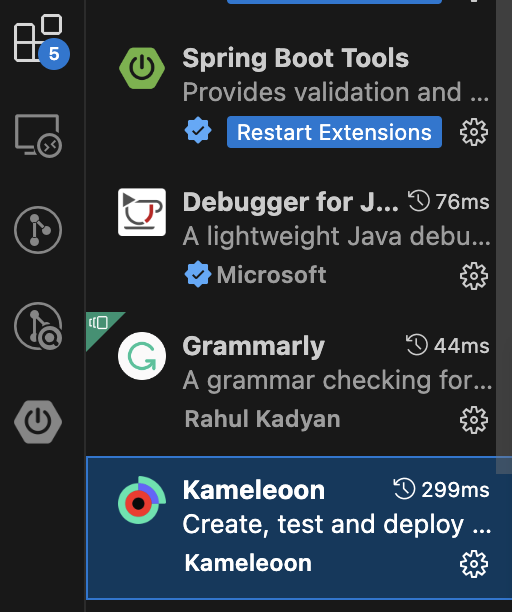
2. From **Kameleoon** in the list of installed extensions and click on **Settings**.
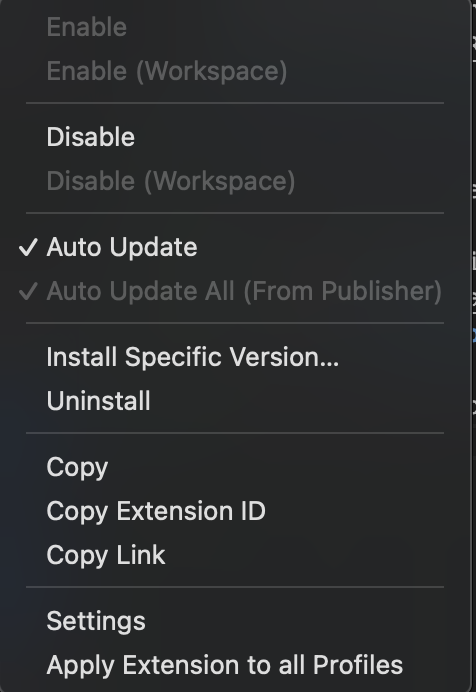
3. Select the option labeled **Enable JS minification for deploying and synchronization**.
