> ## Documentation Index
> Fetch the complete documentation index at: https://docs.kameleoon.com/llms.txt
> Use this file to discover all available pages before exploring further.
# Import a product catalog into Kameleoon using the Product Recommendation API
> Import a product catalog into Kameleoon using the Product Recommendation API, including categories, products, and availability updates.
The Product Recommendation API is the preferred method for catalog imports exceeding 50,000 products. Use this endpoint instead of daily full catalog re-imports.
This tutorial describes the steps and common pitfalls for importing a product catalog into Kameleoon using the Product Recommendation API.
The Product Recommendation API follows RESTful principles.
The import process involves these consecutive steps:
* **[Import Categories](../all-endpoints/Import/import-categories)**: Send a `POST` request to ensure all categories are up to date before uploading products.
* **[Import and Update Products](../all-endpoints/Import/import-product)**: Send a `PUT` request to import the product catalog into the Kameleoon account.
* **[Update available products](../all-endpoints/Import/update-products)** : `PATCH` request to update the availability of Products.
The API also provides an endpoint dedicated to changing the availability of existing products in Kameleoon, which is a more lightweight approach.
## Data
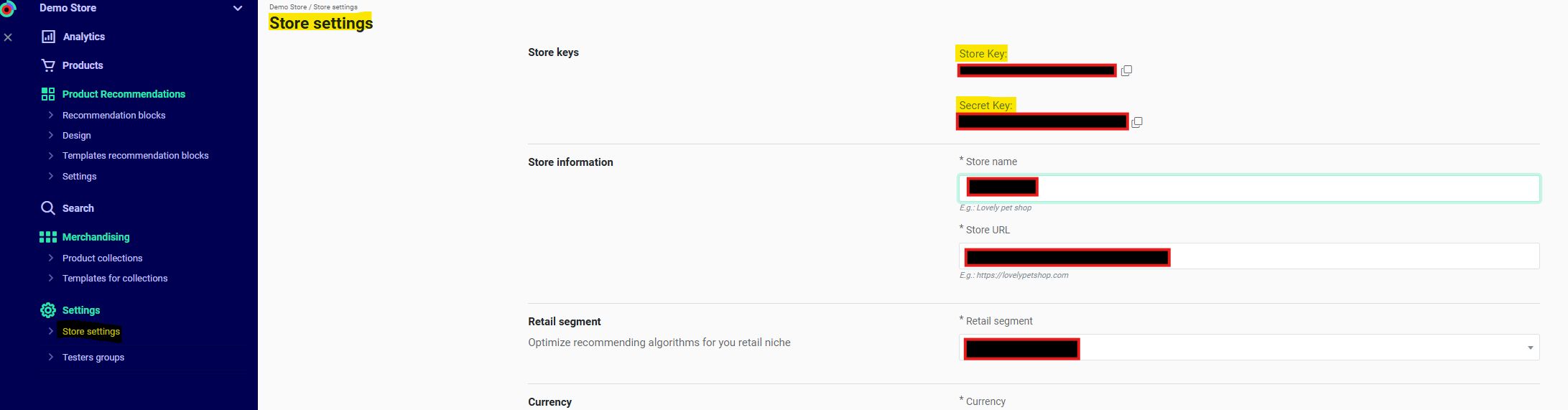
* **Shop ID** `eehj3eu84299kg5ghw5a6743r8` & **Shop Secret** `pmd5362597thrgq8k256ep01t0`
* Locate these in **Recommendations** > **Settings** > **Store settings** in the Kameleoon app. Contact the Customer Success Manager for the key if necessary.
* **Webhooks** `http://www.webhook.com/importCategoriesApiResponses/` & `http://www.webhook.com/importProductsApiResponses/`
* Webhooks ensure completion of the **Import Categories** step before the catalog import and verify completion of the **Import Products** request.
* **Current Product Catalog in Kameleoon:**
```json theme={null}
[
{
"id": "PD1", // String (max 64). Required
"group_id": "Shoe", // String (max 64). Optional
"name": "Sneaker", // String (max 255). Required
"price": "1", // Float (positive). Required
"oldprice": "2", // Float (positive). Optional
"currency": "USD", // Currency code: USD, EUR. Required.
"url": "https://example.com/product", // String (URL). Required
"picture": "https://example.com/product/image.png", // String (URL). Required
"available": true, // Boolean (true, false). Required
"categories": ["shoeID"], // Array of categories IDs. Required.
"locations": [
{
"location": "USA",
"delivery_types": {
"store": 10,
"stock": 50 }
},
{
"location": "CAN",
"price": 60
}
]
},
{
"id": "PD2", // String (max 64). Required
"group_id": "Glass", // String (max 64). Optional
"name": "Sunglasses", // String (max 255). Required
"price": "1", // Float (positive). Required
"oldprice": "2", // Float (positive). Optional
"currency": "USD", // Currency code: USD, EUR. Required.
"url": "https://example.com/product", // String (URL). Required
"picture": "https://example.com/product/image.png", // String (URL). Required
"available": true, // Boolean (true, false). Required
"categories": ["glassID"], // Array of categories IDs. Required.
"locations": [
{
"location": "USA",
"delivery_types": {
"store": 10,
"stock": 50 }
},
{
"location": "CAN",
"price": 60
}
]
}
]
```
* **Current Categories in Kameleoon:**
```json theme={null}
[ {{
"id": "glassID",
"name": "Glass"
},
{
"id": "shoesID",
"name": "shoes",
},
}]
```
* **Products to import in Kameleoon:**
* The price of PD2 (Glass) has changed to three and there is a new product with a new category (`"id": "BootID", "name": "Boot")`
```json theme={null}
{
"id": "PD3", // String (max 64). Required
"group_id": "Boot", // String (max 64). Optional
"name": "Standard Boot", // String (max 255). Required
"price": "1", // Float (positive). Required
"oldprice": "2", // Float (positive). Optional
"currency": "USD", // Currency code: USD, EUR. Required.
"url": "https://example.com/product", // String (URL). Required
"picture": "https://example.com/product/image.png", // String (URL). Required
"available": true, // Boolean (true, false). Required
"categories": ["bootID"], // Array of categories IDs. Required.
"locations": [
{
"location": "USA",
"delivery_types": {
"store": 10,
"stock": 50 }
},
{
"location": "CAN",
"price": 60
}
]
}
```
## Import categories
Use the [Import categories endpoint](../all-endpoints/Import/import-categories) for this step.
Before uploading products, you must upload an up-to-date list of categories into our database.
Data is sent as a JSON string within the request body. **Send all categories in a single `POST` request.**
The following example sends all categories—both existing and new—to enable the import of new products:
```bash theme={null}
curl -X POST -L 'https://api.products.kameleoon.com/import/categories' \
-H 'Content-Type: application/json' \
-d '{
"shop_id":"eehj3eu84299kg5ghw5a6743r8",
"shop_secret":"pmd5362597thrgq8k256ep01t0",
"items":[
{
"id":"slassID",
"name":"Glass"
},
{
"id":"shoesID",
"name":"shoes"
},
{
"id":"bootID",
"name":"boots"
}
],
"webhook":"http://www.webhook.com/importCategoriesApiResponses/"
}'
```
The `webhook` notifies the developer upon request completion. When all specified categories are imported and available, a `POST` request is sent to the designated webhook.
Use the `webhook` for large category imports, as processing may take several minutes.
If importing products using the [import product endpoint](../all-endpoints/Import/import-product), the webhook ensures all categories are processed before beginning the product import. Products without a known category are ignored during import.
**Example of a successful request:**
```json theme={null}
{ "status": "success"}
```
Example of an unsuccessful request:
```json theme={null}
{ "status": "error", "message": "MESSAGE"}
```
## Import and update products
Use the [Import Products endpoint](../all-endpoints/Import/import-product#list-of-parameters-for-items-object) for this step.
The API limit is 40 requests per minute, with a maximum of one request every 1.5 seconds.
The request weight limit is 35 megabytes.
To update specific products, provide all mandatory parameters for each product in the request. Omitting mandatory properties causes the import to ignore those products, leaving the database unchanged. For example, updating a product price requires including all mandatory parameters, such as category, name, picture, and tags.
Omitted values for non-mandatory properties are removed from the database.
Review mandatory fields in the [endpoint documentation](../all-endpoints/Import/import-product#list-of-parameters-for-items-object).
The following example sends the updated product `PD2`, with modified `price` and `oldprice` fields, and the new product `PD3`. Product `PD1` is omitted as it remains unchanged.
```bash theme={null}
# !!! IMPORTANT: Wait for a successful POST request to the webhook endpoint
# (http://www.webhook.com/importCategoriesApiResponses)
# from the Import Categories step before making this call.
#Check that all required fields are filled for each product
curl -X PUT -L 'https://api.products.kameleoon.com/import/products' \
-H 'Content-Type: application/json' \
-d '{
"shop_id":"eehj3eu84299kg5ghw5a6743r8",
"shop_secret":"pmd5362597thrgq8k256ep01t0",
"items":[
{
"id": "PD3", // String (max 64). Required
"group_id": "Boot", // String (max 64). Optional
"name": "StandardBoot", // String (max 255). Required
"price": "1", // Float (positive). Required
"oldprice": "2", // Float (positive). Optional
"currency": "USD", // Currency code: USD, EUR. Required.
"url": "https://example.com/product", // String (URL). Required
"picture": "https://example.com/product/image.png", // String (URL). Required
"available": true, // Boolean (true, false). Required
"categories": ["bootID"], // Array of categories IDs. Required.
"locations": [
{
"location": "USA",
"delivery_types": {
"store": 10,
"stock": 50 }
},
{
"location": "CAN",
"price": 60
}
]
},
{
"id": "PD2", // String (max 64). Required
"group_id": "Glass", // String (max 64). Optional
"name": "Sunglasses", // String (max 255). Required
"price": "3", // Float (positive). Required
"oldprice": "1", // Float (positive). Optional
"currency": "USD", // Currency code: USD, EUR. Required.
"url": "https://example.com/product", // String (URL). Required
"picture": "https://example.com/product/image.png", // String (URL). Required
"available": true, // Boolean (true, false). Required
"categories": ["glassID"], // Array of categories IDs. Required.
"locations": [
{
"location": "USA",
"delivery_types": {
"store": 10,
"stock": 50 }
},
{
"location": "CAN",
"price": 60
}
]
}
],
"webhook":"http://www.webhook.com/importProductsApiResponses/"
}'
# check for the result of the request, which will be sent
# to the provided webhook http://www.webhook.com/importProductsApiResponses/
```
## Update available products
Use the [Update available products endpoint](../all-endpoints/Import/update-products) to manage stock status.
This endpoint updates the list of available products using their IDs.
In this scenario, product `PD1` is marked unavailable by providing IDs for `PD2` and `PD3` and omitting the ID for `PD1`.
```bash theme={null}
curl -X PATCH -L 'https://api.products.kameleoon.com/import/products' \
-H 'Content-Type: application/json' \
-d '{
"shop_id":"eehj3eu84299kg5ghw5a6743r8",
"shop_secret":"pmd5362597thrgq8k256ep01t0",
"items":["PD2","PD3"],
}'
```
## Key recommendations
1. **Workflow Order**\
Always import categories before products
2. **Data Completeness**\
Product imports require all mandatory fields
3. **Webhook Strategy**\
Essential for monitoring large imports
4. **Performance Tips**
* Batch products ≤35MB
* Rate limit: 40 requests/minute
* Only use the Update available products endpoint to change a product's availability.
5. **Error Handling**
* Verify category IDs
* Check field formats
* Monitor webhook responses