> ## Documentation Index
> Fetch the complete documentation index at: https://docs.kameleoon.com/llms.txt
> Use this file to discover all available pages before exploring further.
# API-Referenz
> Referenzdokumentation für die Methoden der Kameleoon JavaScript Activation API.
## Kameleoon.API.Core
Dieses Modul enthält Funktionen für die Implementierung von Frontend-A/B-Test-Variationen ohne Flackern. Verwenden Sie diese Methoden in der vorgeschriebenen Reihenfolge für optimale Ergebnisse. Das Modul umfasst auch Methoden zur Engine-Initialisierung, einschließlich derjenigen für Datenschutzgesetze und die Erfassung der rechtlichen Einwilligung.
Bevor Sie aufrufen das JavaScript-Objekt der Activation API, stellen Sie sicher, dass die Kameleoon-Engine geladen wurde. Verwenden Sie die Kameleoon Command Queue für die verzögerte Befehlsausführung, wenn Sie Tracking-Daten senden, Experimente auslösen oder Besucherattribute aktualisieren. Wenn die Engine geladen ist, werden übergebene Befehle und Funktionen sofort ausgeführt; andernfalls werden sie für die spätere Ausführung in eine Warteschlange gestellt. Weitere Informationen finden Sie im [Command queue](./command-queue) Dokumentation.
### enableLegalConsent
```javascript theme={null}
var agreedButton = Kameleoon.API.Utils.querySelectorAll("#agreed")[0];
Kameleoon.API.Utils.addEventListener(agreedButton, "mousedown", function (event) {
Kameleoon.API.Core.enableLegalConsent();
});
```
Rufen Sie die `enableLegalConsent()` method nachdem Sie die rechtliche Einwilligung des Besuchers zur Aktivierung von Kameleoon erhalten haben. Diese Methode aktiviert den normalen Betriebsmodus von Kameleoon. Weitere Informationen finden Sie im [Consent management](../../../privacy-and-compliance/consent-management) Artikel.
##### Arguments
| Name | Type | Description |
| ------ | ------ | -------------------------------------------------------------------------------------------------------------------------------------------------------------------------------------------------------------------------------------------------------------------------------------------------------------------------------------------------------------------------------------------------------------------------------------------------------------------------------------- |
| module | String | Name des module to enable: "PRODUCT\_RECOMMENDATION", "AB\_TESTING", "PERSONALIZATION", or "BOTH". Beispielsweise `PRODUCT_RECOMMENDATION` executes the entry point **exclusively** with product recommendation capabilities. `AB_TESTING` enables A/B testing **and** product recommendation (unless the custom option to differentiate consent is active). `OTH` enables all capabilities. Wenn weggelassen, the method aktiviert legal consent for all modules (`BOTH`) by default. |
A custom option is also available that allows separate management of Product Recommendation consent. Wenn this option is active, explicitly call `enableLegalConsent("PRODUCT_RECOMMENDATION")` to activate the module. Contact the Customer Success Manager to enable this feature.
### disableLegalConsent
```javascript theme={null}
var disableButton = Kameleoon.API.Utils.querySelectorAll("#disable")[0];
Kameleoon.API.Utils.addEventListener(disableButton, "mousedown", function (event) {
Kameleoon.API.Core.disableLegalConsent();
});
```
Rufen Sie die `disableLegalConsent()` method wenn a visitor declines the use of Kameleoon. Diese Methode disables normal operation mode. Weitere Informationen finden Sie im [Consent management article](../../../privacy-and-compliance/consent-management).
##### Arguments
| Name | Type | Description |
| ------ | ------ | ------------------------------------------------------------------------------------------------------------------------------------------------------ |
| module | String | Name des module to disable: "AB\_TESTING", "PERSONALIZATION", or "BOTH". Wenn weggelassen, the method disables legal consent for all modules (`BOTH`). |
A custom option is also available that allows separate management of Product Recommendation consent. Wenn this option is active, explicitly call `disableLegalConsent("PRODUCT_RECOMMENDATION")` to disable the module. Contact the Customer Success Manager to enable this feature.
### enableSinglePageSupport
```javascript theme={null}
if (location.href.indexOf("mySPAWebsitePart") != -1) {
Kameleoon.API.Core.enableSinglePageSupport();
}
```
The `enableSinglePageSupport()` method reloads die Kameleoon-Engine wenn the active URL changes, regardless of browser page loads. Verwenden Sie diese Methode for Single Page Applications (SPAs) with multiple URLs and a single initial load. Kameleoon treats each URL change as a new page, enabling URL targeting and accurate tracking of metrics like page views.
Kameleoon will also automatically remove all elements that have been added on die Seite that use HTML IDs that begin with "kameleoonElement" or "kameleoonStyleSheet" wenn the SPA reloads.
### enableDynamicRefresh
```javascript theme={null}
if (location.href.indexOf("cart") != -1) {
Kameleoon.API.Core.enableDynamicRefresh();
}
```
The `enableDynamicRefresh()` method detects element changes and reapplies Graphic Editor modifications. Diese Methode supports SPAs that dynamically modify the DOM without URL changes or page reloads, preventing dynamic updates from removing experiments. Siehe `enableSinglePageSupport()` for other SPA types.
### getConfiguration
```javascript theme={null}
var configuration = Kameleoon.API.Core.getConfiguration();
if (configuration.siteCode == "abcde12345") {
document.cookie = "MyMainSite=true;";
} else if (configuration.siteCode == "12345abcdef") {
document.cookie = "MySubSite=true;";
}
```
The `getConfiguration()` method gibt ein reference to the Configuration object, which contains global constant values for the site's Kameleoon configuration.
##### Rückgabewert
| Name | Type | Description |
| ------------- | ------ | --------------------- |
| configuration | Object | Configuration object. |
### load
```javascript theme={null}
var href = location.href;
var intervalId = Kameleoon.API.Utils.setInterval(function () {
if (location.href != href) {
Kameleoon.API.Core.load();
}
}, 2000);
```
The `load()` method initializes die Kameleoon-Engine. While initialization typically occurs automatically during application file loading, you might need to make manual calls. The example demonstrates how to implement reloads after each URL change, similar to `enableSinglePageSupport()`.
Kameleoon will also automatically remove all elements that have been added on die Seite that use HTML IDs that begin with "kameleoonElement" or "kameleoonStyleSheet" wenn the SPA reloads.
### processRedirect
```javascript theme={null}
var experiment = Kameleoon.API.Experiments.getByName("RedirectExperiment");
if (experiment.associatedVariation.id == 123456) {
Kameleoon.API.Core.processRedirect("https://www.mywebsite.com?variation=A");
}
```
The `processRedirect()` method redirects the browser to another URL, typically for split A/B experiments. Verwenden Sie diese Methode anstelle von `window.location.href = redirectionURL;` to ensure accurate background tracking.
Wenn das redirection URL is on a domain other than the base URL and the Kameleoon installation omits [unified session data](../../../web-experimentation/technical-concepts/unify-session-data-storage-across-subdomains), die Engine adds a `kameleoonRedirect-{experimentID}` parameter to the target URL to ensure accurate tracking.
##### Arguments
| Name | Type | Description |
| -------------- | ------ | --------------------------------------------- |
| redirectionURL | String | URL for redirection. This field is mandatory. |
### runWhenConditionTrue
```javascript theme={null}
Kameleoon.API.Core.runWhenConditionTrue(function () {
return typeof jQuery != "undefined";
}, function () {
jQuery("#bloc-2345").text("Mon nouveau texte");
}, 200);
```
The `runWhenConditionTrue()` method executes the callback function wenn the `conditionFunction` gibt zurück true. Die Methode uses a polling mechanism, which might cause flickering. Use `runWhenElementPresent()` instead for improved performance. Siehe the [`runWhenElementPresent()` description](#runwhenelementpresent) for details.
##### Arguments
| Name | Type | Description |
| ----------------- | -------- | ------------------------------------------------------------------------------------------------------------------------------------------------------------------------------------------------------------------------------------------------------------------ |
| conditionFunction | Function | JavaScript function returning **true** or **false**. This field is mandatory. |
| callback | Function | JavaScript function executing wenn the **conditionFunction** gibt zurück **true**. This field is mandatory. |
| pollingInterval | Number | The engine executes the **conditionFunction** periodically at this interval. Wenn `runWhenElementPresent()` is unavailable, a lower **pollingInterval** reduces flickering but increases CPU usage. Wenn weggelassen, the method defaults to **200 milliseconds**. |
### runWhenElementPresent
```javascript theme={null}
// With mutation observers management.
Kameleoon.API.Core.runWhenElementPresent("#bloc-2345", function (elements) {
elements[0].innerText = "My new Text";
});
// With multiple CSS selectors. Executes if any one of the elements is present.
Kameleoon.API.Core.runWhenElementPresent("#bloc-567, .cta-button, #bloc-789", function (elements) {
elements[0].innerText = "More new text";
});
// Without mutation observers management, Kameleoon polls every 200ms to check if the element is on the page.
Kameleoon.API.Core.runWhenElementPresent("#MyPopup.showed", function (elements) {
Kameleoon.API.Events.trigger("popup displayed");
}, 200);
// With mutation observers management and Single Page App support, Kameleoon applies modifications whenever new elements are added to the DOM or when there is a dynamic refresh of the Single Page App that removes previous modifications.
Kameleoon.API.Core.runWhenElementPresent(".product-button", function (elements) {
elements.forEach(element => {
element.innerText = "Add To Cart";
});
}, null, true);
```
The `runWhenElementPresent()` method executes the callback function wenn a specific element appears in the DOM. Diese Methode uses mutation observers to power antiflickering technology. Identify the key elements for eine Variation and call `runWhenElementPresent()` with the element as the first argument and the implementation code as the callback. This ensures that modifications execute as soon as the element appears, before the browser initiates a display refresh cycle.
To act on multiple elements, call `runWhenElementPresent()` separately for each element rather than targeting only the expected final element. A single call may result in flickering if a refresh cycle occurs between the appearance of different elements.
Providing this value **disables** Mutation Observers and Anti-Flickering, reverting to legacy polling. Use this argument only in specific cases, wie etwa complex selector queries with high CPU impact.
##### Arguments
| Name | Type | Description |
| ---------------- | -------- | ---------------------------------------------------------------------------------------------------------------------------------------------------------------------------------------------------------------------------------------------------------------------------------------------------- |
| selector | String | CSS selector of the element. To specify multiple CSS selectors, provide a single comma-separated string. The callback executes wenn one or more elements exist. This field is mandatory. |
| callback | Function | JavaScript function to execute wenn the element appears in the DOM. This field is mandatory. |
| pollingInterval | Number | Providing this value disables Mutation Observers and reverts die Engine to legacy polling, which may cause flickering. This field is optional. |
| isDynamicElement | Boolean | Wenn active, Kameleoon tracks the selector if not immediately found at page load and executes the callback as elements appear. The callback löst aus again for each new element matching the selector. This setting supports dynamic menus, infinite scrolling, and pop-ups. This field is optional. |
### runWhenShadowRootElementPresent
```javascript theme={null}
const wrapper = document.querySelector(".shadow-wrapper");
const shadow = wrapper.attachShadow({ mode: "open" });
const span = document.createElement("span");
span.classList.add("selector-inside-wrapper");
span.textContent = "I'm in the shadow DOM";
shadow.appendChild(span);
Kameleoon.API.Core.runWhenShadowRootElementPresent('.shadow-wrapper', '.selector-inside-wrapper', (elements) => {
elements[0].innerText = "New text"
});
```
The `runWhenShadowRootElementPresent()` method executes the **callback** function wenn a specific element appears in a shadow DOM set to `mode: open`.
#### Arguments
| Name | Type | Description |
| ------------------------- | -------- | --------------------------------------------------------------------------------------------------------------------------------------------------------------------------------------------------------------------------------------------------------------- |
| parentSelector | String | CSS selector for the parent element. This field is mandatory. |
| shadowRootElementSelector | String | CSS selector inside the shadow DOM. This field is mandatory. |
| callback | Function | JavaScript function to execute wenn the element appears in the shadow DOM. This field is mandatory. |
| isDynamicElement | Boolean | Wenn active, Kameleoon tracks the selector if not immediately found and executes the callback as elements appear. The callback löst aus again for each new element matching the selector. This setting supports dynamic menus, infinite scrolling, and pop-ups. |
## Kameleoon.API.Goals
This module manages goal triggering and conversion data, including purchase confirmations and revenue registration.
### cancelConversion
```javascript theme={null}
var buttons = Kameleoon.API.Utils.querySelectorAll(".btnRemoveFromCart");
buttons.forEach(function (button) {
Kameleoon.API.Utils.addEventListener(button, "mousedown", function (event) {
Kameleoon.API.Goals.cancelConversion(event.target.id);
});
});
```
The `cancelConversion()` method cancels a conversion that you ausgelöst during the current visit. Diese Methode cannot cancel conversions from previous visits.
##### Arguments
| Name | Type | Description |
| ------------ | ---------------- | -------------------------------------------------------------------------------- |
| goalNameOrID | String or Number | Name or ID of das Ziel as defined in the Kameleoon App. This field is mandatory. |
### processConversion
Before implementing the processConversion, review the [Custom Code for Custom Goal](#triggergoal-custom-code-for-custom-goal) feature, which simplifies customization by removing the requirement for ein Ziel ID.
```javascript theme={null}
//Conversion for "Add to cart" goal (goal id 123456)
Kameleoon.API.Core.runWhenElementPresent("#buyButton", ([buyButton]) => {
Kameleoon.API.Utils.addEventListener(buyButton, "click", () => {
Kameleoon.API.Goals.processConversion(123456); //Add to cart
});
});
//Conversion for "Add to cart" goal (goal id 123456) with optional revenue argument
Kameleoon.API.Core.runWhenElementPresent("#buyButton", ([buyButton]) => {
Kameleoon.API.Utils.addEventListener(buyButton, "click", () => {
Kameleoon.API.Goals.processConversion(123456, 19.99); //Add to cart
});
});
```
The `processConversion()` method löst aus a conversion. Metadata must be [configured in the Kameleoon App](/de/user-manual/assets/goals/create-a-goal#metadaten) before setting them with `processConversion()`.
Wenn Sie initiate conversions from a Tag Management System, wie etwa Google Tag Manager, use the [Kameleoon Command Queue](./command-queue) to delay execution until die Engine loads. The engine processes queued commands in order after initialization. Example:
```javascript theme={null}
window.kameleoonQueue = window.kameleoonQueue || [];
kameleoonQueue.push(['Kameleoon.API.Goals.processConversion', 'GOAL_ID']);
```
##### Arguments
| Name | Type | Description |
| ------------ | ---------------- | --------------------------------------------------------------------------------------------------------------------------------------------------------------------------------------------------------------------------------------------------------------------------------------------------------------------------------------------------------------------------------------------------------------------------------------------------------- |
| goalNameOrID | String or Number | Name or ID of das Ziel as defined in the Kameleoon App. Goal names must be unique. This field is mandatory. |
| revenue | Number | Transaction amount. Providing this value enables Kameleoon to track purchase metrics, wie etwa revenue and average cart amount. This field is optional. |
| metadata | Object | Sets specific values for custom data defined as goal metadata in the Kameleoon App. [Must be defined beforehand in the Kameleoon App](/de/user-manual/assets/goals/create-a-goal#metadaten). The object keys are the **custom data indexes** (numeric values found in the `INDEX` column of the [Custom data dashboard](/de/user-manual/assets/custom-data/manage-custom-data#den-index-einer-benutzerdefinierten-daten-finden)). This field is optional. |
Metadata values are accessible through [raw data exports](/user-manual/experiment-analytics/analyze-results/results-page/results-page-actions#Export) and [the results page](/user-manual/experiment-analytics/analyze-results/data-and-metrics/goal-metadata).
Wenn Sie provide the `metadata` parameter, Kameleoon uses those values für den conversion anstelle von the values you previously collected through `setCustomData()`. Wenn Sie omit the parameter, Kameleoon uses the last tracked `customData` values before the conversion in the same visit.
Kameleoon only considers the metadata values you pass directly to the `processConversion()` method; it ignores previously set custom data. In the following example, the conversion associates only with the provided metadata (for example, index 5 with 'Amex Credit Card').
```javascript theme={null}
Kameleoon.API.Data.setCustomData(5, 'Credit Card');
Kameleoon.API.Data.setCustomData(9, 'Express Delivery');
Kameleoon.API.Goals.processConversion("GoalIDorName", revenue, {
5: ["Amex Credit Card", "PayPal"], // PaymentMode Custom Data
4: 1234567, // OrderID CustomData
3: "1q2w3e4r" // PayPalID CustomData
})
```
### triggerGoal (Custom Code for Custom Goal)
To trigger **custom goals**, inject custom code by creating a new goal and adding the code to the **Trigger my goal** panel.
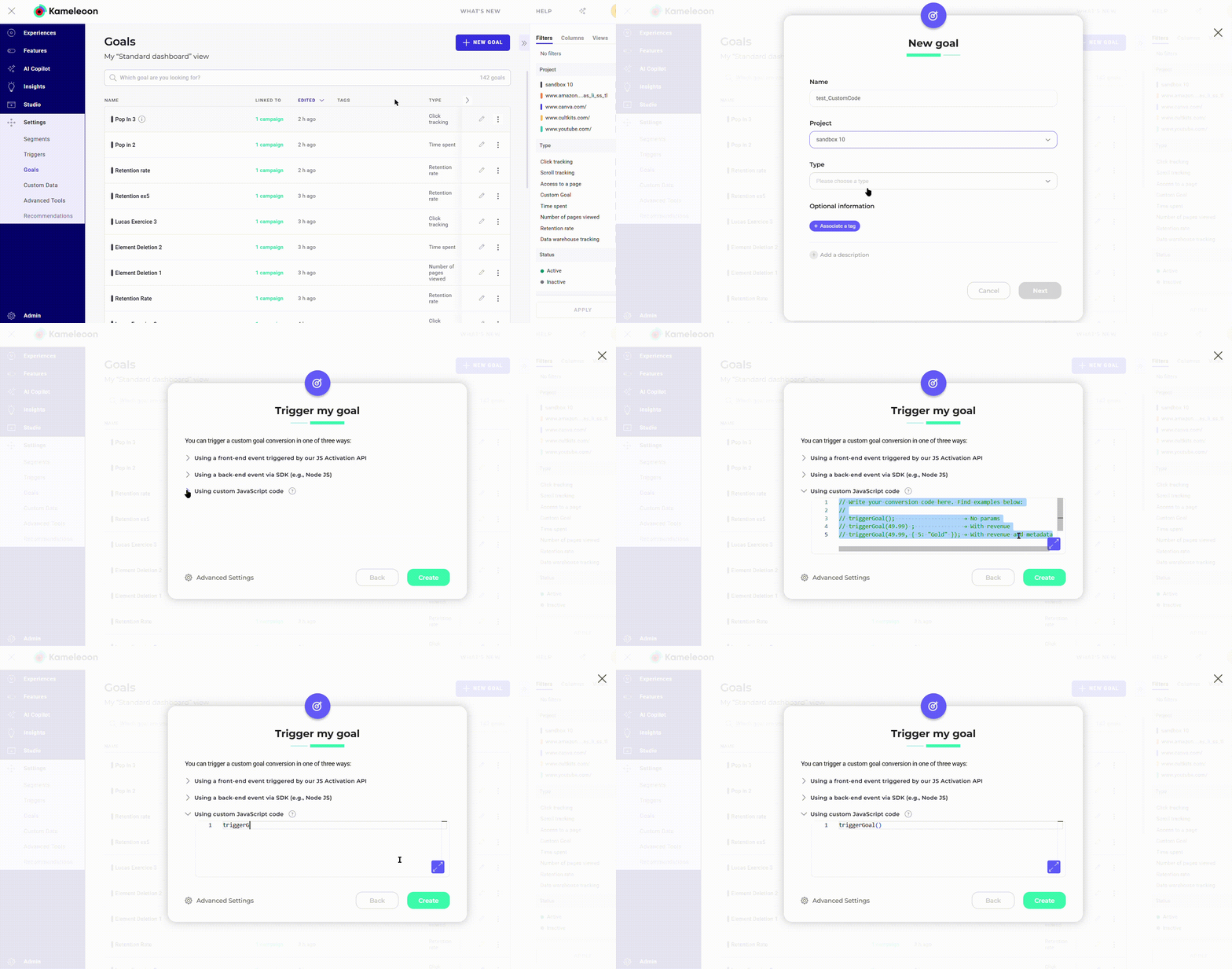
The `triggerGoal()` function löst aus das Ziel von der code panel without requiring ein Ziel ID.
```javascript theme={null}
//No params
triggerGoal();
//With revenue
triggerGoal(49.99);
//With revenue and metadata
triggerGoal(49.99, {5: "Gold"});
```
##### Arguments
| Name | Type | Description |
| -------- | ------ | ------------------------------------------------------------------------------------------------------------------------------------------------------------------------------------------------------------------------------------------------------------------------------------------------------------------------------------------------ |
| revenue | Number | Transaction amount. Providing this value enables Kameleoon to track purchase metrics, wie etwa revenue and average cart amount. This field is optional. |
| metadata | Object | Sets specific values for custom data defined as goal metadata in the Kameleoon App. The object keys are the **custom data indexes** (numeric values found in the `INDEX` column of the [Custom data dashboard](/de/user-manual/assets/custom-data/manage-custom-data#den-index-einer-benutzerdefinierten-daten-finden)). This field is optional. |
Metadata values are accessible through [raw data exports](/user-manual/experiment-analytics/analyze-results/results-page/results-page-actions#Export) and [the results page](/user-manual/experiment-analytics/analyze-results/data-and-metrics/goal-metadata).
Wenn Sie provide the `metadata` parameter, Kameleoon uses those values für den conversion anstelle von the values you previously collected through `setCustomData()`. Wenn Sie omit the parameter, Kameleoon uses the last tracked `customData` values before the conversion in the same visit.
Kameleoon only considers the metadata values you pass directly to the `triggerGoal()` method; it ignores previously set custom data. In the following example, the conversion associates only with the provided metadata (for example, index 5 with 'Amex Credit Card').
```javascript theme={null}
Kameleoon.API.Data.setCustomData(5, 'Credit Card');
Kameleoon.API.Data.setCustomData(9, 'Express Delivery');
triggerGoal( revenue, {
5: ["Amex Credit Card", "PayPal"], // PaymentMode Custom Data
4: 1234567 // OrderID CustomData,
3: "1q2w3e4r" // PayPalID CustomData
})
```
## Kameleoon.API.Data
This module provides methods to set **custom data** for tracking customer or visit characteristics. It also includes data management methods to retrieve and write data in Kameleoon's unified LocalStorage.
### readLocalData
```javascript theme={null}
var userId = Kameleoon.API.Data.readLocalData("myUserId");
if (userId) {
Kameleoon.API.Data.retrieveDataFromRemoteSource(userId, function (data) {
console.log(data.returningVisitor);
});
}
```
The `readLocalData()` method reads local data you previously stored through `writeLocalData()`. The engine retrieves this data from unified Local Storage, which bypasses standard storage limitations.
##### Arguments
| Name | Type | Description |
| ---- | ------ | ----------------------------------------------------- |
| key | String | Key of the data to retrieve. This field is mandatory. |
##### Rückgabewert
| Name | Type | Description |
| ----- | ------ | ------------------ |
| value | String | Value of the data. |
### performRemoteSynchronization
```javascript theme={null}
Kameleoon.API.Data.performRemoteSynchronization("customDataName", "customDataValue", false);
```
The `performRemoteSynchronization()` method löst aus a Server Synchronization Call (SSC) to the Data API. This call retrieves visit history stored on Kameleoon backend servers for der aktuelle Besucher and writes it to LocalStorage. This ensures that the data is accessible through the Activation API and available for targeting. Diese Methode typically runs automatically for cross-device reconciliation or Safari ITP; it does not require manual invocation.
##### Arguments
| Name | Type | Description |
| ---------------- | ------- | ------------------------------------------------------------------------------------------------------------------------------------------------------------------------------------------------------------------------- |
| key | String | Key of the custom data serving as the mapping identifier (e.g., account ID or email). Wenn weggelassen, the method uses the default identifier configured for cross-device reconciliation in the Kameleoon App. |
| value | String | Current visitor identifier value used for the Data API call. Wenn weggelassen, the method uses the current value of the custom data provided in the first argument. |
| currentVisitOnly | Boolean | Wenn active, the SSC requests data only für den visit. Use this optimization to refresh custom data values acquired via the Data API or Server-to-Server integration. Wenn weggelassen, the method defaults to **false**. |
### resetCustomData
```javascript theme={null}
Kameleoon.API.Data.resetCustomData("MyCustomDataName");
```
The `resetCustomData()` method resets a custom data value.
##### Arguments
| Name | Type | Description |
| ---- | ------ | ------------------------------------------------------------------------------ |
| name | String | Name des custom data as defined in the Kameleoon App. This field is mandatory. |
### retrieveDataFromRemoteSource
```javascript theme={null}
if (location.href.indexOf("loginPage") != -1) {
Kameleoon.API.Core.runWhenConditionTrue(function () {
return typeof dataLayer != null;
}, function () {
dataLayer.forEach(function (map) {
if (map.userId) {
Kameleoon.API.Data.retrieveDataFromRemoteSource(userId, function (data) {
Kameleoon.API.Data.setCustomData("known_user", data.knownUser);
});
}
});
}, 200);
}
```
The `retrieveDataFromRemoteSource()` method retrieves data stored on a remote Kameleoon server with the specified **key**. Diese Methode supports retrieving data previously stored through the Data API. Use this for quick storage and retrieval of large data volumes for visitors.
This asynchronous mechanism requires a **callback** function wenn the server call completes.
##### Arguments
| Name | Type | Description |
| -------- | -------- | --------------------------------------------------------------------------------------------------------------------------------- |
| key | String | The lookup key. This field is mandatory. |
| callback | Function | Function called wenn data has been retrieved. It is called with a \**data* argument that is a JS Object. This field is mandatory. |
### setCustomData
```javascript theme={null}
// Single Type Custom Data
Kameleoon.API.Data.setCustomData("mySingleCustomDataName", "myNewValue"); --> "myNewValue"
// List Type Custom Data
Kameleoon.API.Data.setCustomData("myListCustomDataName", "myFirstValue"); --> ["myFirstValue"]
Kameleoon.API.Data.setCustomData("myListCustomDataName", "mySecondValue"); --> ["myFirstValue", "mySecondValue"]
Kameleoon.API.Data.setCustomData("myListCustomDataName", ["myThirdValue", "myFourthValue"]); --> ["myFirstValue", "mySecondValue", "myThirdValue", "myFourthValue"]
Kameleoon.API.Data.setCustomData("myListCustomDataName", ["myThirdValue", "myFourthValue"], true); --> ["myThirdValue", "myFourthValue"]
// Count List Type Custom Data
Kameleoon.API.Data.setCustomData("myCountListCustomDataName", "myFirstValue"); --> {value: 'myFirstValue', count: 1}
Kameleoon.API.Data.setCustomData("myCountListCustomDataName", "myFirstValue"); --> {value: 'myFirstValue', count: 2}
Kameleoon.API.Data.setCustomData("myCountListCustomDataName", "mySecondValue"); --> --> {value: 'myFirstValue', count: 2}, {value: 'mySecondValue', count: 1}
```
The `setCustomData()` method sets a custom data value.
##### Arguments
| Name | Type | Description |
| --------------------- | ------------------------------ | -------------------------------------------------------------------------------------------------------------------------------------------------------------------------------------------------------------------------------------------------------------------------------------------------------------------------------------------------------------------- |
| CustomDataNameOrIndex | String or Number | Name or Index of the custom data as defined in the Kameleoon App. (the index appears in the 'INDEX' column of the Custom Data dashboard). This field is mandatory. |
| value | String, Number, Boolean, Array | Value of the custom data. The argument provided should match the type declared for this custom data in the Kameleoon app. This field is mandatory. **Please be aware that `setCustomData()` accepts String, Number, and Boolean wenn the `Type` is set to `Single`. Wenn das `Type` is set to `List` or `Count List`, it will accept an array of String or Number.** |
| overwrite | Boolean | **Optional boolean**. Wenn `true`, the new value overwrites existing custom data. Wenn `false` or omitted: **Lists/Count Lists** append values (all values appear in reports); **Single types** overwrite (only the latest value appears); **Page-scoped Custom Data** (all types) append values. |
### writeLocalData
```javascript theme={null}
Kameleoon.API.Data.writeLocalData("myData", "myDataValue", true);
```
The `writeLocalData()` method records local data in der Besucher's browser for later retrieval through `readLocalData()`. The engine stores this as unified session data in Local Storage, bypassing standard storage limitations. Data becomes available immediately for retrieval in the same tab through RAM caching, while the physical write occurs asynchronously.
##### Arguments
| Name | Type | Description |
| ---------- | ------- | ----------------------------------------------------------------------------------------------------------------------------------------------------------------- |
| key | String | Key (name) of the data to write. This field is mandatory. |
| value | String | Value of the data to write. This field is mandatory. |
| persistent | Boolean | Toggle data persistence. Non-persistent data expires after 1 hour, while persistent data remains for 30 days. Wenn weggelassen, the method defaults to **false**. |
## Kameleoon.API.Events
This module löst aus custom events for experiment and personalization targeting. Review the [Activation API events documentation](./activation-api-events) for standard DOM events.
### trigger
```javascript theme={null}
Kameleoon.API.Events.trigger("myTriggerEventName");
```
The `trigger()` method löst aus a custom event for targeting segments.
##### Arguments
| Name | Type | Description |
| --------- | ------ | --------------------------------------------------------- |
| eventName | String | Name of das Ereignis to trigger. This field is mandatory. |
## Kameleoon.API.Tracking
This module integrates Kameleoon results with third-party tracking and analytics platforms, wie etwa Adobe Analytics (Omniture).
### processOmniture
```javascript theme={null}
function s_doPlugins(s) {
/* Kameleoon Integration */
window.kameleoonQueue = window.kameleoonQueue || [];
kameleoonQueue.push(['Tracking.processOmniture', s]);
window.kameleoonOmnitureCallSent = true;
// Add your other doPlugins code below
}
s.doPlugins = s_doPlugins;
```
Kameleoon provides a native integration with Adobe Analytics (Omniture). Follow the example to modify the file containing the `s_doPlugins()` code. Complete these steps within the function:
* Add a call to `Kameleoon.API.Tracking.processOmniture()`.
* Set the `window.kameleoonOmnitureCallSent` global variable to `true` to track initial call transmission. Although you can set this variable elsewhere, you should set it within `s_doPlugins()`.
The integration minimizes the number of Adobe Analytics hits to help you manage costs. Kameleoon sends an additional hit only if ein Experiment or personalization löst aus after the main tracking call. This results from asynchronous loading (in which Kameleoon loads after the analytics code) or "late" triggers, wie etwa those that occur after page load, for example button clicks.
If Kameleoon loads first and identifies active experiments at page load, the global tracking call includes all additional data.
##### Arguments
| Name | Type | Description |
| -------------- | ------ | ------------------------------------------------------------------------------------------------------------------------------------------------------------------------------------------------------------------------------ |
| omnitureObject | Object | Reference to your Omniture object. Usually, the global "s" variable (**window\.s**) represents the Omniture object. It is also passed als Argument (named "s" as well) to the `s_doPlugins()` method. This field is mandatory. |
## Kameleoon.API.Products
This module provides access to the product catalog. Use it to register product views or purchases, add products to a cart, retrieve recommendations, or obtain product statistics, wie etwa hourly or daily view and purchase counts.
This module verfügbar ist wenn subscribed to the Product Recommendation module or Product Targeting add-on.
### obtainRecommendedProducts
```javascript theme={null}
Kameleoon.API.Products.obtainRecommendedProducts(
"1a2b3c4d",
{
item: 123500,
exclude: [3, 14, 159, 26535],
category: 146,
search_query: "To be or not to be",
limit: 15,
brands: ["Alas", "poor", "Yorick", 'kameleooner'],
categories: [1, 146, 123500]
},
function (response) {
// the functionality of rendering a block of product recommendations
},
function (error) {
// when something went wrong
}
);
```
The `obtainRecommendedProducts()` method retrieves recommended products computed by the specified algorithm through an asynchronous server call.
Diese Methode requires correct product tracking, wie `trackProductView()` or `trackCategoryView()`, to return meaningful results.
##### Arguments
| Name | Type | Description |
| --------------- | -------- | -------------------------------------------------------------------------------------------------------------------------------------------------- |
| code | String | Unique code of the recommendation block. |
| params | Object | [Parameters to control the data returned by the recommendation platform.](#parameters-to-control-the-data-returned-by-the-recommendation-platform) |
| successCallback | Function | Callback function receiving the API response object. This field is mandatory. |
| errorCallback | Function | Callback function executing if an error occurs. This field is optional. |
#### Parameters to control the data returned by the recommendation platform
| Name | Type | Description |
| --------------- | ------ | ------------------------------------------------------------------------------------------------------------------------------------------------ |
| item | String | ID des current product. Erforderlich for "Similar" and "They also bought this product" algorithms. |
| exclude | Array | Comma-separated list of product identifiers for exclusion. |
| extended | Number | Wenn "1", the method gibt zurück full product details. Wenn weggelassen, it gibt zurück only product IDs. |
| category | Number | Erforderlich for algorithms on category pages. Limits recommendations to the specified category. |
| categories | Array | This field is optional. If used, it gibt zurück recommended products only von der specified categories (a comma-separated list of category IDs). |
| brands | Array | This field is optional. If used, it gibt zurück recommended products only from specified brands (a comma-separated list of brands). |
| locations | Array | This field is optional. If used, it gibt zurück recommended products available in the listed locations (a comma-separated list of location IDs). |
| limit | Number | This field is optional. Maximum number of recommended products. |
| exclude\_brands | Number | This field is optional. A comma-separated list of brands that must be excluded von der recommendation. |
#### API response
The callback function receives the API response object with the following values.
| Name | Type | Description |
| -------- | ------ | ------------------------------------------------------------------------------------------------------------ |
| html | String | The block HTML code. Customize the HTML template in the Kameleoon personal account. |
| title | String | The block title. Corresponds to the value of the "Action" element in the block rules. |
| products | Array | A list of product IDs. |
| id | Number | Unique block identifier. Corresponds to the block ID in the list of blocks in the Kameleoon personal account |
### trackAddToCart
```javascript theme={null}
var buyButton = Kameleoon.API.Utils.querySelectorAll("#buyButton")[0];
Kameleoon.API.Utils.addEventListener(buyButton, "mousedown", function () {
Kameleoon.API.Products.trackAddToCart("myProductId", 19.99, 1, {
stock: true,
recommended_code: 'some-unique-code' //see the arguments table for more information
recommended_by: 'dynamic'//see the arguments table for more information
});
});
```
The `trackAddToCart()` method löst aus wenn a visitor adds a product to the shopping cart.
##### Arguments
| Name | Type | Description |
| ---------- | ------ | --------------------------------------------------------------------------------------------------------------------------------------------------------------------------------------------------------------------------------------------------------- |
| productID | String | Unique product identifier. This field is mandatory. |
| unitPrice | Number | Price for a single unit of the product referenced by **productID**. This field is optional; if not specified, the default price of the product von der imported product feed will be used. |
| amount | Number | Total quantity of the product after the cart update. Use non-incremental values. Beispielsweise if the cart contains two items with the same `productID` and you add another, specify 3. Wenn Sie remove two items from a cart containing 20, specify 18. |
| parameters | Object | [Parameters for the recommendation platform.](#parameters-for-the-recommendation-platform) This field is optional. |
#### Parameters for the recommendation platform
| Name | Type | Description |
| ----------------- | ------- | ------------------------------------------------------------------------------------------------------------------- |
| recommended\_by | String | For SPAs or pop-ups, set this value to "dynamic". This field is mandatory in specific scenarios. |
| recommended\_code | String | For SPAs or pop-ups, provide the unique widget code found in the "data-recommender-code" attribute in your account. |
| stock | Boolean | Product availability. This value overrides data from product feeds or catalog imports. This field is optional. |
### trackAddToWishList
```javascript theme={null}
Kameleoon.API.Products.trackAddToWishList("myProductId"); // to add to wish list
Kameleoon.API.Products.trackAddToWishList("myProductId", -1); // to remove from wish list
```
The `trackAddToWishList()` method executes wenn a visitor adds or removes a product von der wish list or favorites.
| Name | Type | Description |
| --------- | ------ | ----------------------------------------------------------------------------------------------------------------------- |
| productId | String | Unique identifier of the product added to the wishlist. This field is mandatory. |
| quantity | Number | Quantity to update. Use negative values (e.g., -1) to indicate removal. Wenn weggelassen, the method defaults to **1**. |
### trackCategoryView
```javascript theme={null}
if (location.href.indexOf("productPage") != -1) {
Kameleoon.API.Core.runWhenConditionTrue(function () {
return typeof dataLayer != null;
}, function () {
dataLayer.forEach(function (map) {
if (map.categoryID) {
Kameleoon.API.Products.trackCategoryView(5);
}
});
}, 200);
}
```
The `trackCategoryView()` method executes for each category page view during a session.
##### Arguments
| Name | Type | Description |
| ---------- | ------ | ---------------------------------------------------- |
| categoryID | String | Unique category identifier. This field is mandatory. |
### trackProductView
```javascript theme={null}
Kameleoon.API.Products.trackProductView("myProductID", {
"name": "productName",
"categories": [{
"id": "13",
"name": "productCategory",
"parent": null,
"url": "website.com/category/2"
}],
"imageURL": "https://www.mywebsite/productImage.jpg",
"price": 19.99,
"oldPrice": 23.99,
"accessories": ['productID1', 'productID2'],
"available": true,
"availableQuantity": 15,
"brand": "productBrand",
"groupId": "groupID1",
"sku": "productSKU",
"description": "This is a short description",
"rating": 4,
"model": "phone 14 128GB",
"leftovers": "one",
"tags": ["shirt", "red"],
"typePrefix": "mobile phone",
"seasonality": [1, 2, 3, 10, 11, 12],
"priceMargin": 100,
"isChild": false,
"isNew": false,
"isFashion": true,
"auto": {
"vds": ["BP8AN5", "HH5820"],
"compatibility": [
{
"brand": "BMW"
},
{
"brand": "Mini", "model": "Cooper S"
}
]
},
"fashion": {
"gender": "f",
"type": "shoe",
"sizes": ["37", "42"],
"feature": "adult",
"colors": [
{
"color": "red"
},
{
"color": "green", "picture": "https://example.com/items/395532-green.jpg"
}
]
},
"params": [
{
"name": "connectivity",
"value": ["bluetooth", "wi-fi"]
},
{
"name": "lengths",
"value": ["4", "6", "8"],
"unit": "cm"
}
]
});
```
The `trackProductView()` method executes for each product view during a session. Diese Methode allows Kameleoon to build an automated product catalog without an XML feed integration, which simplifies the setup of product recommendation projects.
##### Arguments
| Name | Type | Description |
| ----------- | ------ | ---------------------------------------------------------------------------------------------------------------------- |
| productID | String | Product identifier. This can be any unique identifier for this particular product. This field is mandatory. |
| productData | Object | [Product object](#product). This field is mandatory for importing product feeds via the Product Recommendation add-on. |
### trackSearchQuery
```javascript theme={null}
Kameleoon.API.Products.trackSearchQuery("Example search request");
```
The `trackSearchQuery()` method records user search queries.
##### Arguments
| Name | Type | Description |
| ------------- | ------ | ------------------------------------------------ |
| search\_query | String | The search query value. This field is mandatory. |
### trackTransaction
```javascript theme={null}
Kameleoon.API.Products.trackTransaction(
[
{
"productID": "myProductID1",
"quantity": 4
},
{
"productID": "myProductID4564",
"quantity": 1
}
],
{
"order": "N318",
"order_price": 29999
}
);
```
The `trackTransaction()` method executes wenn a transaction or purchase occurs.
##### Arguments
| Name | Type | Description |
| -------- | ------ | ----------------------------------------------------------------------------------------------------------------------------- |
| products | Array | Liste von objects containing the `productID` and `quantity` for each product in the transaction. This field is mandatory. |
| params | Object | [Additional parameters for the recommendation platform.](#additional-parameters-for-tracktransaction) This field is optional. |
##### Additional parameters for trackTransaction
| Name | Type | Description |
| --------------- | ------- | ----------------------------------------------------------------------------------------------------------------------------------------------------------------------------------- |
| order | string | Store order number. Wenn Sie omit this, die Engine uses an internal numbering system, which prevents order status synchronization. Siehe the parameter descriptions below. |
| order\_price | Number | Final order cost, including discounts, bonuses, and additional services. Wenn Sie omit this, die Engine calculates the cost von der product database without discounts or services. |
| email | string | Customer email. |
| phone | string | Customer phone number. |
| promocode | string | Transaction promo code. |
| order\_cash | number | Cash payment amount. |
| order\_bonuses | number | Bonus payment amount. |
| order\_delivery | number | Delivery fee. |
| order\_discount | number | Order discount amount. |
| delivery\_type | string | Delivery method. |
| payment\_type | string | Payment type (e.g., "cash", "card", "wire"). |
| tax\_free | boolean | Tax-free status. |
### obtainInstantSearchProducts
```javascript theme={null}
Kameleoon.API.Products.obtainInstantSearchProducts(
{
search_query: "To be or not to be"
},
function (response) {
// the functionality to render a block from instant search
},
function (error) {
// to handle when something goes wrong
}
);
```
The `obtainInstantSearchProducts()` method retrieves personalized instant search results from Kameleoon Search through an asynchronous server call.
##### Arguments
| Name | Type | Description |
| --------------- | -------- | ----------------------------------------------------------------------------- |
| search\_query | String | User-provided search query. This field is mandatory. |
| successCallback | Function | Callback function receiving the API response object. This field is mandatory. |
| errorCallback | Function | Callback function executing if an error occurs. This field is optional. |
#### API response
The callback function receives the API response object with the following values.
| Name | Type | Description |
| ------------------------ | ------ | ------------------------------------------------------------------------------------------------------------------------------------------------------------------------------------------------------------------------------------------------------------------------------------------------------------------------------------------------------------------------------------------------------------------------------------------------------------------------------------------------------------------------------------------------------------------------------------------------------------------------------------------------------------------------------------------------------------------------------------------------------------------------------------------------------------------------------------------------------------------------------------------------------------------------------------------------------------------------------------------------------------------------------------------------------------------------------------------------------------------------------------------------------------------------------------------------------------------------------------------------------------------------------------------------------------------------------------------------------------------------------------------------------------------------------------------------------------------------------------------------------------------------------------------------------------------------------------------------------------------------------------------------------------------------------------------------------------------------------------------------------------ |
| search\_query | String | Search query |
| categories | Array | Array with information about categories. Each object has the following properties:- id – category id (string)
- name – category name (string)
- url – category url (string)
- count – count of products in category (number)
|
| filters | Array | Array with information about filters. Each object has the following properties: - filter – filter object. Has the following properties:
- count – total count of products whith this parameters (number)
- values – array of values (object). Has the following properties:
- value – value label. (string)
- count – cont of products whith this parameter (number)
|
| html | String | HTML-code of the block with products. The template is customized in the Kameleoon personal account. |
| price\_range | Object | Min and max price of products. Has the following properties:- min – min price (number)
- max – max price (number)
|
| products | Array | Array with information about products. Each object has the following properties:- description – product description (string)
- url – absolute product URL (string)
- url\_handle – relative product URL (string)
- picture – product's picture URL in the Kameleoon storage (string)
- name – product name (string)
- price – product price (number / int)
- price\_full – product price (number / float)
- price\_formatted – product price with currency (string)
- price\_full\_formatted – product price with currency (string)
- image\_url - absolute product's picture URL in the Kameleoon storage (string)
- image\_url\_handle - relative product's picture URL in the Kameleoon storage (string)
- image\_url\_resized - product image resizes url (array)
- currency – product currency (string, corresponds to the currency of the personal account in Kameleoon, or a custom value specified in the shop settings in the personal account)
- id – product ID (string)
- old\_price – product old price (number / int, default - 0)
- old\_price\_full – product old price (number / float)
- old\_price\_formatted – product old price with currency (string)
- old\_price\_full\_formatted – product old price with currency (string)
- Additional properties. Wenn ein parameter "extended" is passed in the request categories – product categories (array). Has the following properties:
- id – category id (string)
- name – category name (string)
- parent\_id – parent category id (string)
- url - category url
- category\_ids - product categories ids (array).
|
| search\_query\_redirects | array | Array with information about redirects. Each object has the following properties:- query – search query (string)
- redirect\_link – Url for redirect (string)
- deep\_link – Url for mobile apps (string)
|
| products\_tota | Number | Total number of products |
### obtainFullSearchProducts
```javascript theme={null}
Kameleoon.API.Products.obtainFullSearchProducts(
{
search_query: "To be or not to be",
limit: 15,
brands: ["Alas", "poor", "Yorick"],
categories: [1, 146, 100500],
filters: { key: ["value"], key: ["value"] },
sort_by: "price",
order: "asc"
},
function (response) {
// the functionality to render a block from full search
},
function (error) {
// when something went wrong
}
);
```
Verwenden Sie den `obtainFullSearchProducts()` method to retrieve full search results von der Kameleoon Search solution with filtering options.
##### Arguments
| Name | Type | Description |
| --------------- | -------- | ---------------------------------------------------------------------------------------------------------------------------------------- |
| search\_query | Object | User-provided search query and optional filter parameters. Review the filtering parameters in the next section. This field is mandatory. |
| successCallback | Function | Callback function receiving the API response object. This field is mandatory. |
| errorCallback | Function | Callback function executing if an error occurs. This field is optional. |
##### Parameters to filter results
| Name | Type | Description |
| ------------------- | ------- | ---------------------------------------------------------------------------------------------------------------------------------------------------------------- |
| search\_query | String | Search query. This field is mandatory. |
| limit | Number | Limit of results. This field is optional. |
| offset | Number | Offset of results. This field is optional. |
| category\_limit | Number | How many categories for sidebar filter to return. This field is optional. |
| categories | Array | Comma separated list of categories to filter. This field is optional. |
| extended | Number | Set to `true` for full search results. |
| sort\_by | String | Sort by parameter: `popular`, `price`, `discount`, `sales_rate`, `date`. This field is optional. |
| order | String | Sort direction: asc or desc (default). This field is optional. |
| locations | Array | Comma separated list of locations IDs. This field is optional. |
| brands | Array | Comma separated list of brands to filter. This field is optional. |
| filters | String | Optional escaped JSON string with filter parameters. Beispielsweise: `{"bluetooth":["yes"],"offers":["15% cashback"],"weight":["1.6"]}`. This field is optional. |
| price\_min | Number | Min price. This field is optional. |
| price\_max | Number | Max price. This field is optional. |
| colors false | Array | Comma separated list of colors. This field is optional. |
| fashion\_sizes | Array | Comma separated list of sizes. This field is optional. |
| exclude | Array | Comma separated list of products IDs to exclude from search results. This field is optional. |
| email | String | It's only for S2S integration, wenn service doesn't have user's session. Mobile SDK doesn't use it. This field is optional. |
| no\_clarification | Boolean | Disables clarified search. Defaults to **false**. Do not use this parameter unless instructed by Kameleoon support. |
| merchants | Array | Comma separated list of merchants. This field is optional. |
| filters\_search\_by | String | Available options for filter: `name`, `quantity`, `popularity`. This field is optional. |
#### API response
The callback function receives the API response object with the following values.
| Name | Type | Description |
| --------------- | ------ | ------------------------------------------------------------------------------------------------------------------------------------------------------------------------------------------------------------------------------------------------------------------------------------------------------------------------------------------------------------------------------------------------------------------------------------------------------------------------------------------------------------------------------------------------------------------------------------------------------------------------------------------------------------------------------------------------------------------------------------------------------------------------------------------------------------------------------------------------------------------------------------------------------------------------------------------------------------------------------------------------------------------------------------------------------------------------------------------------------------------------------------------------------------------------------------------------------------------------------------------------------------------------------------ |
| brands | Array | Array with information about brands. Each object has the following properties:- name – brand name (string)
- picture – brand picture (string)
|
| categories | Array | Array with information about categories. Each object has the following properties:- alias – category alias (string)
- id – category id (string)
- name – category name (string)
- parent – parent category id (string)
- url – category url (string)
|
| filters | Array | Array with information about filters. Each object has the following properties:- filter – filter object. Has the following properties:
- count – total count of products whith this parameters (number)
- values – array of values (object). Has the following properties: \* value – value label. (string), count – cont of products whith this parameter (number)
|
| html | String | HTML-code of the block with products. The template is customized in the Kameleoon personal account. |
| price\_range | Object | Min and max price of products. Has the following properties:- min – min price (number)
- max – max price (number)
|
| products | Array | Array with information about products. Each object has the following properties:- brand – product brand (string)
- currency – product currency (string, corresponds to the currency of the personal account in Kameleoon, or a custom value specified in the shop settings in the personal account)
- id – product ID (string)
- is\_new – product property (boolean, default - null)
- name – product name (string)
- old\_price – product old price (string, default - 0)
- picture – product's picture URL in the Kameleoon storage (string)
- price – product price (number)
- price\_formatted – product price with currency (string)
- url – product URL (string)
- Additional properties if a parameter "extended" is passed in the request:
- barcode – product barcode (string)
- categories – product categories (array). Has the following properties:
- id – category id (string)
- name – category name (string)
- parent – parent category id (string)
- params – array with information about params. Each object has the following properties:
- key – param name (string)
- values – array of values (array)
|
| products\_total | Number | Total count of products |
| search\_query | String | Search query typed by the user. |
### obtainProductInteractions
```javascript theme={null}
Kameleoon.API.Products.obtainProductInteractions("123456", product => {
console.log("product", product); // {123456: {views: 1, cartQuantities: 0, boughtQuantities: 0}}
});
Kameleoon.API.Products.obtainProductInteractions(["123456", "654321"], products => {
console.log("products", products);
});
Kameleoon.API.Products.obtainProductInteractions(
"123456",
callback,
new Date().getTime() - 1000 * 60 * 60 * 24, // timeBegin
new Date().getTime() // timeEnd
);
```
The `obtainProductInteractions()` method retrieves interaction metrics for products tracked via `trackProductView()`, `trackTransaction()`, or `trackAddToCart()`.
##### Arguments
| Name | Type | Description |
| --------- | -------- | ---------------------------------------------------------------------- |
| eans | Array | Product IDs (as Strings). This field is mandatory. |
| callback | Function | Callback function receiving the product data. This field is mandatory. |
| timeBegin | Number | Start of the date range (UNIX milliseconds timestamp). |
| timeEnd | Number | End of the date range (UNIX milliseconds timestamp). |
##### API Response
| Name | Type | Description |
| ---------------- | ------- | --------------------------------------------------------------------------------------------------- |
| eans | Array | Unique identifier of the product. Each product ID maps to an object containing interaction metrics. |
| views | integer | Number of times the product has been viewed. |
| cartQuantities | integer | Total number of times the product has been added to visitors’ carts. |
| boughtQuantities | integer | Total number of times the product has been purchased. |
### obtainProductData
```javascript theme={null}
Kameleoon.API.Products.obtainProductData("123456", product => {
console.log("product", product);
});
Kameleoon.API.Products.obtainProductData(["123456", "654321"], products => {
console.log("products", products);
});
Kameleoon.API.Products.obtainProductData("123456", callback, {
name: true,
categoryId: true
}); // {123456: {name: '', categoryId: '' }}
```
The `obtainProductData()` method retrieves product information for items sent via `trackProductView()`.
##### Arguments
| Name | Type | Description |
| ---------- | -------- | ----------------------------------------------------------------------------- |
| eans | Array | Product IDs (as Strings). This field is mandatory. |
| callback | Function | Callback function receiving the product data. This field is mandatory. |
| parameters | Object | Optional parameters to retrieve specific fields. Defaults to `{ all: true }`. |
##### API Response
| Name | Type | Description |
| ----------- | ------ | ------------------------------------------------------------------------------------------------------ |
| eans | Array | Unique identifier of the product. Each product ID maps to an object containing interaction metrics. |
| productData | Object | [Product object](#product). The same object sent by `trackProductView` will be recieved in this field. |
### obtainRecommendedCollections
```javascript theme={null}
Kameleoon.API.Products.obtainRecommendedCollections("123456", collections => {
/* The functionality of rendering a product collection block */
console.log("collections", collections);
}, error => {
/* Error handling logic if something goes wrong */
});
```
The `obtainRecommendedCollections()` method retrieves products von der specified collection.
##### Arguments
| Name | Type | Description |
| --------------- | -------- | ------------------------------------------------------------------------------ |
| collectionId | String | Product collection ID, available in the Product Collections dashboard section. |
| successCallback | Function | Callback function receiving the API response object. This field is mandatory. |
| errorCallback | Function | Callback function executing if an error occurs. This field is optional. |
#### API response
##### Products
API gibt ein array of objects. Each object in the `products` array contains the following:
| **Parameter** | **Type** | **Description** |
| ---------------------- | ----------------- | ------------------------------------------------------------- |
| name | String | Name des product |
| url | String (URL) | URL of the product page |
| description | String | Description of the product |
| category\_ids | Array von Strings | Liste von category IDs the product belongs to |
| brand | String | Brand of the product |
| fashion\_feature | String | Fashion feature (e.g., `"adult"`) |
| fashion\_gender | String | Intended gender for the product |
| sales\_rate | Integer | Product's sales rate |
| relative\_sales\_rate | Float | Sales rate relative to other products |
| picture | String (URL) | URL of the main product image |
| categories | Array von Objects | Liste von category objects (system-defined structure) |
| price\_formatted | String | Formatted product price (e.g., `$29.99`) |
| price\_full\_formatted | String | Formatted full/original price |
| price | Float | Current product price |
| price\_full | Float | Original/full price before any discounts |
| image\_url | String (URL) | URL of the resized product image |
| image\_url\_handle | String (URL) | Processed image URL (handle-based) |
| image\_url\_resized | String (URL) | Resized image URL |
| url\_handle | String | URL handle used to access the product within the collection |
| currency | String | Currency code used for the product price (e.g., `USD`, `EUR`) |
| id | String | Product ID (numeric or string depending on system) |
| html | String (HTML) | The HTML template selected wenn the collection was created |
## Kameleoon.API.Experiments
This module provides methods to access live experiments.
This module is only available with Kameleoon Web Experimentation solution.
### assignVariation
```javascript theme={null}
var experimentID = 2468;
var variationID;
if (Kameleoon.API.CurrentVisit.device.type == "Desktop") {
variationID = 123456;
} else if (Kameleoon.API.CurrentVisit.device.type == "Tablet") {
variationID = 654321;
} else {
variationID = 987654;
}
Kameleoon.API.Experiments.assignVariation(experimentID, variationID);
```
The `assignVariation()` method forces the association of a specific variation for ein Experiment, which overrides the standard allocation algorithm. Wenn Sie call this before das Experiment triggers, die Engine pre-allocates die Variation for later activation. If das Experiment has already triggered, set the **override** argument to **true** to replace the existing association.
##### Arguments
| Name | Type | Description |
| ------------ | ------- | -------------------------------------------------------------------------------------------------------------------------------------------------- |
| experimentID | Number | ID des Experiments. This field is mandatory. |
| variationID | Number | ID der Variation. This field is mandatory. |
| override | Boolean | Wenn **true**, die Engine replaces any existing variation association with the provided value. Wenn weggelassen, the method defaults to **false**. |
### block
```javascript theme={null}
// The experiment will be blocked for the current page
Kameleoon.API.Experiments.block(12345);
// The experiment will be blocked for the whole visit
Kameleoon.API.Experiments.block(54321, true);
```
The `block()` method prevents ein Experiment from triggering or activating, including manual calls through `trigger()`. The block applies to the current page by default until the next `Kameleoon.API.Core.load()`. Set the **visit** argument to **true** to block das Experiment for the entire visit.
##### Arguments
| Name | Type | Description |
| ------------ | ------- | -------------------------------------------------------------------------------------------------------------------------------------------------------- |
| experimentID | Number | ID des Experiments. This field is mandatory. |
| visit | Boolean | Wenn **true**, die Engine blocks das Experiment for the entire visit. Wenn weggelassen, the block applies only to the current page (default: **false**). |
### getAll
```javascript theme={null}
Kameleoon.API.Experiments.getAll().forEach(function (experiment) {
if (experiment.id == 123456 && experiment.active) {
console.log(experiment.name);
}
});
```
The `getAll()` method gibt zurück all live experiments (running, not draft/paused/stopped).
##### Rückgabewert
| Name | Type | Description |
| ----------- | ----- | -------------------------------------------- |
| experiments | Array | Liste von [Experiment objects](#experiment). |
### getActive
```javascript theme={null}
if (Kameleoon.API.Experiments.getActive().length == 0) {
Kameleoon.API.Events.trigger("No Experiments Events");
}
```
The `getActive()` method gibt zurück active experiments für den visit and page. An experiment is active if its variation code has executed in the current session context. To retrieve experiments that you activated on other URLs during the visit, use `getActivatedInVisit()`.
##### Rückgabewert
| Name | Type | Description |
| ----------- | ----- | -------------------------------------------- |
| experiments | Array | Liste von [Experiment objects](#experiment). |
### getById
```javascript theme={null}
var experiment = Kameleoon.API.Experiments.getById(123456);
if (experiment && experiment.active) {
console.log(experiment.name);
}
```
The `getById()` method gibt zurück das Experiment for the specified ID.
##### Arguments
| Name | Type | Description |
| ---- | ------ | -------------------------------------------- |
| id | Number | ID des Experiments. This field is mandatory. |
##### Rückgabewert
| Name | Type | Description |
| ---------- | ------ | --------------------------------- |
| experiment | Object | [Experiment object](#experiment). |
### getByName
```javascript theme={null}
var experiment = Kameleoon.API.Experiments.getByName("MyExperimentName");
if (experiment && experiment.active) {
console.log(experiment.id);
}
```
The `getByName()` method gibt zurück das Experiment for the specified name.
##### Arguments
| Name | Type | Description |
| ---- | ------ | ---------------------------------------------- |
| name | String | Name des Experiments. This field is mandatory. |
##### Rückgabewert
| Name | Type | Description |
| ---------- | ------ | ---------------------------------- |
| experiment | Object | [Experiment objects](#experiment). |
### getTriggeredInVisit
```javascript theme={null}
Kameleoon.API.Experiments.getTriggeredInVisit().forEach(function (experiment) {
if (experiment.id == 123456) {
console.log(experiment.name);
}
});
```
The `getTriggeredInVisit()` method gibt zurück all experiments ausgelöst during the current visit.
##### Rückgabewert
| Name | Type | Description |
| ----------- | ----- | -------------------------------------------- |
| experiments | Array | Liste von [Experiment objects](#experiment). |
### getActivatedInVisit
```javascript theme={null}
Kameleoon.API.Experiments.getActivatedInVisit().forEach(function (experiment) {
if (experiment.id == 123456) {
console.log(experiment.name);
}
});
```
The `getActivatedInVisit()` method gibt zurück all experiments activated during the current visit.
##### Rückgabewert
| Name | Type | Description |
| ----------- | ----- | -------------------------------------------- |
| experiments | Array | Liste von [Experiment objects](#experiment). |
### trigger
```javascript theme={null}
let experimentID = 123456;
Kameleoon.API.Experiments.trigger(experimentID, true);
```
The `trigger()` method forces ein Experiment to trigger, bypassing targeting segment conditions. This action initiates das Experiment but might not activate it.
##### Arguments
| Name | Type | Description |
| ------------ | ------- | --------------------------------------------------------------------------------------------------------------------------------------------------------------------------------------------------------------------------------------- |
| experimentID | Number | ID des Experiments. This field is mandatory. |
| trackingOnly | Boolean | Set to **true** for hybrid experiments (backend implementation with frontend tracking) to perform only tracking actions without executing variation assets (JS, CSS, redirections). Wenn weggelassen, the method defaults to **false**. |
## Kameleoon.API.Personalizations
This module provides methods to access live personalizations.
### disable
```javascript theme={null}
let personalizationID = 12345;
Kameleoon.API.Personalizations.disable(personalizationID);
```
The `disable()` method marks eine Personalisierung as disabled. Use this for interactive elements like pop-ins. Wenn a user closes the element, call `disable()` to update die Personalisierung status. Kameleoon automatically implements this call for native, non-custom interface elements.
##### Arguments
| Name | Type | Description |
| ---- | ------ | ---------------------------------------------------- |
| id | Number | Id of die Personalisierung. This field is mandatory. |
### getActive
```javascript theme={null}
if (Kameleoon.API.Personalizations.getActive().length == 0) {
Kameleoon.API.Events.trigger("No Personalizations Events");
}
```
The `getActive()` method gibt zurück active personalizations für den visit and page. A personalization is active if its variation code has executed and the associated action remains visible. To retrieve personalizations that ausgelöst on other URLs or that are now closed, wie etwa pop-ins, use `getTriggeredInVisit()`.
##### Rückgabewert
| Name | Type | Description |
| ---------------- | ----- | ------------------------------------------------------ |
| personalizations | Array | Liste von [Personalization objects](#personalization). |
### getAll
```javascript theme={null}
Kameleoon.API.Personalizations.getAll().forEach(function (personalization) {
if (personalization.id == 123456 && personalization.active) {
console.log(personalization.name);
}
});
```
The `getAll()` method gibt zurück all live personalizations (running, not draft/paused/stopped).
##### Rückgabewert
| Name | Type | Description |
| ---------------- | ----- | ------------------------------------------------------ |
| personalizations | Array | Liste von [Personalization objects](#personalization). |
### getById
```javascript theme={null}
var personalization = Kameleoon.API.Personalizations.getById(123456);
if (personalization && personalization.active) {
console.log(personalization.name);
}
```
The `getById()` method gibt zurück die Personalisierung for the specified ID.
##### Arguments
| Name | Type | Description |
| ---- | ------ | ---------------------------------------------------- |
| id | Number | Id of die Personalisierung. This field is mandatory. |
##### Rückgabewert
| Name | Type | Description |
| --------------- | ------ | ------------------------------------------- |
| personalization | Object | [Personalization object](#personalization). |
### getByName
```javascript theme={null}
var personalization = Kameleoon.API.Personalizations.getByName("MyPersonalizationName");
if (personalization && personalization.active) {
console.log(personalization.id);
}
```
The `getByName()` method gibt zurück die Personalisierung for the specified name.
##### Arguments
| Name | Type | Description |
| ---- | ------ | ------------------------------------------------------ |
| name | String | Name of die Personalisierung. This field is mandatory. |
##### Rückgabewert
| Name | Type | Description |
| --------------- | ------ | ------------------------------------------- |
| personalization | Object | [Personalization object](#personalization). |
### getTriggeredInVisit
```javascript theme={null}
Kameleoon.API.Personalizations.getTriggeredInVisit().forEach(function (personalization) {
if (personalization.id == 123456) {
console.log(personalization.name);
}
});
```
The `getTriggeredInVisit()` method gibt zurück all personalizations ausgelöst during the current visit.
##### Rückgabewert
| Name | Type | Description |
| ---------------- | ----- | ----------------------------------------------------- |
| personalizations | Array | Liste von [Personalization object](#personalization). |
### getActivatedInVisit
```javascript theme={null}
Kameleoon.API.Personalizations.getActivatedInVisit().forEach(function (personalization) {
if (personalization.id == 123456) {
console.log(personalization.name);
}
});
```
The `getActivatedInVisit()` method gibt zurück all personalizations activated during the current visit.
##### Rückgabewert
| Name | Type | Description |
| ---------------- | ----- | ----------------------------------------------------- |
| personalizations | Array | Liste von [Personalization object](#personalization). |
### trigger
```javascript theme={null}
let personalizationID = 123456;
Kameleoon.API.Personalizations.trigger(personalizationID, true);
```
The `trigger()` method forces eine Personalisierung to trigger, bypassing targeting segment conditions. This action initiates die Personalisierung but might not activate it.
##### Arguments
| Name | Type | Description |
| ----------------- | ------- | ------------------------------------------------------------------------------------------------------------------------------------------------------------------------------------------------------------------------------------------- |
| personalizationID | Number | ID of die Personalisierung. This field is mandatory. |
| trackingOnly | Boolean | Set to **true** for external personalizations (targeting or tracking managed by Kameleoon) to perform only tracking actions without executing variation assets (JS, CSS, redirections). Wenn weggelassen, the method defaults to **false**. |
## Kameleoon.API.Variations
This module provides methods to manage variations.
### execute
```javascript theme={null}
if (Kameleoon.API.Utils.querySelectorAll("#KameleoonPopin").length == 0) {
Kameleoon.API.Experiments.getById(123456).variations.forEach(function (variation) {
if (variation.name == "MyVariation") {
Kameleoon.API.Variations.execute(variation.id);
}
});
}
```
The `execute()` method executes JavaScript and applies CSS for the specified variation ID.
## Kameleoon.API.Segments
This module provides methods to manage segments and targeting.
### getAll
```javascript theme={null}
let segments = Kameleoon.API.Segments.getAll();
```
The `getAll()` method gibt zurück all live segments, including those verknüpft mit experiments, personalizations, or Audience tracking.
##### Rückgabewert
| Name | Type | Description |
| -------- | ----- | -------------------------------------- |
| segments | Array | Liste von [Segment objects](#segment). |
### getById
```javascript theme={null}
let segment = Kameleoon.API.Segments.getById(123456);
```
The `getById()` method gibt zurück das Segment for the specified ID.
##### Arguments
| Name | Type | Description |
| ---- | ------ | ------------------------------------------- |
| id | Number | ID of das Segment. This field is mandatory. |
##### Rückgabewert
| Name | Type | Description |
| ------- | ------ | --------------------------- |
| segment | Object | [Segment object](#segment). |
### getByName
```javascript theme={null}
let segment = Kameleoon.API.Segments.getByName("My segment");
```
The `getByName()` method gibt zurück das Segment for the specified name.
##### Arguments
| Name | Type | Description |
| ---- | ------ | --------------------------------------------- |
| name | String | Name of das Segment. This field is mandatory. |
##### Rückgabewert
| Name | Type | Description |
| ------- | ------ | --------------------------- |
| segment | Object | [Segment object](#segment). |
### reevaluate
```javascript theme={null}
Kameleoon.API.Utils.addEventListener(document.body, "mouseleave", function (event) {
if (event.clientY < 0) {
Kameleoon.API.Segments.reevaluate(123456);
}
});
```
The `reevaluate()` method forces an immediate re-evaluation of the Targeting-Bedingungen for the specified segment. Evaluation typically occurs at page load, resulting in statuses of **true**, **false**, or **undefined**. Diese Methode restarts the evaluation process as if die Engine just initialized.
##### Arguments
| Name | Type | Description |
| ---- | ------ | ------------------------------------------- |
| id | Number | ID of das Segment. This field is mandatory. |
### trigger
```javascript theme={null}
Kameleoon.API.Segments.trigger(12345);
```
The `trigger()` method forces ein Segment trigger for der aktuelle Besucher and bypasses Targeting-Bedingungen.
##### Arguments
| Name | Type | Description |
| ---- | ------ | ------------------------------------------- |
| id | Number | ID of das Segment. This field is mandatory. |
## Kameleoon.API.Triggers
This module provides methods to manage löst aus and targeting.
### getAll
```javascript theme={null}
let triggers = Kameleoon.API.Triggers.getAll();
```
The `getAll()` method gibt zurück all live triggers, including those verknüpft mit experiments, personalizations, or Audience tracking.
##### Rückgabewert
| Name | Type | Description |
| -------- | ----- | -------------------------------------- |
| triggers | Array | Liste von [Trigger objects](#trigger). |
### getById
```javascript theme={null}
let trigger = Kameleoon.API.Triggers.getById(123456);
```
The `getById()` method gibt den trigger for the specified ID.
##### Arguments
| Name | Type | Description |
| ---- | ------ | ---------------------------------------- |
| id | Number | ID des trigger. This field is mandatory. |
##### Rückgabewert
| Name | Type | Description |
| ------- | ------ | --------------------------- |
| trigger | Object | [Trigger object](#trigger). |
### getByName
```javascript theme={null}
let trigger = Kameleoon.API.Triggers.getByName("My trigger");
```
The `getByName()` method gibt den trigger for the specified name.
##### Arguments
| Name | Type | Description |
| ---- | ------ | ------------------------------------------ |
| name | String | Name des trigger. This field is mandatory. |
##### Rückgabewert
| Name | Type | Description |
| ------- | ------ | --------------------------- |
| trigger | Object | [Trigger object](#trigger). |
### reevaluate
```javascript theme={null}
Kameleoon.API.Utils.addEventListener(document.body, "mouseleave", function (event) {
if (event.clientY < 0) {
Kameleoon.API.Triggers.reevaluate(123456);
}
});
```
The `reevaluate()` method forces an immediate re-evaluation of the Targeting-Bedingungen for the specified trigger. Evaluation typically occurs at page load, resulting in statuses of **true**, **false**, or **undefined**. Diese Methode restarts the evaluation process as if die Engine just initialized.
##### Arguments
| Name | Type | Description |
| ---- | ------ | ---------------------------------------- |
| id | Number | ID des trigger. This field is mandatory. |
### trigger
```javascript theme={null}
Kameleoon.API.Triggers.trigger(12345);
```
The `trigger()` method forces a trigger to fire for der aktuelle Besucher and bypasses Targeting-Bedingungen.
##### Arguments
| Name | Type | Description |
| ---- | ------ | ---------------------------------------- |
| id | Number | ID des trigger. This field is mandatory. |
## Kameleoon.API.Utils
This module provides utility methods for common operations.
### addEventListener
```javascript theme={null}
var popin = document.createElement("div");
popin.id = "kameleoonPopin";
popin.innerHTML = " ";
document.body.appendChild(popin);
Kameleoon.API.Utils.addEventListener(popin, "mousedown", function (event) {
document.body.removeChild(popin);
});
```
The `addEventListener()` method attaches ein Ereignis handler to the specified element.
Kameleoon resets all event listeners created via this API during engine reloads. Verwenden Sie diese Methode to add listeners in SPAs to ensure proper cleanup.
##### Arguments
| Name | Type | Description |
| --------- | -------- | ------------------------------------------------------------------------ |
| element | Object | Target element for the listener. This field is mandatory. |
| eventType | String | Event name. This field is mandatory. |
| callback | Function | Function to execute wenn das Ereignis triggers. This field is mandatory. |
### addUniversalClickListener
```javascript theme={null}
let btn = document.querySelector("#MyButton");
Kameleoon.API.Utils.addUniversalClickListener(btn, function (event) {
let goalID = 1234;
Kameleoon.API.Goals.processConversion(goalID);
});
```
The `addUniversalClickListener()` method attaches a click handler that listens for mouse clicks on desktop and touchdown events on mobile devices and tablets. For mobile devices, a touchdown occurs if die Engine detects a `touchstart` event followed by a `touchend` event without an intermediate `touchmove`.
Kameleoon resets all listeners created via this API during engine reloads, facilitating cleanup in SPAs.
On desktop devices, right-clicks trigger this method (e.g., wenn opening a link in a new tab).
##### Arguments
| Name | Type | Description |
| -------- | -------- | --------------------------------------------------------------------------- |
| element | Object | Target element for the listener. This field is mandatory. |
| callback | Function | Function to execute wenn the click event triggers. This field is mandatory. |
### clearInterval
```javascript theme={null}
var myInterval = Kameleoon.API.Utils.setInterval(function () {
if (window.dataLayer != null) {
Kameleoon.API.Utils.clearInterval(myInterval);
}
}, 1000);
```
The `clearInterval()` method clears a timer you set through `setInterval()`.
##### Arguments
| Name | Type | Description |
| ---------- | ------ | ------------------------------------------------------------------------- |
| intervalId | Number | Timer ID returned by the `setInterval()` method. This field is mandatory. |
### clearTimeout
```javascript theme={null}
var myTimeout = Kameleoon.API.Utils.setTimeout(function () {
var popin = document.createElement("div");
popin.id = "kameleoonPopin";
popin.innerHTML = "";
document.body.appendChild(popin);
}, 5000);
Kameleoon.API.Utils.addEventListener(document.body, "mousedown", function () {
Kameleoon.API.Utils.clearTimeout(myTimeout);
});
```
The `clearTimeout()` method clears a timer you set through `setTimeout()`.
##### Arguments
| Name | Type | Description |
| --------- | ------ | ------------------------------------ |
| timeoutId | Number | Timer ID returned by `setTimeout()`. |
### computeHash
```javascript theme={null}
var emailId = Kameleoon.API.Utils.createHash("myemail@mail.com");
Kameleoon.API.Data.setCustomData("VisitorEmail", emailId);
```
The `computeHash()` method computes a hash from a string. Use this to process unique data without manipulating sensitive personal information directly.
##### Arguments
| Name | Type | Description |
| ------ | ------ | ------------------------------------------------- |
| string | String | The source string from which to compute the hash. |
##### Rückgabewert
| Name | Type | Description |
| ---- | ------ | -------------------------------------------------------------------------------------------------------------------------------------------------------------------- |
| hash | String | Resulting hash. The algorithm used is the same as the [implementation of `hashCode()` for java.lang.String](https://www.w3schools.com/java/ref_string_hashcode.asp). |
### getURLParameters
```javascript theme={null}
var parameters = Kameleoon.API.Utils.getURLParameters();
if (parameters.productID != null) {
Kameleoon.API.Events.trigger("ProductPage");
}
```
The `getURLParameters()` method parses the current URL and gibt zurück all detected parameters. Diese Methode supports both search (?) and hash (#) parameters.
##### Rückgabewert
| Name | Type | Description |
| ---------- | ------ | ------------------------------------------------------------------- |
| parameters | Object | Object with parameter names as keys and parameter values as values. |
### performRequest
```javascript theme={null}
Kameleoon.API.Utils.performRequest(
"https://www.my_web_server_url.com",
function () {
if (this.readyState == 4 && this.status == 200) {
eval(this.responseText);
}
},
function() {
console.log("Request cancelled");
},
2000
);
```
The `performRequest()` method initiates a call to a remote web server.
##### Arguments
| Name | Type | Description |
| ----------------- | -------- | ----------------------------------------------------------------------------------------------------------------------------------------------------------------------------------------------------------------------------------------------------------------------------------------------------------------------------------------------------------------------------------------------------------------------------------------------------------------------------------------------------------------------------------------------------------------------------- |
| url | String | The URL of the remote server. This field is mandatory. |
| readyStateHandler | Function | A callback function that will be executed wenn a reply is received von der server. The event argument is passed to this function ([load event](https://developer.mozilla.org/en-US/docs/Web/API/XMLHttpRequest/load_event)) and the underlying XMLHttpRequest object is bound to the callback. So all [properties from XMLHttpRequest](https://developer.mozilla.org/en-US/docs/Web/API/XMLHttpRequest#Properties) are available inside the callback via **this**. This field is optional. |
| errorHandler | Function | A callback function that will be called in case an error occurs. The event argument is passed to this function ([error event](https://developer.mozilla.org/en-US/docs/Web/API/XMLHttpRequestEventTarget/onerror) or [timeout event](https://developer.mozilla.org/en-US/docs/Web/API/XMLHttpRequest/timeout)) and the underlying XMLHttpRequest object is bound to the callback. So all [properties from XMLHttpRequest](https://developer.mozilla.org/en-US/docs/Web/API/XMLHttpRequest#Properties) are available inside the callback via **this**. This field is optional. |
| timeout | Number | Wait time in milliseconds before cancelling the request. Defaults to 5000 milliseconds. |
### querySelectorAll
```javascript theme={null}
var foundElements = Kameleoon.API.Utils.querySelectorAll(".kameleoonClassName");
foundElements.forEach(function (element) {
element.style.display = "none";
});
```
The `querySelectorAll()` method gibt zurück all document elements matching the specified CSS selectors as a static `NodeList` object.
Diese Methode supports selectors with **:contains** and **:eq**.
##### Arguments
| Name | Type | Description |
| -------- | ------ | --------------------------------------------------- |
| selector | String | One or more CSS selectors. This field is mandatory. |
##### Rückgabewert
| Name | Type | Description |
| -------- | ----- | -------------------------------------- |
| elements | Array | Liste von elements matching the query. |
### setInterval
```javascript theme={null}
var countdown = 10;
var timer = document.createElement("div");
timer.innerHTML = countdown.toString();
document.body.appendChild(timer);
var myInterval = Kameleoon.API.Utils.setInterval(function () {
countdown--;
timer.innerHTML = countdown.toString();
if (countdown == 0) {
Kameleoon.API.Utils.clearInterval(myInterval);
}
}, 1000);
```
The `setInterval()` method executes a function or expression at the specified interval in milliseconds.
Kameleoon resets all intervals created via this API during engine reloads. Verwenden Sie diese Methode in SPAs to ensure proper cleanup.
##### Arguments
| Name | Type | Description |
| ------------ | -------- | -------------------------------------------------------------------------------- |
| function | Function | JavaScript function that will be executed periodically. This field is mandatory. |
| milliseconds | Number | Interval duration in milliseconds. Defaults to 200 milliseconds. |
##### Rückgabewert
| Name | Type | Description |
| ---------- | ------ | ---------------------------------------- |
| intervalId | Number | Timer ID for use with `clearInterval()`. |
### setTimeout
```javascript theme={null}
var myTimeout = Kameleoon.API.Utils.setTimeout(function () {
Kameleoon.API.Events.Trigger("5 seconds elapsed");
}, 5000);
```
The `setTimeout()` method executes a function or expression after the specified number of milliseconds.
Kameleoon resets all timeouts created via this API during engine reloads. Verwenden Sie diese Methode in SPAs to ensure proper cleanup.
##### Arguments
| Name | Type | Description |
| ------------ | -------- | -------------------------------------------------------------------------------------- |
| function | Function | JavaScript function that will be executed periodically. This field is mandatory. |
| milliseconds | Number | Wait time in milliseconds before executing the function. Defaults to 200 milliseconds. |
##### Rückgabewert
| Name | Type | Description |
| --------- | ------ | --------------------------------------- |
| timeoutId | Number | Timer ID for use with `clearTimeout()`. |
## Kameleoon.API.Visitor
This module provides a shortcut to obtain a reference to the current [Visitor object](#visitor). The Activation API contains a single, unique Visitor object. This module also allows you to override der Besucher code.
### setVisitorCode
```javascript theme={null}
// Setting up the Kameleoon VisitorCode Override
// Initialize the KameleoonQueue if it doesn't exist
window.kameleoonQueue = window.kameleoonQueue || [];
// Push the command to set the VisitorCode with your own ID
window.kameleoonQueue.push({
level: "IMMEDIATE",
command: () => Kameleoon.API.Visitor.setVisitorCode("")
});
```
The `setVisitorCode()` method overrides the Kameleoon VisitorCode, which is a unique identifier randomly generated for every visitor. Ensure that your ID is unique and does not exceed 255 characters.
Rufen Sie diese method as early as possible, specifically before Kameleoon löst aus any experiments. Wenn Sie update the VisitorCode after die Engine assigns eine Variation, die Engine reassigns die Variation.
## Kameleoon.API.CurrentVisit
This module provides a shortcut to obtain a reference to the current, in-progress [Visit object](#visit). It references the same object as `Kameleoon.API.Visitor.visits[Kameleoon.API.Visitor.visits.length - 1]`.
## Configuration
A Configuration object holds global constant values related to the current configuration of Kameleoon on this site.
### Properties
| Name | Type | Description |
| ----------------- | ------- | ------------------------------------------------------------------------------------------------------------------------------------------------------------------------------------------------------------------------------------------------------------------------------------- |
| siteCode | String | The unique site code corresponding to the Kameleoon application file installed on the website. It is a string of 10 random characters (lower case letters and numerals). |
| singlePageSupport | Boolean | Set to **true** if Single Page Support is configured. Configuration occurs globally via the Kameleoon app or via `Kameleoon.API.Core.enableSinglePageSupport()`. Single Page Support ensures URL changes trigger `Kameleoon.API.Core.load()` without requiring a browser page reload. |
| goals | Array | Liste von [Goal objects](#goal) representing all the active (configured) goals for this site. |
| generationTime | Number | Time of the last generation of the Kameleoon application file (UTC format - ms since 1st January, 1970). |
## Visitor
A Visitor object contains visitor-scoped data independent of specific visits. This object includes a list of all [Visit objects](#visit) for der Besucher.
### Properties
| Name | Type | Description |
| --------------------------- | ------- | ------------------------------------------------------------------------------------------------------------------------------------------------------------------------------------------------------------------------------------------------------------------- |
| code | String | The randomly generated visitor code. Unless a custom value has been specifically set on the server (via a Kameleoon server-side SDK), it is a string of 16 random characters (lower case letters and numerals). |
| numberOfVisits | Number | Total visits for der Besucher. This value may exceed `visits.length`, as the Activation API retains only the latest 25 visits. |
| firstVisitStartDate | Number | Start date (UNIX milliseconds) for the first visit. This value may not align with `visits[0].startDate`, as the Activation API retains only the latest 25 visits. |
| visits | Array | Liste von all the [Visit objects](#visit) made by this visitor on your website, with a maximum of 25 visits. If this visitor made more than 25 visits, only the latest 25 are available via this property. |
| currentVisit | Object | [Visit object](#visit) corresponding to the current, in-progress visit. This is a reference to the same object as **Kameleoon.API.CurrentVisit**. |
| previousVisit | Object | [Visit object](#visit) corresponding to the previous visit. Wenn dasre was no previous visit (that is, the current visit is the first one), this property is **null**. |
| customData | Object | Map of all custom data with a **VISITOR** scope. The keys of the map are the defined custom data names. This map only includes custom data that you defined in the Kameleoon app with a **VISITOR** scope. Sie können access other custom data from a Visit object. |
| experimentLegalConsent | Boolean | Wenn **true**, die Engine obtained legal consent (or it is not required) for der Besucher to activate experiments. Diese Eigenschaft is **null** if der Besucher has not given or declined consent. |
| personalizationLegalConsent | Boolean | Wenn **true**, die Engine obtained legal consent (or it is not required) for der Besucher to activate personalizations. Diese Eigenschaft is **null** if der Besucher has not given or declined consent. |
## Visit
A Visit object represents a single visit and contains real-time information that Kameleoon gathers. Data points include visit context (device, location), observed behavior (duration, page views), and Kameleoon operations, wie etwa ausgelöst experiments or personalizations.
### Properties
| Name | Type | Description |
| ---------------------------- | ------ | ------------------------------------------------------------------------------------------------------------------------------------------------------------------------------------------------------------------------------------------------------------------------------------------ |
| index | Number | Index of the visit. The first visit of a given visitor has an index of 0. Because the Activation API retains only the latest 25 visits, `Kameleoon.API.Visitor.visits[0].index` might not equal 0. |
| startDate | Number | Date (UTC format - ms since 1st January, 1970) of the start of the visit. |
| duration | Number | Duration of this visit in ms. If this visit is the current visit, this value is always up to date (it is recomputed each time it is accessed). |
| pageViews | Number | Number of pages viewed during the visit. In SPAs, calling `Kameleoon.API.Core.load()` increments this number. URL changes automatically trigger this call if Single Page Support is enabled. |
| locale | String | The locale of der Besucher's browser. |
| device | Object | [Device object](#device) corresponding to der Besucher's device for this visit. |
| geolocation | Object | [Geolocation object](#geolocation) corresponding to der Besucher's location for this visit. |
| weather | Object | [Weather object](#weather) corresponding to der Besucher's weather for this visit. |
| activatedExperiments | Array | Liste von [ExperimentActivation objects](#experimentactivation), corresponding to all das Experiments that were activated on this visit. |
| activatedPersonalizations | Array | Liste von [PersonalizationActivation objects](#personalizationactivation), corresponding to all die Personalisierungs that were activated on this visit. |
| conversions | Object | Map of conversions performed on this visit. The keys of the map are the defined goal IDs. The values are Objects with two keys: **count** (number of times this goal was converted for this visit) and **revenue** (total revenue of this goal for this visit). |
| customData | Object | Map of all custom data with a **PAGE** or **VISIT** scope. The keys of the map are the defined custom data names. This map only includes custom data that you defined in the Kameleoon app with a **PAGE** or **VISIT** scope. Sie können access other custom data von der Visitor object. |
| currentProduct | Object | [Product object](#product) corresponding to the product displayed on the current product page. If der Besucher is currently not on a product page, this property is **null**. |
| products | Array | Liste von [Product objects](#product), corresponding to all the product pages that were seen on this visit (including the **currentProduct** if applicable). |
| acquisitionChannel | String | Name des acquisition channel for the visit. The list of acquisition channels, along with their characteristics (mainly how they can be inferred, for instance by URL parameter), are defined using the Kameleoon app. |
| landingPageURL | String | URL of the first page of the visit, usually called the landing page. |
| initialConversionPredictions | Object | Map of Kameleoon Conversion Scores (KCS). The keys of the map are the defined key moment names. The values range from 0 to 100, representing the KCS for the designated key moment. (Note: Kameleoon recently changed "key moment" to "triggers" in the Kameleoon app.) |
The `kameleoonConversionScores` property is only available with the AI Predictive Targeting add-on.
## Device
A Device object contains data about the device for a given visit.
### Properties
| Name | Type | Description |
| -------------- | ------- | -------------------------------------------------------------------------------------------------------------------------------------------------------------------------------------------------------------------------------------------------------------------------------------------------------------------------------------------------------------------------------------------------------------------------------------------------------------------------------------------------------------------------------------------------------------------------------- |
| browser | String | Name des browser. Possible values are: **Chrome**, **Chromium**, **Firefox**, **Safari**, **Microsoft Edge**, **Internet Explorer**, **Opera**, **Android**, **iPhone**, **iPad**, **iPod**, **Samsung Internet for Android**, **Opera Coast**, **Yandex Browser**, **UC Browser**, **Maxthon**, **Epiphany**, **Puffin**, **Sleipnir**, **K-Meleon**, **Windows Phone**, **Vivaldi**, **Sailfish**, **SeaMonkey**, **Amazon Silk**, **PhantomJS**, **SlimerJS**, **BlackBerry**, **WebOS**, **Bada**, **Tizen**, **QupZilla**, **Googlebot**, **Blink**, **Gecko**, **Webkit**. |
| browserVersion | String | Version of the browser. |
| os | String | Name des OS. Possible values are: **Windows**, **Mac**, **Linux**, **Android**, **iOS**, **Chrome OS**, **Windows Phone**. |
| type | String | Type of the device. Possible values are: **Desktop**, **Tablet**, **Phone**. |
| screenHeight | Number | Height of the device's screen (in pixels). |
| screenWidth | String | Width of the device's screen (in pixels). |
| windowHeight | Number | Height of the browser's window (in pixels). |
| windowWidth | String | Width of the browser's window (in pixels). |
| adBlocker | Boolean | Boolean equal to **true** if this device has an active ad blocker, else to **false**. |
| timeZone | String | Time zone of the browser. The value is a string (for example, "Europe/Paris") that corresponds to the [TZ database of time zones.](https://en.wikipedia.org/wiki/List_of_tz_database_time_zones) |
## Geolocation
A Geolocation object contains data about the physical location of der Besucher for a given visit.
### Properties
| Name | Type | Description |
| ---------- | ------ | ----------------------------------------------------- |
| country | String | Country name, in English. |
| region | String | Name des region, in the country's preferred language. |
| city | String | Name des city, in the country's preferred language. |
| postalCode | String | Postal code. |
| latitude | Number | Latitude (in degrees). |
| longitude | Number | Longitude (in degrees). |
## Weather
A Weather object contains data about the weather conditions occurring at the time of the visit.
### Properties
| Name | Type | Description |
| -------------------- | ------ | ---------------------------------------------------------------------------------------------------------------------------------------------------------- |
| temperature | String | Temperature in Kelvin. |
| humidity | String | Humidity in percentage (from 0 to 100). |
| pressure | String | Atmospheric pressure in hPa. |
| windSpeed | String | Wind speed in meters/sec. |
| cloudiness | Number | Cloudiness in percentage (from 0 to 100). |
| sunrise | Number | Time of sunrise (UTC format - ms since 1st January, 1970). |
| sunset | Number | Time of sunset (UTC format - ms since 1st January, 1970). |
| conditionCode | Number | Weather condition ID code. [Full reference list verfügbar ist here.](https://openweathermap.org/weather-conditions) |
| conditionDescription | String | Weather condition description that matches the `conditionCode`. Beispielsweise a `conditionCode` of **800** has a `conditionDescription` of **clear sky**. |
## Experiment
An Experiment object represents a Kameleoon A/B test. Core properties include das Segment and associated variations. Variations contain the JavaScript and CSS code that implements the changes.
### Properties
| Name | Type | Description |
| -------------------------------- | ------- | ----------------------------------------------------------------------------------------------------------------------------------------------------------------------------------------------------------------------------------------------------------------------------------------------------------------------------------------------------------------------------------------------------------------------------------------------------------------------- |
| id | Number | ID des Experiments. |
| name | String | Name des Experiments. |
| dateLaunched | Number | Time of first launch of das Experiment (UTC format - ms since 1st January, 1970). |
| dateModified | Number | Time of last modification of das Experiment (UTC format - ms since 1st January, 1970). |
| targetSegment | Object | [Segment object](#segment) verknüpft mit dem Experiment. |
| variations | Array | Liste von [Variation objects](#variation) for this experiment. |
| trafficDeviation | Object | Map of current experiment traffic deviation. Keys are variation IDs (ID **0** is the reference). Values are percentages (0-100). The sum may not equal 100 if a portion of traffic is unallocated. |
| untrackedTrafficReallocationTime | Number | Time of the last reallocation performed for untracked traffic (UTC format - ms since 1st January, 1970). Wenn ein reallocation was never performed, the value will be **null**. |
| goals | Array | Liste von [Goal objects](#goal) tracked for das Experiment. |
| mainGoal | Object | [Goal object](#goal) representing the main goal of das Experiment. |
| triggered | Boolean | Boolean equal to **true** if das Experiment was ausgelöst on die Seite, else to **false**. |
| active | Boolean | Boolean equal to **true** if das Experiment is derzeit aktiv on die Seite, else to **false**. |
| triggeredInVisit | Boolean | Boolean equal to **true** if das Experiment was ausgelöst in the current visit, else to **false**. This means that the visit fulfilled das Experiment's segment conditions at some point. |
| activatedInVisit | Boolean | Wenn **true**, die Engine activated das Experiment during the current visit. A ausgelöst experiment does not guarantee activation; factors like traffic exclusion or capping can prevent activation. |
| nonExpositionReason | String | If die Engine ausgelöst but did not activate das Experiment, this field represents the reason. Possible values: `EXPERIMENT_EXCLUSION` (der Besucher belongs to the population excluded von der experiment, that is, they are not counted towards results) and `VISITOR_CAPPING` (der Besucher reached a capping limit that prevents activation). Diese Eigenschaft verfügbar ist if die Engine ausgelöst das Experiment on the current page and `active` is **false**. |
| associatedVariation | Object | [Variation object](#variation) verknüpft mit dem Experiment for the given visitor. If das Experiment is not yet activated, this will usually be **null**, except if a pre-allocation was performed. |
| redirectProcessed | Boolean | Wenn **true**, a URL redirection occurred for this experiment on the previous page. Diese Eigenschaft is set through [processRedirect()](#processredirect) or manual configuration. In JavaScript-based integrations, redirects can cancel further code execution; check this property to resend network requests on the landing page if necessary. |
## Personalization
A Personalization object represents a Kameleoon personalization action for a specific segment. Core properties include das Segment and the associated single variation. The Variation object contains the JavaScript and CSS code that implements die Personalisierung action.
### Properties
| Name | Type | Description |
| ------------------- | ------- | ------------------------------------------------------------------------------------------------------------------------------------------------------------------------------------------------------------------------------------------------------------------------------------------------------------------------------------------------ |
| id | Number | ID of die Personalisierung. |
| name | String | Name of die Personalisierung. |
| dateLaunched | Number | Time of first launch of die Personalisierung (UTC format - ms since 1st January, 1970). |
| dateModified | Number | Time of last modification of die Personalisierung (UTC format - ms since 1st January, 1970). |
| targetSegment | Object | [Segment object](#segment) verknüpft mit die Personalisierung. |
| goals | Array | Liste von [Goal objects](#goal) tracked for die Personalisierung. |
| mainGoal | Object | [Goal object](#goal) representing the main goal of die Personalisierung. |
| triggered | Boolean | Wenn **true**, die Personalisierung ausgelöst on die Seite. |
| active | Boolean | Wenn **true**, die Personalisierung is active (displayed) on die Seite. |
| triggeredInVisit | Boolean | Wenn **true**, die Personalisierung ausgelöst during the current visit. This indicates that the visit fulfilled die Personalisierung's segment conditions. |
| activatedInVisit | Boolean | Wenn **true**, die Engine displayed die Personalisierung's action during the current visit. Triggering eine Personalisierung does not guarantee that die Engine displays the action; for example, capping options or control group membership can prevent display. |
| nonExpositionReason | String | Reason for non-exposition if ausgelöst but not displayed. Possible values: `GLOBAL_EXCLUSION`, `PERSONALIZATION_EXCLUSION`, `PRIORITY`, `SCHEDULE`, `PERSONALIZATION_CAPPING`, `VISITOR_CAPPING`, `SCENARIO`, and `SIMULATION`. Diese Eigenschaft verfügbar ist if die Personalisierung ausgelöst on the current page and `active` is **false**. |
| associatedVariation | Object | Associated [Variation object](#variation). Diese Eigenschaft always references a valid object for personalizations. |
## ExperimentActivation
An `ExperimentActivation` object represents ein Experiment activated during a specific visit. Because visits can be historical, the associated experiment might have stopped. In such cases, die Engine does not inject experiment metadata (name, launch date, segment) into the application file, which makes it unavailable through the API. Allerdings, IDs remaining available.
### Properties
| Name | Type | Description |
| --------------------- | ------ | ------------------------------------------------------------------------------------------------------------------------------------------------ |
| experimentID | Number | ID des Experiments. |
| associatedVariationID | Number | ID des associated variation. Wenn das associated variation is the reference (control), the ID is equal to 0. |
| associatedVariation | Object | Associated [Variation object](#variation). Diese Eigenschaft is **null** if das Experiment or variation is no longer active (stopped or paused). |
| times | Array | Liste von activation times for this experiment on this visit (UTC format - ms since 1st January, 1970). |
## PersonalizationActivation
A `PersonalizationActivation` object represents eine Personalisierung activated during a specific visit. As with experiments, metadata is unavailable if die Personalisierung has stopped, although IDs remain accessible.
### Properties
| Name | Type | Description |
| --------------------- | ------ | ------------------------------------------------------------------------------------------------------------------------------------------------------ |
| personalizationID | Number | ID of die Personalisierung. |
| associatedVariationID | Number | ID des associated variation. |
| personalization | Object | Associated [Personalization object](#personalization). Diese Eigenschaft is **null** if die Personalisierung is no longer active (stopped or paused). |
| associatedVariation | Object | Associated [Variation object](#variation). Diese Eigenschaft is **null** if die Personalisierung or variation is no longer active (stopped or paused). |
| times | Array | Liste von activation times for this personalization on this visit (UTC format - ms since 1st January, 1970). |
## Variation
A `Variation` object represents a component of an `Experiment`. An A/B test contains multiple variations, wie etwa an A/B test with one variation plus reference or an A/B/C test with two plus reference. Personalizations associate with a single [Variation object](#variation).
During variation code execution, the `this` keyword references the corresponding `Variation` object. Use this reference to navigate the object hierarchy (for example, through the `associatedCampaign` property).
### Properties
| Name | Type | Description |
| -------------------- | ------ | ----------------------------------------------------------------------------------------------------------------------------------------------------------------------------------- |
| id | Number | Unique id of die Variation. If die Variation represents the reference (control), the ID is equal to **0**. |
| name | String | Name der Variation. If die Variation represents the reference (control), the name is equal to "Reference". |
| associatedCampaign | Object | The [Experiment](#experiment) or [Personalization](#personalization) object linked to this variation. |
| instantiatedTemplate | Object | [Instantiated template object](#template) from which this variation was built, if applicable. If die Variation was not built from a template, this property is **null**. |
| reallocationTime | Number | Time of the last traffic reallocation performed for die Variation (UTC format - ms since 1st January, 1970). Wenn ein reallocation was never performed, the value will be **null**. |
## Template
A `Template` object represents an instantiated Widget template. Use templates to generate variations from a common codebase through the Kameleoon app interface. A `Template` object contains predefined fields and their values for the associated variation.
### Properties
| Name | Type | Description |
| ------------ | ------ | ---------------------------------------------------------------------------------------------------------------------------------------------------------------------------------------------------------------------------------------------------------------------------------------------------------------------------------------------------------------------- |
| name | String | Name des base template. |
| customFields | Object | Map corresponding to the template data. The keys are the names of the fields defined in the base template. The values are the instantiated values that you entered for the associated variation. Beispielsweise wenn Sie created a template with a single text field "currentDiscount", `customFields` could equal `{"currentDiscount": "-10% on all orders today!"}`. |
## Goal
A `Goal` object represents a Key Performance Indicator (KPI) defined in the Kameleoon app.
### Properties
| Name | Type | Description |
| ---- | ------ | ----------------------------------------------------------------------------------------------------- |
| id | Number | ID of das Ziel. |
| name | String | Name of das Ziel. |
| type | String | Type of das Ziel. Possible values are: **CLICK**, **SCROLL**, **URL**, **ENGAGEMENT** and **CUSTOM**. |
## Segment
A `Segment` object contains criteria that a visit must fulfill to belong to das Segment. On the Kameleoon platform, segments include constant conditions, wie etwa age or location, and triggering conditions, wie etwa time on page or cart contents.
### Properties
| Name | Type | Description |
| ---- | ------ | -------------------- |
| id | Number | ID of das Segment. |
| name | String | Name of das Segment. |
## Trigger
A Trigger object contains criteria that a visit must fulfill to fire the trigger. On the Kameleoon platform, löst aus include constant conditions, wie etwa age or location, and triggering conditions, wie etwa time on page or cart contents.
### Properties
| Name | Type | Description |
| ---- | ------ | ----------------- |
| id | Number | ID des trigger. |
| name | String | Name des trigger. |
## Product
A `Product` object describes items in a catalog. Most properties are optional and might be **null**.
### Properties
| Name | Type | Erforderlich | Description |
| ----------------- | ------- | ------------ | ----------------------------------------------------------------------------------------------------------------------------------------------------------------------------------- |
| id | String | True | Unique ID des product. |
| name | String | False | Name des product. |
| sku | String | False | Stock Keeping Unit (SKU) of the product. |
| categories | Array | False | Liste von [Category objects](#category) |
| imageURL | String | False | The URL of the main image for this product. |
| price | Number | False | The current price of the product. |
| oldPrice | Number | False | The original price of the product, usually before discounts or promotions. |
| brand | String | False | Name des product's brand. |
| description | String | False | Textual description of the product. |
| available | Boolean | False | Indication whether the product is in stock. |
| availableQuantity | Number | False | Current stock of the product. |
| rating | Number | False | Rating (usually from 0 to 5, but can be any number) attributed to the product. |
| tags | Array | False | Liste von tags (as Strings) for this product. |
| typePrefix | String | False | Product type, wie etwa "mobile phone" or "washing machine". Used by search algorithms. |
| merchantID | String | False | Seller / merchant ID of this product if your website operates a marketplace. |
| groupId | String | False | Use this field to combine product variants into one group. |
| model | String | False | Model of the product. |
| leftovers | String | False | Inventory for a particular product. Use one of the following values: `one` (one copy available), `few` (limited quantities, up to 10 units), or `lot` (10 or more units available). |
| priceMargin | Number | False | A weighting factor of the product price margin, between 0 and 100. |
| isFashion | Boolean | False | Set to `true` for clothing products. |
| isChild | Boolean | False | Use this field if child product. |
| isNew | Boolean | False | Use this field if new product. |
| accessories | Array | False | Array von product IDs that can be complementary or equivalent to the current product. |
| seasonality | Array | False | Array von integers (months: 1-12). |
| params | Array | False | Liste von [Param objects](#param) |
| fashion | Object | False | [Fashion object](#fashion) |
| auto | Object | False | [Auto object](#auto) |
## Category
### Properties
| Name | Type | Erforderlich | Description |
| ------ | ------ | ------------ | ------------------------------ |
| id | String | True | Unique ID des category. |
| name | String | False | Name des category. |
| parent | String | False | Unique ID des parent category. |
| url | String | False | The URL of the category. |
## Param
An optional generic field that allows you to upload custom information about a product that does not fit in other fields.
Beispielsweise this information could be the membership status required to buy a product or departure and return dates for a travel circuit.
### Properties
| Name | Type | Erforderlich | Description |
| ----- | ------ | ------------ | --------------------------------------------------------------------------------------------------- |
| name | String | True | Name des param. |
| value | Array | True | Liste von value (as Strings). |
| unit | String | False | Use two-character abbreviations for SI units, wie etwa cm (centimeters), wt (watts), or gr (grams). |
## Fashion
An optional generic field that allows you to upload custom information about the product.
### Properties
| Name | Type | Description |
| ------- | ------ | ------------------------------------------------------------------------------------------------------------------------------------- |
| gender | String | Must be “f” (Female) or “m” (Male). |
| type | String | Product type. Possible values: `shoe`, `shirt`, `tshirt`, `underwear`, `trouser`, `jacket`, `blazer`, `sock`, `belt`, `hat`, `glove`. |
| feature | String | Use this field to indicate if the product is for adults or kids only. Must take the value “child” or “adult”. |
| colors | Array | Liste von [Color objects](#color). |
## Color
### Properties
| Name | Type | Description |
| ------- | ------ | ----------------------- |
| color | String | Product colors. |
| picture | String | The URL of the picture. |
## Auto
An optional generic field that allows you to upload custom information about the product.
### Properties
| Name | Type | Description |
| ------------- | ----- | -------------------------------------------------------------------------------------------------- |
| vds | Array | Array that contains the Vehicle Identification Numbers (VIN) that serves as the car’s fingerprint. |
| compatibility | Array | Contains a list of [Compatible objects](#compatible) |
## Compatible
### Properties
| Name | Type | Erforderlich | Description |
| ----- | ------ | ------------ | --------------- |
| brand | String | True | Car brand name. |
| model | String | False | Car model name. |
";
document.body.appendChild(popin);
Kameleoon.API.Utils.addEventListener(popin, "mousedown", function (event) {
document.body.removeChild(popin);
});
```
The `addEventListener()` method attaches ein Ereignis handler to the specified element.
Kameleoon resets all event listeners created via this API during engine reloads. Verwenden Sie diese Methode to add listeners in SPAs to ensure proper cleanup.
##### Arguments
| Name | Type | Description |
| --------- | -------- | ------------------------------------------------------------------------ |
| element | Object | Target element for the listener. This field is mandatory. |
| eventType | String | Event name. This field is mandatory. |
| callback | Function | Function to execute wenn das Ereignis triggers. This field is mandatory. |
### addUniversalClickListener
```javascript theme={null}
let btn = document.querySelector("#MyButton");
Kameleoon.API.Utils.addUniversalClickListener(btn, function (event) {
let goalID = 1234;
Kameleoon.API.Goals.processConversion(goalID);
});
```
The `addUniversalClickListener()` method attaches a click handler that listens for mouse clicks on desktop and touchdown events on mobile devices and tablets. For mobile devices, a touchdown occurs if die Engine detects a `touchstart` event followed by a `touchend` event without an intermediate `touchmove`.
Kameleoon resets all listeners created via this API during engine reloads, facilitating cleanup in SPAs.
On desktop devices, right-clicks trigger this method (e.g., wenn opening a link in a new tab).
##### Arguments
| Name | Type | Description |
| -------- | -------- | --------------------------------------------------------------------------- |
| element | Object | Target element for the listener. This field is mandatory. |
| callback | Function | Function to execute wenn the click event triggers. This field is mandatory. |
### clearInterval
```javascript theme={null}
var myInterval = Kameleoon.API.Utils.setInterval(function () {
if (window.dataLayer != null) {
Kameleoon.API.Utils.clearInterval(myInterval);
}
}, 1000);
```
The `clearInterval()` method clears a timer you set through `setInterval()`.
##### Arguments
| Name | Type | Description |
| ---------- | ------ | ------------------------------------------------------------------------- |
| intervalId | Number | Timer ID returned by the `setInterval()` method. This field is mandatory. |
### clearTimeout
```javascript theme={null}
var myTimeout = Kameleoon.API.Utils.setTimeout(function () {
var popin = document.createElement("div");
popin.id = "kameleoonPopin";
popin.innerHTML = "";
document.body.appendChild(popin);
}, 5000);
Kameleoon.API.Utils.addEventListener(document.body, "mousedown", function () {
Kameleoon.API.Utils.clearTimeout(myTimeout);
});
```
The `clearTimeout()` method clears a timer you set through `setTimeout()`.
##### Arguments
| Name | Type | Description |
| --------- | ------ | ------------------------------------ |
| timeoutId | Number | Timer ID returned by `setTimeout()`. |
### computeHash
```javascript theme={null}
var emailId = Kameleoon.API.Utils.createHash("myemail@mail.com");
Kameleoon.API.Data.setCustomData("VisitorEmail", emailId);
```
The `computeHash()` method computes a hash from a string. Use this to process unique data without manipulating sensitive personal information directly.
##### Arguments
| Name | Type | Description |
| ------ | ------ | ------------------------------------------------- |
| string | String | The source string from which to compute the hash. |
##### Rückgabewert
| Name | Type | Description |
| ---- | ------ | -------------------------------------------------------------------------------------------------------------------------------------------------------------------- |
| hash | String | Resulting hash. The algorithm used is the same as the [implementation of `hashCode()` for java.lang.String](https://www.w3schools.com/java/ref_string_hashcode.asp). |
### getURLParameters
```javascript theme={null}
var parameters = Kameleoon.API.Utils.getURLParameters();
if (parameters.productID != null) {
Kameleoon.API.Events.trigger("ProductPage");
}
```
The `getURLParameters()` method parses the current URL and gibt zurück all detected parameters. Diese Methode supports both search (?) and hash (#) parameters.
##### Rückgabewert
| Name | Type | Description |
| ---------- | ------ | ------------------------------------------------------------------- |
| parameters | Object | Object with parameter names as keys and parameter values as values. |
### performRequest
```javascript theme={null}
Kameleoon.API.Utils.performRequest(
"https://www.my_web_server_url.com",
function () {
if (this.readyState == 4 && this.status == 200) {
eval(this.responseText);
}
},
function() {
console.log("Request cancelled");
},
2000
);
```
The `performRequest()` method initiates a call to a remote web server.
##### Arguments
| Name | Type | Description |
| ----------------- | -------- | ----------------------------------------------------------------------------------------------------------------------------------------------------------------------------------------------------------------------------------------------------------------------------------------------------------------------------------------------------------------------------------------------------------------------------------------------------------------------------------------------------------------------------------------------------------------------------- |
| url | String | The URL of the remote server. This field is mandatory. |
| readyStateHandler | Function | A callback function that will be executed wenn a reply is received von der server. The event argument is passed to this function ([load event](https://developer.mozilla.org/en-US/docs/Web/API/XMLHttpRequest/load_event)) and the underlying XMLHttpRequest object is bound to the callback. So all [properties from XMLHttpRequest](https://developer.mozilla.org/en-US/docs/Web/API/XMLHttpRequest#Properties) are available inside the callback via **this**. This field is optional. |
| errorHandler | Function | A callback function that will be called in case an error occurs. The event argument is passed to this function ([error event](https://developer.mozilla.org/en-US/docs/Web/API/XMLHttpRequestEventTarget/onerror) or [timeout event](https://developer.mozilla.org/en-US/docs/Web/API/XMLHttpRequest/timeout)) and the underlying XMLHttpRequest object is bound to the callback. So all [properties from XMLHttpRequest](https://developer.mozilla.org/en-US/docs/Web/API/XMLHttpRequest#Properties) are available inside the callback via **this**. This field is optional. |
| timeout | Number | Wait time in milliseconds before cancelling the request. Defaults to 5000 milliseconds. |
### querySelectorAll
```javascript theme={null}
var foundElements = Kameleoon.API.Utils.querySelectorAll(".kameleoonClassName");
foundElements.forEach(function (element) {
element.style.display = "none";
});
```
The `querySelectorAll()` method gibt zurück all document elements matching the specified CSS selectors as a static `NodeList` object.
Diese Methode supports selectors with **:contains** and **:eq**.
##### Arguments
| Name | Type | Description |
| -------- | ------ | --------------------------------------------------- |
| selector | String | One or more CSS selectors. This field is mandatory. |
##### Rückgabewert
| Name | Type | Description |
| -------- | ----- | -------------------------------------- |
| elements | Array | Liste von elements matching the query. |
### setInterval
```javascript theme={null}
var countdown = 10;
var timer = document.createElement("div");
timer.innerHTML = countdown.toString();
document.body.appendChild(timer);
var myInterval = Kameleoon.API.Utils.setInterval(function () {
countdown--;
timer.innerHTML = countdown.toString();
if (countdown == 0) {
Kameleoon.API.Utils.clearInterval(myInterval);
}
}, 1000);
```
The `setInterval()` method executes a function or expression at the specified interval in milliseconds.
Kameleoon resets all intervals created via this API during engine reloads. Verwenden Sie diese Methode in SPAs to ensure proper cleanup.
##### Arguments
| Name | Type | Description |
| ------------ | -------- | -------------------------------------------------------------------------------- |
| function | Function | JavaScript function that will be executed periodically. This field is mandatory. |
| milliseconds | Number | Interval duration in milliseconds. Defaults to 200 milliseconds. |
##### Rückgabewert
| Name | Type | Description |
| ---------- | ------ | ---------------------------------------- |
| intervalId | Number | Timer ID for use with `clearInterval()`. |
### setTimeout
```javascript theme={null}
var myTimeout = Kameleoon.API.Utils.setTimeout(function () {
Kameleoon.API.Events.Trigger("5 seconds elapsed");
}, 5000);
```
The `setTimeout()` method executes a function or expression after the specified number of milliseconds.
Kameleoon resets all timeouts created via this API during engine reloads. Verwenden Sie diese Methode in SPAs to ensure proper cleanup.
##### Arguments
| Name | Type | Description |
| ------------ | -------- | -------------------------------------------------------------------------------------- |
| function | Function | JavaScript function that will be executed periodically. This field is mandatory. |
| milliseconds | Number | Wait time in milliseconds before executing the function. Defaults to 200 milliseconds. |
##### Rückgabewert
| Name | Type | Description |
| --------- | ------ | --------------------------------------- |
| timeoutId | Number | Timer ID for use with `clearTimeout()`. |
## Kameleoon.API.Visitor
This module provides a shortcut to obtain a reference to the current [Visitor object](#visitor). The Activation API contains a single, unique Visitor object. This module also allows you to override der Besucher code.
### setVisitorCode
```javascript theme={null}
// Setting up the Kameleoon VisitorCode Override
// Initialize the KameleoonQueue if it doesn't exist
window.kameleoonQueue = window.kameleoonQueue || [];
// Push the command to set the VisitorCode with your own ID
window.kameleoonQueue.push({
level: "IMMEDIATE",
command: () => Kameleoon.API.Visitor.setVisitorCode("")
});
```
The `setVisitorCode()` method overrides the Kameleoon VisitorCode, which is a unique identifier randomly generated for every visitor. Ensure that your ID is unique and does not exceed 255 characters.
Rufen Sie diese method as early as possible, specifically before Kameleoon löst aus any experiments. Wenn Sie update the VisitorCode after die Engine assigns eine Variation, die Engine reassigns die Variation.
## Kameleoon.API.CurrentVisit
This module provides a shortcut to obtain a reference to the current, in-progress [Visit object](#visit). It references the same object as `Kameleoon.API.Visitor.visits[Kameleoon.API.Visitor.visits.length - 1]`.
## Configuration
A Configuration object holds global constant values related to the current configuration of Kameleoon on this site.
### Properties
| Name | Type | Description |
| ----------------- | ------- | ------------------------------------------------------------------------------------------------------------------------------------------------------------------------------------------------------------------------------------------------------------------------------------- |
| siteCode | String | The unique site code corresponding to the Kameleoon application file installed on the website. It is a string of 10 random characters (lower case letters and numerals). |
| singlePageSupport | Boolean | Set to **true** if Single Page Support is configured. Configuration occurs globally via the Kameleoon app or via `Kameleoon.API.Core.enableSinglePageSupport()`. Single Page Support ensures URL changes trigger `Kameleoon.API.Core.load()` without requiring a browser page reload. |
| goals | Array | Liste von [Goal objects](#goal) representing all the active (configured) goals for this site. |
| generationTime | Number | Time of the last generation of the Kameleoon application file (UTC format - ms since 1st January, 1970). |
## Visitor
A Visitor object contains visitor-scoped data independent of specific visits. This object includes a list of all [Visit objects](#visit) for der Besucher.
### Properties
| Name | Type | Description |
| --------------------------- | ------- | ------------------------------------------------------------------------------------------------------------------------------------------------------------------------------------------------------------------------------------------------------------------- |
| code | String | The randomly generated visitor code. Unless a custom value has been specifically set on the server (via a Kameleoon server-side SDK), it is a string of 16 random characters (lower case letters and numerals). |
| numberOfVisits | Number | Total visits for der Besucher. This value may exceed `visits.length`, as the Activation API retains only the latest 25 visits. |
| firstVisitStartDate | Number | Start date (UNIX milliseconds) for the first visit. This value may not align with `visits[0].startDate`, as the Activation API retains only the latest 25 visits. |
| visits | Array | Liste von all the [Visit objects](#visit) made by this visitor on your website, with a maximum of 25 visits. If this visitor made more than 25 visits, only the latest 25 are available via this property. |
| currentVisit | Object | [Visit object](#visit) corresponding to the current, in-progress visit. This is a reference to the same object as **Kameleoon.API.CurrentVisit**. |
| previousVisit | Object | [Visit object](#visit) corresponding to the previous visit. Wenn dasre was no previous visit (that is, the current visit is the first one), this property is **null**. |
| customData | Object | Map of all custom data with a **VISITOR** scope. The keys of the map are the defined custom data names. This map only includes custom data that you defined in the Kameleoon app with a **VISITOR** scope. Sie können access other custom data from a Visit object. |
| experimentLegalConsent | Boolean | Wenn **true**, die Engine obtained legal consent (or it is not required) for der Besucher to activate experiments. Diese Eigenschaft is **null** if der Besucher has not given or declined consent. |
| personalizationLegalConsent | Boolean | Wenn **true**, die Engine obtained legal consent (or it is not required) for der Besucher to activate personalizations. Diese Eigenschaft is **null** if der Besucher has not given or declined consent. |
## Visit
A Visit object represents a single visit and contains real-time information that Kameleoon gathers. Data points include visit context (device, location), observed behavior (duration, page views), and Kameleoon operations, wie etwa ausgelöst experiments or personalizations.
### Properties
| Name | Type | Description |
| ---------------------------- | ------ | ------------------------------------------------------------------------------------------------------------------------------------------------------------------------------------------------------------------------------------------------------------------------------------------ |
| index | Number | Index of the visit. The first visit of a given visitor has an index of 0. Because the Activation API retains only the latest 25 visits, `Kameleoon.API.Visitor.visits[0].index` might not equal 0. |
| startDate | Number | Date (UTC format - ms since 1st January, 1970) of the start of the visit. |
| duration | Number | Duration of this visit in ms. If this visit is the current visit, this value is always up to date (it is recomputed each time it is accessed). |
| pageViews | Number | Number of pages viewed during the visit. In SPAs, calling `Kameleoon.API.Core.load()` increments this number. URL changes automatically trigger this call if Single Page Support is enabled. |
| locale | String | The locale of der Besucher's browser. |
| device | Object | [Device object](#device) corresponding to der Besucher's device for this visit. |
| geolocation | Object | [Geolocation object](#geolocation) corresponding to der Besucher's location for this visit. |
| weather | Object | [Weather object](#weather) corresponding to der Besucher's weather for this visit. |
| activatedExperiments | Array | Liste von [ExperimentActivation objects](#experimentactivation), corresponding to all das Experiments that were activated on this visit. |
| activatedPersonalizations | Array | Liste von [PersonalizationActivation objects](#personalizationactivation), corresponding to all die Personalisierungs that were activated on this visit. |
| conversions | Object | Map of conversions performed on this visit. The keys of the map are the defined goal IDs. The values are Objects with two keys: **count** (number of times this goal was converted for this visit) and **revenue** (total revenue of this goal for this visit). |
| customData | Object | Map of all custom data with a **PAGE** or **VISIT** scope. The keys of the map are the defined custom data names. This map only includes custom data that you defined in the Kameleoon app with a **PAGE** or **VISIT** scope. Sie können access other custom data von der Visitor object. |
| currentProduct | Object | [Product object](#product) corresponding to the product displayed on the current product page. If der Besucher is currently not on a product page, this property is **null**. |
| products | Array | Liste von [Product objects](#product), corresponding to all the product pages that were seen on this visit (including the **currentProduct** if applicable). |
| acquisitionChannel | String | Name des acquisition channel for the visit. The list of acquisition channels, along with their characteristics (mainly how they can be inferred, for instance by URL parameter), are defined using the Kameleoon app. |
| landingPageURL | String | URL of the first page of the visit, usually called the landing page. |
| initialConversionPredictions | Object | Map of Kameleoon Conversion Scores (KCS). The keys of the map are the defined key moment names. The values range from 0 to 100, representing the KCS for the designated key moment. (Note: Kameleoon recently changed "key moment" to "triggers" in the Kameleoon app.) |
The `kameleoonConversionScores` property is only available with the AI Predictive Targeting add-on.
## Device
A Device object contains data about the device for a given visit.
### Properties
| Name | Type | Description |
| -------------- | ------- | -------------------------------------------------------------------------------------------------------------------------------------------------------------------------------------------------------------------------------------------------------------------------------------------------------------------------------------------------------------------------------------------------------------------------------------------------------------------------------------------------------------------------------------------------------------------------------- |
| browser | String | Name des browser. Possible values are: **Chrome**, **Chromium**, **Firefox**, **Safari**, **Microsoft Edge**, **Internet Explorer**, **Opera**, **Android**, **iPhone**, **iPad**, **iPod**, **Samsung Internet for Android**, **Opera Coast**, **Yandex Browser**, **UC Browser**, **Maxthon**, **Epiphany**, **Puffin**, **Sleipnir**, **K-Meleon**, **Windows Phone**, **Vivaldi**, **Sailfish**, **SeaMonkey**, **Amazon Silk**, **PhantomJS**, **SlimerJS**, **BlackBerry**, **WebOS**, **Bada**, **Tizen**, **QupZilla**, **Googlebot**, **Blink**, **Gecko**, **Webkit**. |
| browserVersion | String | Version of the browser. |
| os | String | Name des OS. Possible values are: **Windows**, **Mac**, **Linux**, **Android**, **iOS**, **Chrome OS**, **Windows Phone**. |
| type | String | Type of the device. Possible values are: **Desktop**, **Tablet**, **Phone**. |
| screenHeight | Number | Height of the device's screen (in pixels). |
| screenWidth | String | Width of the device's screen (in pixels). |
| windowHeight | Number | Height of the browser's window (in pixels). |
| windowWidth | String | Width of the browser's window (in pixels). |
| adBlocker | Boolean | Boolean equal to **true** if this device has an active ad blocker, else to **false**. |
| timeZone | String | Time zone of the browser. The value is a string (for example, "Europe/Paris") that corresponds to the [TZ database of time zones.](https://en.wikipedia.org/wiki/List_of_tz_database_time_zones) |
## Geolocation
A Geolocation object contains data about the physical location of der Besucher for a given visit.
### Properties
| Name | Type | Description |
| ---------- | ------ | ----------------------------------------------------- |
| country | String | Country name, in English. |
| region | String | Name des region, in the country's preferred language. |
| city | String | Name des city, in the country's preferred language. |
| postalCode | String | Postal code. |
| latitude | Number | Latitude (in degrees). |
| longitude | Number | Longitude (in degrees). |
## Weather
A Weather object contains data about the weather conditions occurring at the time of the visit.
### Properties
| Name | Type | Description |
| -------------------- | ------ | ---------------------------------------------------------------------------------------------------------------------------------------------------------- |
| temperature | String | Temperature in Kelvin. |
| humidity | String | Humidity in percentage (from 0 to 100). |
| pressure | String | Atmospheric pressure in hPa. |
| windSpeed | String | Wind speed in meters/sec. |
| cloudiness | Number | Cloudiness in percentage (from 0 to 100). |
| sunrise | Number | Time of sunrise (UTC format - ms since 1st January, 1970). |
| sunset | Number | Time of sunset (UTC format - ms since 1st January, 1970). |
| conditionCode | Number | Weather condition ID code. [Full reference list verfügbar ist here.](https://openweathermap.org/weather-conditions) |
| conditionDescription | String | Weather condition description that matches the `conditionCode`. Beispielsweise a `conditionCode` of **800** has a `conditionDescription` of **clear sky**. |
## Experiment
An Experiment object represents a Kameleoon A/B test. Core properties include das Segment and associated variations. Variations contain the JavaScript and CSS code that implements the changes.
### Properties
| Name | Type | Description |
| -------------------------------- | ------- | ----------------------------------------------------------------------------------------------------------------------------------------------------------------------------------------------------------------------------------------------------------------------------------------------------------------------------------------------------------------------------------------------------------------------------------------------------------------------- |
| id | Number | ID des Experiments. |
| name | String | Name des Experiments. |
| dateLaunched | Number | Time of first launch of das Experiment (UTC format - ms since 1st January, 1970). |
| dateModified | Number | Time of last modification of das Experiment (UTC format - ms since 1st January, 1970). |
| targetSegment | Object | [Segment object](#segment) verknüpft mit dem Experiment. |
| variations | Array | Liste von [Variation objects](#variation) for this experiment. |
| trafficDeviation | Object | Map of current experiment traffic deviation. Keys are variation IDs (ID **0** is the reference). Values are percentages (0-100). The sum may not equal 100 if a portion of traffic is unallocated. |
| untrackedTrafficReallocationTime | Number | Time of the last reallocation performed for untracked traffic (UTC format - ms since 1st January, 1970). Wenn ein reallocation was never performed, the value will be **null**. |
| goals | Array | Liste von [Goal objects](#goal) tracked for das Experiment. |
| mainGoal | Object | [Goal object](#goal) representing the main goal of das Experiment. |
| triggered | Boolean | Boolean equal to **true** if das Experiment was ausgelöst on die Seite, else to **false**. |
| active | Boolean | Boolean equal to **true** if das Experiment is derzeit aktiv on die Seite, else to **false**. |
| triggeredInVisit | Boolean | Boolean equal to **true** if das Experiment was ausgelöst in the current visit, else to **false**. This means that the visit fulfilled das Experiment's segment conditions at some point. |
| activatedInVisit | Boolean | Wenn **true**, die Engine activated das Experiment during the current visit. A ausgelöst experiment does not guarantee activation; factors like traffic exclusion or capping can prevent activation. |
| nonExpositionReason | String | If die Engine ausgelöst but did not activate das Experiment, this field represents the reason. Possible values: `EXPERIMENT_EXCLUSION` (der Besucher belongs to the population excluded von der experiment, that is, they are not counted towards results) and `VISITOR_CAPPING` (der Besucher reached a capping limit that prevents activation). Diese Eigenschaft verfügbar ist if die Engine ausgelöst das Experiment on the current page and `active` is **false**. |
| associatedVariation | Object | [Variation object](#variation) verknüpft mit dem Experiment for the given visitor. If das Experiment is not yet activated, this will usually be **null**, except if a pre-allocation was performed. |
| redirectProcessed | Boolean | Wenn **true**, a URL redirection occurred for this experiment on the previous page. Diese Eigenschaft is set through [processRedirect()](#processredirect) or manual configuration. In JavaScript-based integrations, redirects can cancel further code execution; check this property to resend network requests on the landing page if necessary. |
## Personalization
A Personalization object represents a Kameleoon personalization action for a specific segment. Core properties include das Segment and the associated single variation. The Variation object contains the JavaScript and CSS code that implements die Personalisierung action.
### Properties
| Name | Type | Description |
| ------------------- | ------- | ------------------------------------------------------------------------------------------------------------------------------------------------------------------------------------------------------------------------------------------------------------------------------------------------------------------------------------------------ |
| id | Number | ID of die Personalisierung. |
| name | String | Name of die Personalisierung. |
| dateLaunched | Number | Time of first launch of die Personalisierung (UTC format - ms since 1st January, 1970). |
| dateModified | Number | Time of last modification of die Personalisierung (UTC format - ms since 1st January, 1970). |
| targetSegment | Object | [Segment object](#segment) verknüpft mit die Personalisierung. |
| goals | Array | Liste von [Goal objects](#goal) tracked for die Personalisierung. |
| mainGoal | Object | [Goal object](#goal) representing the main goal of die Personalisierung. |
| triggered | Boolean | Wenn **true**, die Personalisierung ausgelöst on die Seite. |
| active | Boolean | Wenn **true**, die Personalisierung is active (displayed) on die Seite. |
| triggeredInVisit | Boolean | Wenn **true**, die Personalisierung ausgelöst during the current visit. This indicates that the visit fulfilled die Personalisierung's segment conditions. |
| activatedInVisit | Boolean | Wenn **true**, die Engine displayed die Personalisierung's action during the current visit. Triggering eine Personalisierung does not guarantee that die Engine displays the action; for example, capping options or control group membership can prevent display. |
| nonExpositionReason | String | Reason for non-exposition if ausgelöst but not displayed. Possible values: `GLOBAL_EXCLUSION`, `PERSONALIZATION_EXCLUSION`, `PRIORITY`, `SCHEDULE`, `PERSONALIZATION_CAPPING`, `VISITOR_CAPPING`, `SCENARIO`, and `SIMULATION`. Diese Eigenschaft verfügbar ist if die Personalisierung ausgelöst on the current page and `active` is **false**. |
| associatedVariation | Object | Associated [Variation object](#variation). Diese Eigenschaft always references a valid object for personalizations. |
## ExperimentActivation
An `ExperimentActivation` object represents ein Experiment activated during a specific visit. Because visits can be historical, the associated experiment might have stopped. In such cases, die Engine does not inject experiment metadata (name, launch date, segment) into the application file, which makes it unavailable through the API. Allerdings, IDs remaining available.
### Properties
| Name | Type | Description |
| --------------------- | ------ | ------------------------------------------------------------------------------------------------------------------------------------------------ |
| experimentID | Number | ID des Experiments. |
| associatedVariationID | Number | ID des associated variation. Wenn das associated variation is the reference (control), the ID is equal to 0. |
| associatedVariation | Object | Associated [Variation object](#variation). Diese Eigenschaft is **null** if das Experiment or variation is no longer active (stopped or paused). |
| times | Array | Liste von activation times for this experiment on this visit (UTC format - ms since 1st January, 1970). |
## PersonalizationActivation
A `PersonalizationActivation` object represents eine Personalisierung activated during a specific visit. As with experiments, metadata is unavailable if die Personalisierung has stopped, although IDs remain accessible.
### Properties
| Name | Type | Description |
| --------------------- | ------ | ------------------------------------------------------------------------------------------------------------------------------------------------------ |
| personalizationID | Number | ID of die Personalisierung. |
| associatedVariationID | Number | ID des associated variation. |
| personalization | Object | Associated [Personalization object](#personalization). Diese Eigenschaft is **null** if die Personalisierung is no longer active (stopped or paused). |
| associatedVariation | Object | Associated [Variation object](#variation). Diese Eigenschaft is **null** if die Personalisierung or variation is no longer active (stopped or paused). |
| times | Array | Liste von activation times for this personalization on this visit (UTC format - ms since 1st January, 1970). |
## Variation
A `Variation` object represents a component of an `Experiment`. An A/B test contains multiple variations, wie etwa an A/B test with one variation plus reference or an A/B/C test with two plus reference. Personalizations associate with a single [Variation object](#variation).
During variation code execution, the `this` keyword references the corresponding `Variation` object. Use this reference to navigate the object hierarchy (for example, through the `associatedCampaign` property).
### Properties
| Name | Type | Description |
| -------------------- | ------ | ----------------------------------------------------------------------------------------------------------------------------------------------------------------------------------- |
| id | Number | Unique id of die Variation. If die Variation represents the reference (control), the ID is equal to **0**. |
| name | String | Name der Variation. If die Variation represents the reference (control), the name is equal to "Reference". |
| associatedCampaign | Object | The [Experiment](#experiment) or [Personalization](#personalization) object linked to this variation. |
| instantiatedTemplate | Object | [Instantiated template object](#template) from which this variation was built, if applicable. If die Variation was not built from a template, this property is **null**. |
| reallocationTime | Number | Time of the last traffic reallocation performed for die Variation (UTC format - ms since 1st January, 1970). Wenn ein reallocation was never performed, the value will be **null**. |
## Template
A `Template` object represents an instantiated Widget template. Use templates to generate variations from a common codebase through the Kameleoon app interface. A `Template` object contains predefined fields and their values for the associated variation.
### Properties
| Name | Type | Description |
| ------------ | ------ | ---------------------------------------------------------------------------------------------------------------------------------------------------------------------------------------------------------------------------------------------------------------------------------------------------------------------------------------------------------------------- |
| name | String | Name des base template. |
| customFields | Object | Map corresponding to the template data. The keys are the names of the fields defined in the base template. The values are the instantiated values that you entered for the associated variation. Beispielsweise wenn Sie created a template with a single text field "currentDiscount", `customFields` could equal `{"currentDiscount": "-10% on all orders today!"}`. |
## Goal
A `Goal` object represents a Key Performance Indicator (KPI) defined in the Kameleoon app.
### Properties
| Name | Type | Description |
| ---- | ------ | ----------------------------------------------------------------------------------------------------- |
| id | Number | ID of das Ziel. |
| name | String | Name of das Ziel. |
| type | String | Type of das Ziel. Possible values are: **CLICK**, **SCROLL**, **URL**, **ENGAGEMENT** and **CUSTOM**. |
## Segment
A `Segment` object contains criteria that a visit must fulfill to belong to das Segment. On the Kameleoon platform, segments include constant conditions, wie etwa age or location, and triggering conditions, wie etwa time on page or cart contents.
### Properties
| Name | Type | Description |
| ---- | ------ | -------------------- |
| id | Number | ID of das Segment. |
| name | String | Name of das Segment. |
## Trigger
A Trigger object contains criteria that a visit must fulfill to fire the trigger. On the Kameleoon platform, löst aus include constant conditions, wie etwa age or location, and triggering conditions, wie etwa time on page or cart contents.
### Properties
| Name | Type | Description |
| ---- | ------ | ----------------- |
| id | Number | ID des trigger. |
| name | String | Name des trigger. |
## Product
A `Product` object describes items in a catalog. Most properties are optional and might be **null**.
### Properties
| Name | Type | Erforderlich | Description |
| ----------------- | ------- | ------------ | ----------------------------------------------------------------------------------------------------------------------------------------------------------------------------------- |
| id | String | True | Unique ID des product. |
| name | String | False | Name des product. |
| sku | String | False | Stock Keeping Unit (SKU) of the product. |
| categories | Array | False | Liste von [Category objects](#category) |
| imageURL | String | False | The URL of the main image for this product. |
| price | Number | False | The current price of the product. |
| oldPrice | Number | False | The original price of the product, usually before discounts or promotions. |
| brand | String | False | Name des product's brand. |
| description | String | False | Textual description of the product. |
| available | Boolean | False | Indication whether the product is in stock. |
| availableQuantity | Number | False | Current stock of the product. |
| rating | Number | False | Rating (usually from 0 to 5, but can be any number) attributed to the product. |
| tags | Array | False | Liste von tags (as Strings) for this product. |
| typePrefix | String | False | Product type, wie etwa "mobile phone" or "washing machine". Used by search algorithms. |
| merchantID | String | False | Seller / merchant ID of this product if your website operates a marketplace. |
| groupId | String | False | Use this field to combine product variants into one group. |
| model | String | False | Model of the product. |
| leftovers | String | False | Inventory for a particular product. Use one of the following values: `one` (one copy available), `few` (limited quantities, up to 10 units), or `lot` (10 or more units available). |
| priceMargin | Number | False | A weighting factor of the product price margin, between 0 and 100. |
| isFashion | Boolean | False | Set to `true` for clothing products. |
| isChild | Boolean | False | Use this field if child product. |
| isNew | Boolean | False | Use this field if new product. |
| accessories | Array | False | Array von product IDs that can be complementary or equivalent to the current product. |
| seasonality | Array | False | Array von integers (months: 1-12). |
| params | Array | False | Liste von [Param objects](#param) |
| fashion | Object | False | [Fashion object](#fashion) |
| auto | Object | False | [Auto object](#auto) |
## Category
### Properties
| Name | Type | Erforderlich | Description |
| ------ | ------ | ------------ | ------------------------------ |
| id | String | True | Unique ID des category. |
| name | String | False | Name des category. |
| parent | String | False | Unique ID des parent category. |
| url | String | False | The URL of the category. |
## Param
An optional generic field that allows you to upload custom information about a product that does not fit in other fields.
Beispielsweise this information could be the membership status required to buy a product or departure and return dates for a travel circuit.
### Properties
| Name | Type | Erforderlich | Description |
| ----- | ------ | ------------ | --------------------------------------------------------------------------------------------------- |
| name | String | True | Name des param. |
| value | Array | True | Liste von value (as Strings). |
| unit | String | False | Use two-character abbreviations for SI units, wie etwa cm (centimeters), wt (watts), or gr (grams). |
## Fashion
An optional generic field that allows you to upload custom information about the product.
### Properties
| Name | Type | Description |
| ------- | ------ | ------------------------------------------------------------------------------------------------------------------------------------- |
| gender | String | Must be “f” (Female) or “m” (Male). |
| type | String | Product type. Possible values: `shoe`, `shirt`, `tshirt`, `underwear`, `trouser`, `jacket`, `blazer`, `sock`, `belt`, `hat`, `glove`. |
| feature | String | Use this field to indicate if the product is for adults or kids only. Must take the value “child” or “adult”. |
| colors | Array | Liste von [Color objects](#color). |
## Color
### Properties
| Name | Type | Description |
| ------- | ------ | ----------------------- |
| color | String | Product colors. |
| picture | String | The URL of the picture. |
## Auto
An optional generic field that allows you to upload custom information about the product.
### Properties
| Name | Type | Description |
| ------------- | ----- | -------------------------------------------------------------------------------------------------- |
| vds | Array | Array that contains the Vehicle Identification Numbers (VIN) that serves as the car’s fingerprint. |
| compatibility | Array | Contains a list of [Compatible objects](#compatible) |
## Compatible
### Properties
| Name | Type | Erforderlich | Description |
| ----- | ------ | ------------ | --------------- |
| brand | String | True | Car brand name. |
| model | String | False | Car model name. |